How to Normalize Data for Graphs in Excel
TL;DR
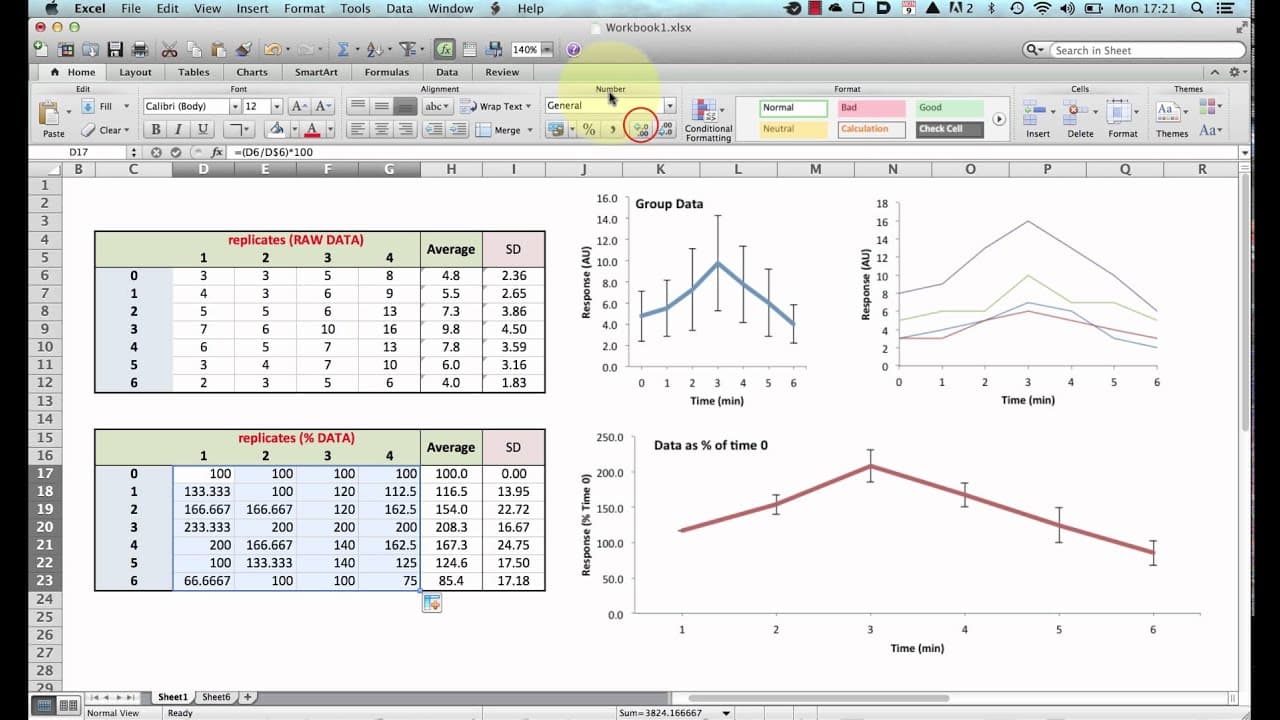
To normalize data for plotting graphs in Excel, convert raw values to percentages of a specific time point by dividing each value by its corresponding time zero and multiplying by 100. This process reduces variability and makes it easier to analyze trends across different subjects or conditions.
Transcript
hello in this brief tutorial I'm going to be showing how to convert individual raw data values into normalized data which shows the data as a percentage of a given time point I'll explain what I mean in these data set we see here we have our replicates which are raw data and we're showing this is an arbitrary unit as a response to a stimulus we hav... Read More
Key Insights
- 👥 Raw data values can be highly variable, which can make it difficult to interpret group data.
- 😥 Converting raw data to normalized data as a percentage of a specific time point can reduce variability and enhance data visualization.
- 📈 Normalizing data can help in identifying trends and patterns across different subjects or conditions.
- 🍓 The normalization process involves dividing each raw data value by a reference value and multiplying by 100.
- ⌛ Calculating normalized data as a percentage of the individual time zero value or the average time zero value can yield different results.
- ❓ Normalizing data is a simple mathematical process but should be used judiciously depending on the analysis objectives.
- 😥 Normalized data can be plotted to visualize trends and compare responses across different time points.
Install to Summarize YouTube Videos and Get Transcripts
Explore YouTube Video Summarizer or Get YouTube Transcript Extractor
Questions & Answers
Q: Why is it necessary to convert raw data to normalized data?
Converting raw data to normalized data helps to reduce the variability caused by individual differences between subjects, making it easier to compare and interpret the data.
Q: How can I calculate the normalized data as a percentage of the time zero?
To calculate the normalized data, divide each raw data value by the corresponding time zero value and multiply by 100. This will give you the percentage of the time zero value for each subject.
Q: Can I calculate the normalized data as a percentage of the average time zero value?
Yes, instead of dividing by the individual time zero value, you can divide by the average time zero value and multiply by 100. This will give you the percentage of the average time zero value for each subject.
Q: When is it appropriate to normalize data for analysis?
Normalizing data can be useful when comparing responses across different subjects or conditions, as it reduces the impact of individual variability. However, it may not always be necessary depending on the specific analysis being performed.
Summary & Key Takeaways
-
This tutorial demonstrates how to convert raw data values into normalized data as a percentage of a specific time point.
-
The raw data set consists of replicates showing the response to a stimulus over a span of 0 to 6 minutes.
-
By converting the data to percentages, the variability between subjects can be reduced, making it easier to analyze and interpret the results.
Read in Other Languages (beta)
Share This Summary 📚
Summarize YouTube Videos and Get Video Transcripts with 1-Click
Try YouTube Summary with ChatGPT & Claude or YouTube Transcript Generator
Explore More Summaries from Dory Video 📚






Summarize YouTube Videos and Get Video Transcripts with 1-Click
Try YouTube Summary with ChatGPT & Claude or YouTube Transcript Generator