How to Improve AI Coding With Better Context
TL;DR
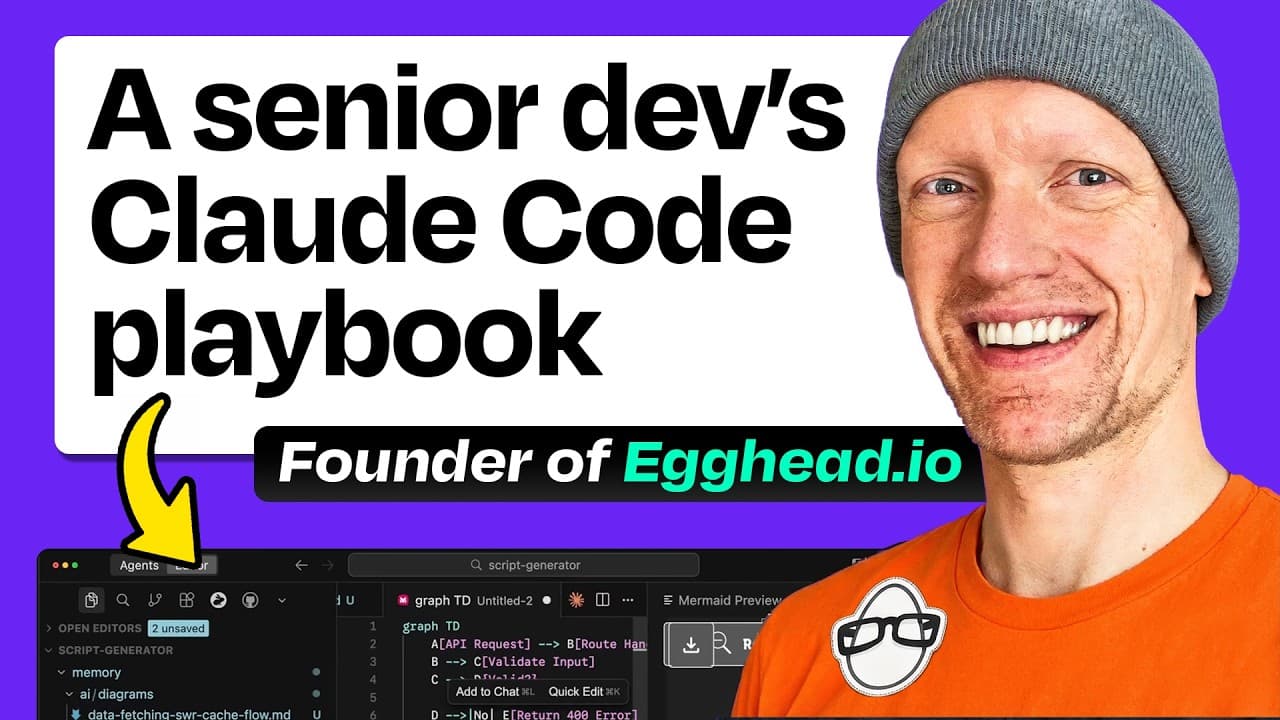
Preload AI coding tools with compact, structured context such as Mermaid diagrams so they understand application flows before editing code. This uses more tokens initially, but reduces codebase exploration, accelerates answers, and improves reliability. Custom hooks, command-line tools, automated quality checks, and deliberate conversation resets can further streamline professional development workflows.
Transcript
There are people out there definitely like me that really want to know the advanced techniques that can leverage the most powerful parts of these AI powered coding tools. Where do you want us to get started that you think many people don't think [music] about in terms of how they can use these tools? >> Context and diagrams is a great place to star... Read More
Key Insights
- Structured context is the foundation of reliable AI-assisted coding because every new AI session begins without memory or knowledge of the application. Preloading architectural information helps the tool understand component relationships before it proposes edits, explanations, or implementation plans.
- Mermaid diagrams are a compact way to represent database operations, authentication flows, user interactions, events, channels, and dependencies. Although large diagrams may be difficult for humans to scan, their structured text can communicate application behavior efficiently to an AI model.
- The append-system-prompt option can inject project documentation before a user request is processed. A shell command can concatenate Markdown files from a diagram directory, allowing Claude Code to receive the same prepared architectural context whenever a development session starts.
- Preloaded context reduces repeated codebase exploration because the model can answer questions from information already present in its context. In the demonstrated authentication example, Claude Code explained the flow without reading additional files or searching through the repository first.
- The trade-off for context loading is higher token usage at the start of a session. The proposed justification is that engineering time and task reliability can be more valuable than minimizing initial token consumption, especially for larger or more complicated projects.
- A dedicated memory directory is a practical way to organize diagrams and other contextual assets. Larger projects may contain many diagrams, so engineers can either load all of them or select only the files relevant to the work they are about to perform.
- Custom hooks can automate code-quality steps within an AI coding workflow. The episode describes using hooks to check for TypeScript errors and commit working code, reducing the need to remember and manually repeat these checks during each AI-assisted implementation cycle.
- Conversation resets are a useful recovery technique when an AI session goes off track. Starting again with prepared documentation, diagrams, and a clearer request can be more effective than continuing to correct a conversation whose accumulated context is producing poor results.
- More videos from this channel:
- More from this channel: How I AI
Install to Summarize YouTube Videos and Get Transcripts
Explore YouTube Video Summarizer or Get YouTube Transcript Extractor
Questions & Answers
Q: How can Mermaid diagrams improve AI coding results?
Mermaid diagrams give an AI coding tool a compact representation of application behavior, including database operations, authentication flows, user interactions, events, channels, and dependencies. When these diagrams are loaded before a task begins, the model can understand how different parts of the system connect. That context helps it answer questions, create plans, and propose edits without first exploring many source files.
Q: How do you preload project context into Claude Code?
Project context can be preloaded through Claude Code's append-system-prompt option. The demonstrated workflow uses a command that reads Markdown files from an AI diagrams directory and concatenates them into the system prompt. This happens before the user submits a normal request, so Claude Code begins the interaction with architectural information already available instead of discovering the entire application from scratch.
Q: Why should AI coding context be stored in separate files?
Separate context files make project knowledge easier to organize, select, and reuse across AI coding sessions. A memory directory can contain Mermaid diagrams and other Markdown documentation describing important flows. Larger projects can accumulate several diagrams, allowing engineers to load all of them for broad understanding or choose only those connected to the task they are currently addressing.
Q: What is the trade-off of loading extensive context upfront?
Loading extensive context consumes more tokens at the beginning of an AI coding session. The benefit is that subsequent work can be faster and more reliable because the model does not need to perform as many file reads or codebase searches. The workflow treats engineering time, task completion speed, and the quality of proposed changes as more valuable than minimizing initial token use.
Q: How does preloaded context reduce codebase exploration?
Preloaded context gives the AI an existing description of application flows and component relationships before it receives a question. In the authentication example, Claude Code could explain the flow directly from the loaded diagrams, without reading files or searching the repository. The same context can then support planning changes because the model already knows how relevant pieces of the application fit together.
Q: What can custom Claude Code hooks automate?
Custom hooks can automate recurring quality-control steps in an AI-assisted engineering workflow. The episode describes hooks that check for TypeScript errors and commit code that is working. These automated actions help streamline development by making verification and progress preservation part of the workflow, instead of relying on the engineer to remember every repeated command after each generated change.
Q: How can AI help engineers understand an unfamiliar codebase?
AI can support investigation and orientation by consuming documentation and diagrams that describe user actions, events, channels, database operations, and connections between components. With that structured context loaded, an engineer can ask for explanations of specific flows and use the results to create implementation plans. This reduces the preliminary work required before making changes in an unfamiliar repository.
Q: When should an AI coding conversation be reset?
An AI coding conversation should be reset when it has gone off track and its accumulated context is no longer producing useful results. Rather than repeatedly correcting a confused session, the engineer can begin again with prepared diagrams, relevant documentation, and a clearer request. This restores a cleaner context and gives the model another opportunity to reason from accurate project information.
Summary & Key Takeaways
-
Mermaid diagrams can compress application flows, database operations, events, and component relationships into structured text that AI tools consume efficiently. Loading these diagrams at startup gives Claude Code immediate architectural context, helping it explain systems and plan changes without repeatedly reading files or searching the repository.
-
Claude Code's append-system-prompt option can load every Markdown diagram from a dedicated memory directory before the user submits a task. This approach costs more tokens at the beginning, but it can produce faster, more reliable answers because the model already understands how changes in one area affect another.
-
Senior engineers can extend this context-first workflow with custom hooks, automated TypeScript checks, working-code commits, command-line aliases, documentation generation, and code investigation techniques. When a conversation becomes confused or drifts from the intended task, resetting it and starting again with strong context can restore useful results.
Read in Other Languages (beta)
Share This Summary 📚
Summarize YouTube Videos and Get Video Transcripts with 1-Click
Try YouTube Summary with ChatGPT & Claude or YouTube Transcript Generator
Explore More Summaries from How I AI 📚


Summarize YouTube Videos and Get Video Transcripts with 1-Click
Try YouTube Summary with ChatGPT & Claude or YouTube Transcript Generator