Improvements to my DC power meter
TL;DR
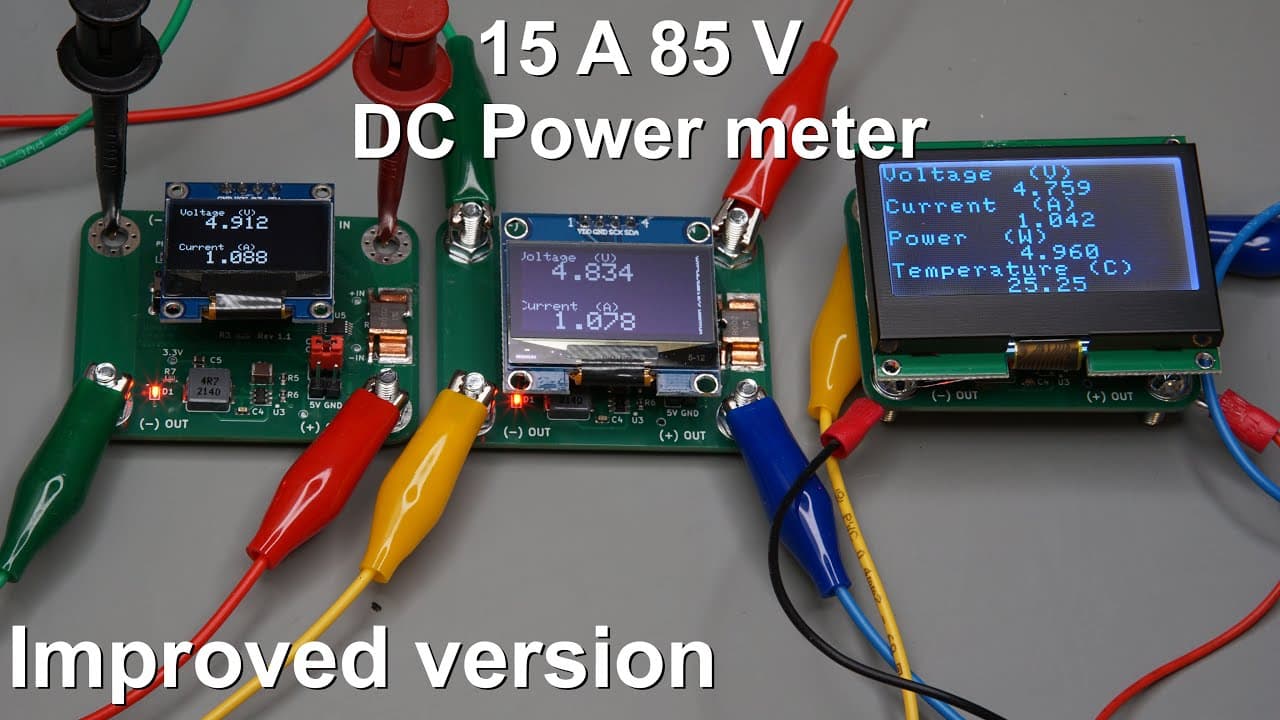
The video showcases the upgraded DC power meter, highlighting design corrections and display functionalities.
Transcript
this video is sponsored by pcba welcome everyone in this video I'm going to show you the new version of my DC power meter so this version has a little bit of a correction because my previous PCB missed a few connections but you can see that the layout is basically the same as the previous pcbs layout all the parts and all the connections are at the... Read More
Key Insights
- 🤒 The updated PCB design of the DC power meter addresses previous electrical connection errors through minor modifications.
- 👤 The choice of display type influences user experience and functionality, offering options for dynamic vs. static data presentations.
- 🤒 The power meter integrates temperature monitoring capabilities, enhancing overall reliability and safety during operation.
- 👨💻 The video emphasizes practical coding aspects for LCD management while referencing earlier demonstrations for continuity in learning.
- 💦 Connection drops in power parameters are addressed with explanations about the impact of wiring on accuracy.
- 👨💻 Accessibility to code and designs through platforms like Patreon and PCBWay is promoted, encouraging experimentation and learning in electronics.
- 👤 The internal logic of readings involves unit conversion to facilitate proper measurement visualization in a user-friendly manner.
Install to Summarize YouTube Videos and Get Transcripts
Explore YouTube Video Summarizer or Get YouTube Transcript Extractor
Questions & Answers
Q: What were the main improvements made in the new version of the DC power meter?
The new version has corrected a few connection issues from the previous PCB design. The layout remains the same, but two pins have been connected to the ground with a wire. This enhancement ensures more reliable operation while allowing the use of old components like the 0.96-inch OLED display.
Q: How do the different display options impact the functionality of the power meter?
The power meter supports multiple display types, such as 0.96-inch and 1.3-inch OLED displays, along with an LCD display. Each display has unique characteristics: while OLEDs offer smaller pixels and dynamic page switching, the LCD allows for larger characters and a more static representation of data, beneficial for reading key measurements simultaneously.
Q: Can you explain the temperature measurement feature of the power meter?
The temperature measurement is derived from the power meter chip’s silicon die, located near the shunt resistor. It provides insight into potential overheating of the traces or resistor, thus acting as an important parameter for understanding the power meter's operational conditions and ensuring safety during usage.
Q: What does the code for the LCD display entail, and how does it differ from OLED?
The code for the LCD incorporates specific libraries for I2C communication and manages static data display. Unlike the OLED, which switches between pages, the LCD code is streamlined for a single screen presentation, covering voltage, current, power, and temperature with tailored unit conversions based on measured values.
Summary & Key Takeaways
-
The updated DC power meter features minor corrections from the previous model, maintaining the same layout while fixing connection issues with added wiring.
-
Several display options are introduced, including OLED and LCD screens, which provide varying resolutions and functionalities for monitoring voltage, current, power, and temperature.
-
The code explanation covers display management for the updated version, with focus on improved reading methods and unit conversions, along with references to previous works for further guidance.
Read in Other Languages (beta)
Share This Summary 📚
Summarize YouTube Videos and Get Video Transcripts with 1-Click
Try YouTube Summary with ChatGPT & Claude or YouTube Transcript Generator
Explore More Summaries from Curious Scientist 📚


![Building a Peltier cooler-based cooling box - First iteration, improvements [Part 2/6] thumbnail](/_next/image?url=https%3A%2F%2Fi.ytimg.com%2Fvi%2F0YlNw0EGnzI%2Fhqdefault.jpg&w=750&q=75)


Summarize YouTube Videos and Get Video Transcripts with 1-Click
Try YouTube Summary with ChatGPT & Claude or YouTube Transcript Generator