Building an SZBK07-based thermostat for Peltier cooling
TL;DR
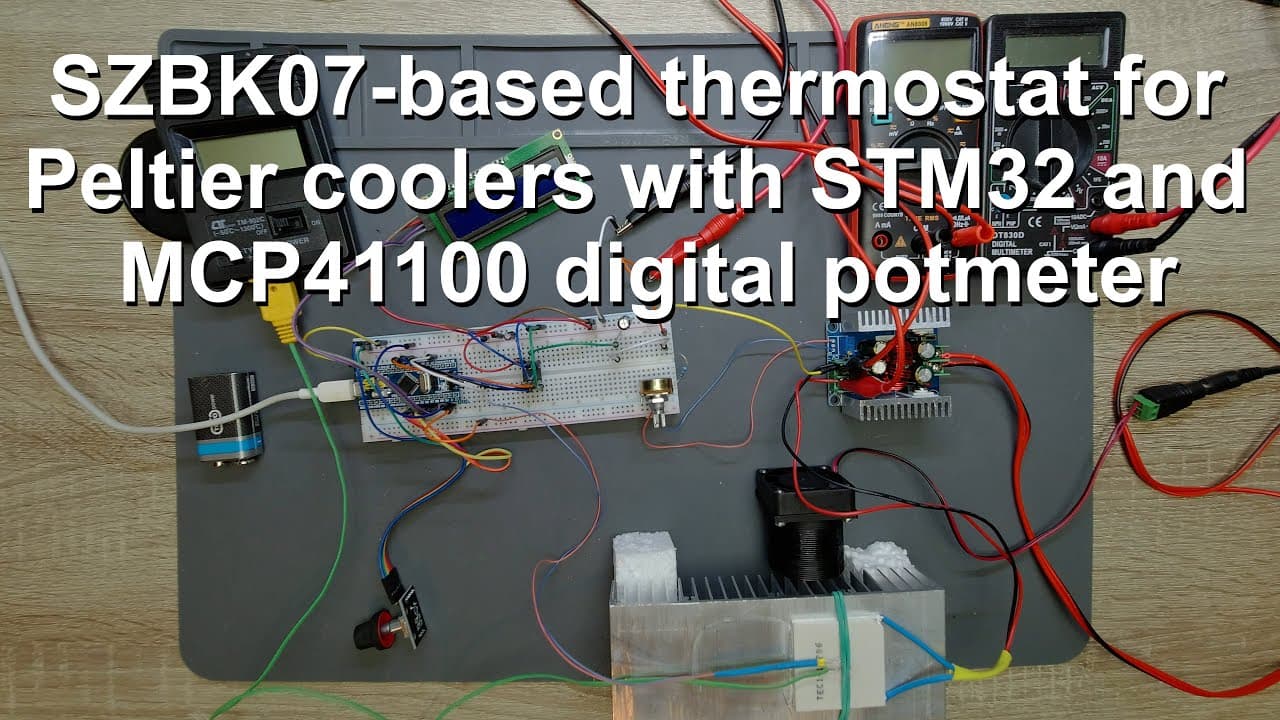
This video demonstrates creating a digital thermostat using an STM32 microcontroller and Arduino IDE.
Transcript
welcome everyone in this video i'm going to show you how to build a digital thermostat so the brain of this digital thermostat is an stm32 microcontroller here you can use an arduino as well because i brought the source code in an arduino ide so we can use the code on arduino or stm32 bluepill like in this case you just have to change the pins beca... Read More
Key Insights
- 👷 The project showcases integrating various electronic components to construct an automated temperature regulation system, illustrating practical applications of microcontroller programming.
- 😎 A unique feedback loop design adjusts cooling output based on real-time temperature readings, highlighting the system's adaptability to changing conditions.
- 👤 The utilization of both an LCD for user interface and a rotary encoder for input allows for intuitive temperature setting by users.
- 🎮 The video emphasizes the importance of proper initialization and configuration of components in software to achieve desired functionalities.
- 💁 Thermal inertia is a critical factor considered in the design, informing the programming to balance between rapid adjustments and system stability.
- 💗 The collaboration potential for improvements within the coding community is encouraged, reflecting a growing collective learning environment.
- 👤 Users are motivated to explore the underlying concepts through additional resources linked in the video description, such as schematics and detailed explanations of components used.
Install to Summarize YouTube Videos and Get Transcripts
Explore YouTube Video Summarizer or Get YouTube Transcript Extractor
Questions & Answers
Q: What components are necessary for building the digital thermostat?
To build the thermostat, you'll need an STM32 microcontroller or an Arduino, an LCD screen for display, a rotary encoder with a switch for temperature adjustment, an MCP4100 digital potentiometer for voltage control, and an NTC thermistor for temperature measurement. The setup also includes a K-type thermocouple to measure cold surface temperature, and various resistors and power supplies to complete the connections.
Q: How does the microcontroller manage the cooling process?
The microcontroller monitors the temperature via the NTC thermistor and adjusts the output voltage sent to the cooling system based on the target temperature set by the rotary encoder. If the measured temperature exceeds the desired range, the microcontroller increases the power to the cooling device through the digital potentiometer, creating an active feedback loop that maintains the temperature.
Q: Can I use an Arduino instead of an STM32 for this project?
Yes, the digital thermostat can be built using Arduino instead of an STM32 microcontroller. The project provides source code compatible with both platforms, requiring minor changes to pin configurations. However, users must be aware of the differences in functionalities and libraries when implementing the project on either platform.
Q: What is the role of the digital potentiometer in this thermostat?
The digital potentiometer is crucial in regulating the output voltage applied to the cooling system. By changing the resistance electronically based on the feedback from the thermistor, it allows the microcontroller to adjust the cooling power dynamically, enhancing the control and stability of the desired temperature.
Summary & Key Takeaways
-
The video guides viewers through building a digital thermostat using an STM32 microcontroller, highlighting its functionality and code implementation.
-
Key components include an LCD for displaying temperature data, a rotary encoder for setting target temperatures, and a digital potentiometer for voltage control.
-
The project's feedback loop mechanism keeps the temperature within a specified tolerance range by dynamically adjusting the power supply to the cooling system.
Read in Other Languages (beta)
Share This Summary 📚
Summarize YouTube Videos and Get Video Transcripts with 1-Click
Try YouTube Summary with ChatGPT & Claude or YouTube Transcript Generator
Explore More Summaries from Curious Scientist 📚


![Building a Peltier cooler-based cooling box - First iteration, improvements [Part 2/6] thumbnail](/_next/image?url=https%3A%2F%2Fi.ytimg.com%2Fvi%2F0YlNw0EGnzI%2Fhqdefault.jpg&w=750&q=75)
![Building a coil winder [Part 6] - A few improvements thumbnail](/_next/image?url=https%3A%2F%2Fi.ytimg.com%2Fvi%2F3eyxG_g2iUA%2Fhqdefault.jpg&w=750&q=75)

Summarize YouTube Videos and Get Video Transcripts with 1-Click
Try YouTube Summary with ChatGPT & Claude or YouTube Transcript Generator