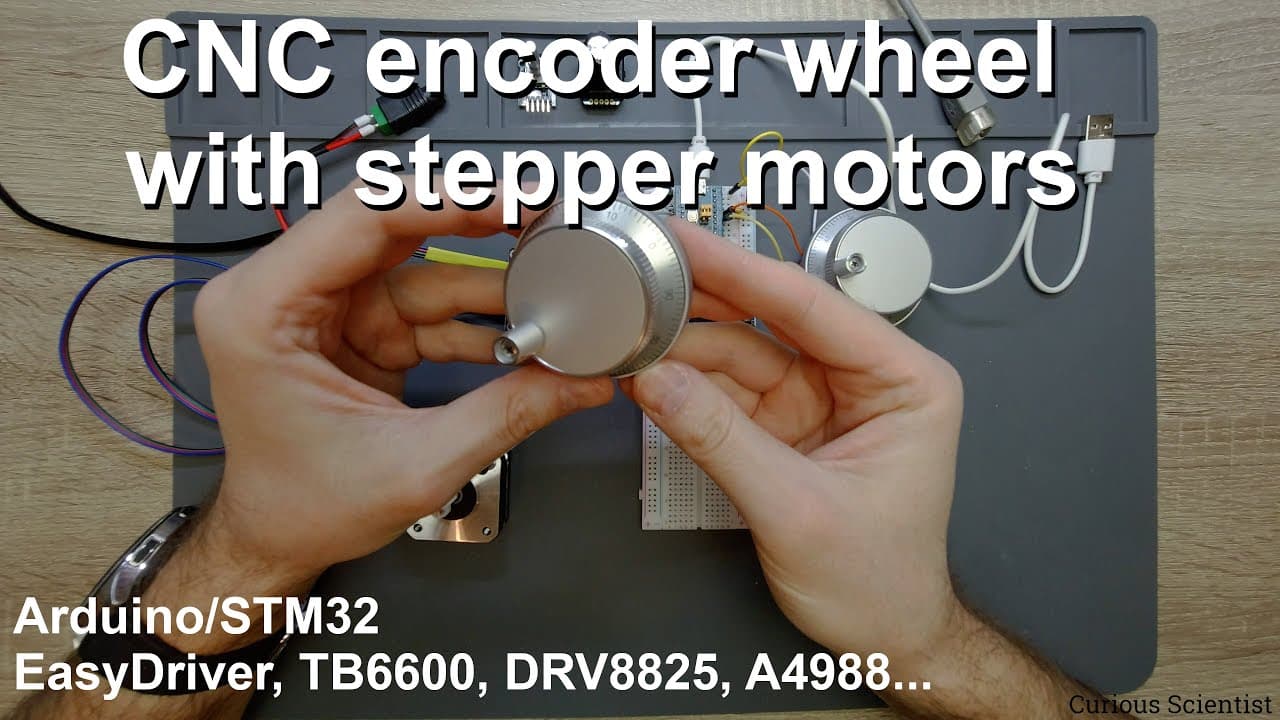
CNC encoder wheel with stepper motors
TL;DR
This video explains how to use a CNC handwheel encoder with microcontrollers to control stepper motors.
Transcript
welcome everyone in this video i'm going to show you another type of uh encoder so in my previous videos i've been working with these two types of encoders a simple rotary encoder this one this specific type is with a switch and then also with a absolute encoder with 128 different positions and 10 pins so these two guys work very nicely when you wa... Read More
Key Insights
- 🧑🦼 CNC handwheel encoders provide intuitive control for stepper motors, essential in various applications like CNC machinery and robotics.
- 🔄 Signal detection methods for encoders typically focus on the relationship between two outputs, A and B, which reflect clockwise and counterclockwise movements.
- 📽️ The functionality of these encoders can be implemented easily across various microcontroller platforms, reinforcing their versatility in electronics projects.
- 🧑🦼 The integration of encoders can simplify hardware designs by enabling direct connections to motor drivers, reducing complexity without compromising functionality.
- 🧑🦼 The responsiveness of the motor operation is tied to the encoder’s output frequency, which is affected by the speed of the user’s physical input.
- 😒 Effective use of coding practices and libraries is crucial when implementing encoder functionality to prevent common pitfalls such as signal loss and inaccurate readings.
- 🧑🦼 Insightful applications of CNC encoders can extend to fields beyond basic motor control, promoting innovation in automation and machinery operations.
Install to Summarize YouTube Videos and Get Transcripts
Explore YouTube Video Summarizer or Get YouTube Transcript Extractor
Questions & Answers
Q: What is the main function of the CNC handwheel encoder?
The CNC handwheel encoder is primarily utilized to control devices, such as stepper motors. It provides a user-friendly interface, allowing the user to make precise movements or adjustments through physical rotation. The encoder outputs square wave signals that reflect the direction and speed of rotation, making it an essential component in CNC and robotics applications.
Q: How does the encoder signal work in determining the direction of rotation?
The encoder generates two output signals, labeled A and B, that produce square waves. When the encoder is rotated clockwise, signal A is activated before signal B, while the reverse order occurs during counterclockwise rotation. This time difference between the two signals allows the microcontroller to determine the direction of rotation and track the number of steps taken.
Q: Can the CNC handwheel encoder be used with different microcontrollers?
Yes, the video suggests that the CNC handwheel encoder can be integrated with various microcontrollers, including STM32 and Arduino. While the specifics of pin connections might differ, the programming logic remains largely consistent across these platforms, allowing flexibility in choosing the microcontroller based on the project requirements.
Q: What are the benefits of connecting the CNC encoder directly to the stepper motor driver?
Directly connecting the CNC encoder to the stepper motor driver allows for simplified control of the motor without the need for a microcontroller, thus reducing complexity and potential points of failure. This method enables instant feedback from the encoder for real-time control of the motor's speed and direction, ideal for straightforward applications where display feedback isn't crucial.
Q: How does the speed of rotation affect the stepper motor operation when using the encoder?
The encoder's output frequency correlates with the speed of rotation; slower rotations produce wider spaces between square waves, while faster movements result in closely spaced signals. This frequency helps the motor control system interpret the desired speed and adjust the motor's movements accordingly, enabling accurate and responsive control depending on user input.
Q: What coding challenges might one encounter when using encoders?
Coding for encoders involves managing interrupts triggered by the square wave outputs. Developers must ensure that debounce mechanisms are applied to avoid false readings and can struggle with managing speed and direction interpretation accurately in real-time. Proper structuring of code to handle variable updates without delay is critical to achieving smooth and responsive control.
Q: Are there any specific libraries recommended for Arduino when working with encoders?
The video recommends using specific libraries that facilitate interactions with the OLED display and stepper motors, such as the AccelStepper library for motor control. These libraries provide the necessary functions to manage motor behavior and facilitate encoder signal processing, making it easier for developers to implement effectively.
Q: What additional applications could be explored using a CNC handwheel encoder?
Beyond stepper motor control, CNC handwheel encoders can be explored in applications involving robotics, automated systems, and precise positioning tasks in CNC machines. Future projects could involve integrating tactile feedback, using multiple encoders for multi-axis control, or even 3D printing applications to enhance control interfaces.
Summary & Key Takeaways
-
The video introduces a CNC handwheel encoder and its application in controlling stepper motors, highlighting its two output signals, A and B, which help determine rotation direction.
-
It demonstrates connecting the encoder to a microcontroller, such as an STM32 or Arduino, while offering insights into the coding process required to interpret the encoder’s signals.
-
Lastly, the video shows practical applications, including direct connections to stepper motor drivers for controlling motor speed and movement without complex programming.
Read in Other Languages (beta)
Share This Summary 📚
Summarize YouTube Videos and Get Video Transcripts with 1-Click
Try YouTube Summary with ChatGPT & Claude or YouTube Transcript Generator
Explore More Summaries from Curious Scientist 📚

![Building a Peltier cooler-based cooling box - First iteration, improvements [Part 2/6] thumbnail](/_next/image?url=https%3A%2F%2Fi.ytimg.com%2Fvi%2F0YlNw0EGnzI%2Fhqdefault.jpg&w=750&q=75)



Summarize YouTube Videos and Get Video Transcripts with 1-Click
Try YouTube Summary with ChatGPT & Claude or YouTube Transcript Generator