How to Use ImageJ for Cell Counting and Area Measurement
TL;DR
To analyze cardiac muscle images using ImageJ, start by calibrating the scale with a known distance. Utilize the point and multi-point tools for counting cells, and the freehand selection tool for measuring cross-sectional areas. Proper calibration ensures accurate results, making it a potent software for microscopy analysis.
Transcript
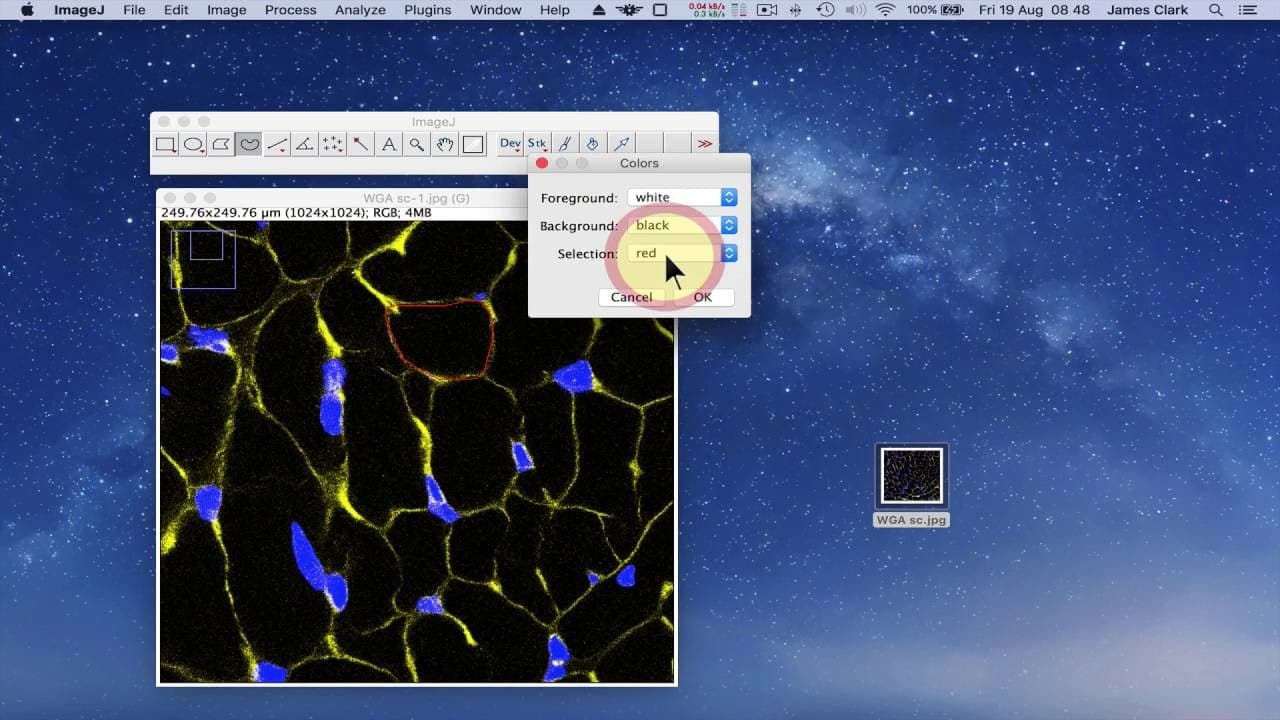
hello in this brief tutorial I'm going to be using image J software to analyze some control micro taken of cardiac muscle so this is image j and i have it loaded on my mac computer and this is an image taken staining using the wheat germ agglutinin stain using alexa fluor 488 that allows me to visualize the cell membranes of cardiac myocytes this i... Read More
Key Insights
- 🗾 Image J software is a powerful tool for analyzing microscopy images, specifically for cell counting and area measurements.
- 👻 Calibration is essential to ensure accurate measurements, and Image J allows for easy calibration using a known distance.
- 😥 The point tool and multi-point tool in Image J simplify the process of cell counting in microscopy images.
Install to Summarize YouTube Videos and Get Transcripts
Explore YouTube Video Summarizer or Get YouTube Transcript Extractor
Questions & Answers
Q: How can Image J be used to measure the length of a scale bar in a microscopy image?
To measure the length of a scale bar, use the straight freehand line measurement tool in the analyze window. Draw a line corresponding to the length of the scale bar, then click on measure to view the measurement in pixels.
Q: How is Image J calibrated to accept a known distance as a specific unit?
In the analyze window, go to set scale. Enter the known distance in pixels and the corresponding unit, such as microns. Change the unit of distance to micrometers and select "global" to apply the calibration to future images.
Q: How can Image J be used for cell counting in microscopy images?
Use the point tool or multi-point tool to click on cells in the image. The point tool places a square in the cell, while the multi-point tool allows for labeling and counting multiple cells. Right-click on the tool to select the multi-point tool and customize settings.
Q: How can Image J measure the cross-sectional area of cells in microscopy images?
Use the freehand selection tool to draw around the cell's membrane. The default color is yellow, but it can be changed. Go to analyze and measure to view the measured area in square micrometers. Adding noise can help differentiate between measured and unmeasured cells.
Summary & Key Takeaways
-
The tutorial introduces Image J software for analyzing cardiac muscle microscopy images.
-
Image J allows for image manipulation, but in this tutorial, it is used for cell counting and area measurement.
-
Calibration is done using a scale bar, and the software can be set to accept a known distance as a specific unit.
Read in Other Languages (beta)
Share This Summary 📚
Summarize YouTube Videos and Get Video Transcripts with 1-Click
Try YouTube Summary with ChatGPT & Claude or YouTube Transcript Generator
Explore More Summaries from Dory Video 📚






Summarize YouTube Videos and Get Video Transcripts with 1-Click
Try YouTube Summary with ChatGPT & Claude or YouTube Transcript Generator