How to Record Engaging Drawing Tutorials Using Explain Everything
TL;DR
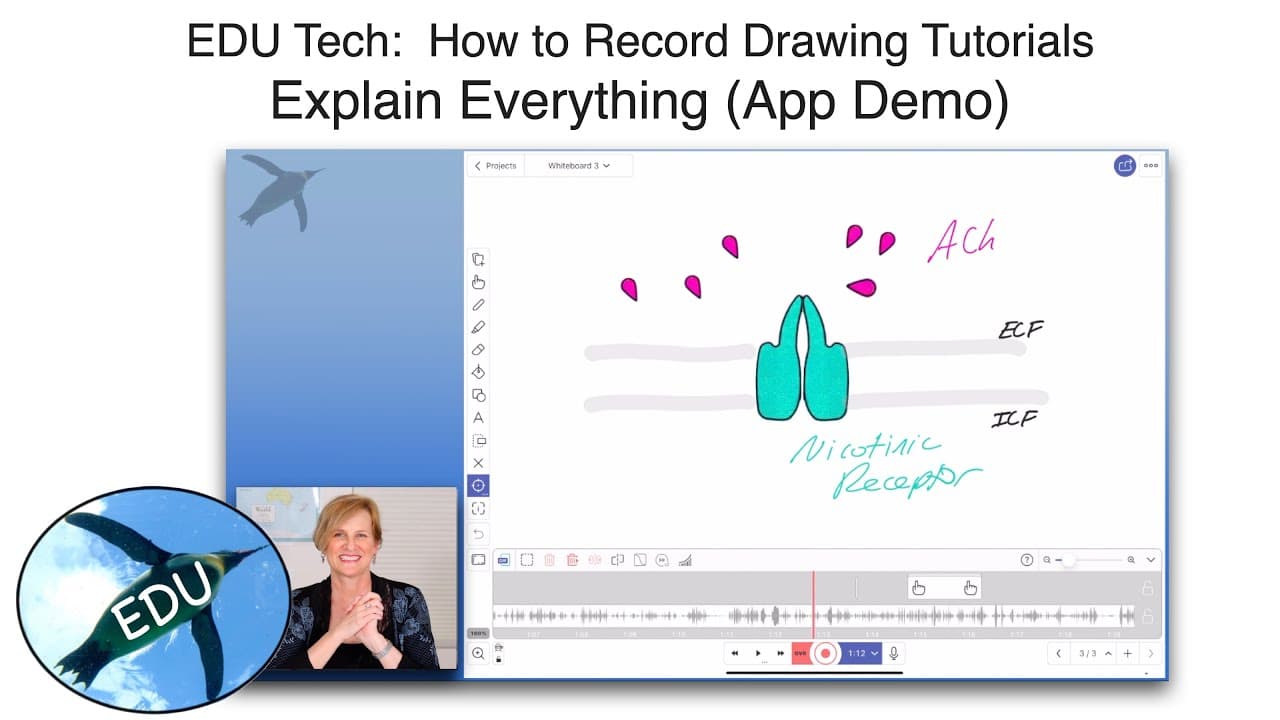
To create dynamic drawing tutorials, use the Explain Everything app, which allows real-time interaction with pre-made objects, various drawing tools, and voice recording. Despite a steep learning curve, its features like file importing and flexible presentation options make it an excellent choice for educators looking to engage students effectively.
Transcript
hello and welcome to the penguin prof channel this episode is for educators and that number one question I have been getting how do I do drawings for tutorials and videos I'm gonna recommend an app called explain everything it is available on all platforms there's also a web-based browser version for it I think it is worth a look some of my colleag... Read More
Key Insights
- 😀 Explain Everything is a recommended app for educators to create tutorial drawings and videos.
- 🕸️ It is available on various platforms and has a web-based version.
- 😀 The app may require some time to learn, but its features make it a powerful tool for dynamic presentations.
- 💦 Users can import files, draw in various colors and sizes, highlight, erase, and work with shapes and text.
- 👻 Objects can be dragged and resized during recordings, allowing for an interactive experience.
- 😀 The app offers tool options like a laser pointer, arrows, and different types of selections.
- 😀 Educators can label and highlight drawings within the app to enhance their presentations.
Install to Summarize YouTube Videos and Get Transcripts
Explore YouTube Video Summarizer or Get YouTube Transcript Extractor
Questions & Answers
Q: What is the app Explain Everything?
Explain Everything is a versatile app available on multiple platforms that allows educators to create tutorial drawings and videos.
Q: Is Explain Everything easy to use?
Some may find the learning curve steep, but the app's features and capabilities make it worth the investment of time and effort.
Q: Can Explain Everything be used on iPads?
Yes, the video demonstrates the app being used on a twelve-point-nine inch iPad Pro with a second-generation Apple Pencil.
Q: What tools does Explain Everything offer?
The app provides various tools such as importing files, drawing with different colors and sizes, using a highlighter and eraser, shapes, text, laser pointer, and more.
Q: Can objects be manipulated and resized while recording?
Yes, Explain Everything allows for dynamic presentations by allowing users to drag and resize pre-made objects during the recording.
Q: How does Explain Everything record videos?
The app includes a timeline where recordings can be edited, overwritten, mixed, or inserted. It also offers microphone options for recording audio.
Q: Is it possible to label and highlight drawings within the app?
Yes, educators can label and highlight drawings while presenting, enhancing their tutorial videos.
Q: What are some unique features of Explain Everything?
Explain Everything offers features like stealth mode, object grouping, undo button, and control over the type of presentation to create engaging and interactive content.
Summary & Key Takeaways
-
The video introduces the app Explain Everything, which is available on all platforms and has a web-based version.
-
The app's learning curve may be steep compared to other whiteboard apps, but its features make it worth exploring.
-
The video demonstrates how the app can be used on an iPad Pro to create dynamic presentations with pre-made objects, drawing tools, and interactive features.
Read in Other Languages (beta)
Share This Summary 📚
Summarize YouTube Videos and Get Video Transcripts with 1-Click
Try YouTube Summary with ChatGPT & Claude or YouTube Transcript Generator
Explore More Summaries from ThePenguinProf 📚




Summarize YouTube Videos and Get Video Transcripts with 1-Click
Try YouTube Summary with ChatGPT & Claude or YouTube Transcript Generator