How to Set Up and Use Projects in Claude.ai
TL;DR
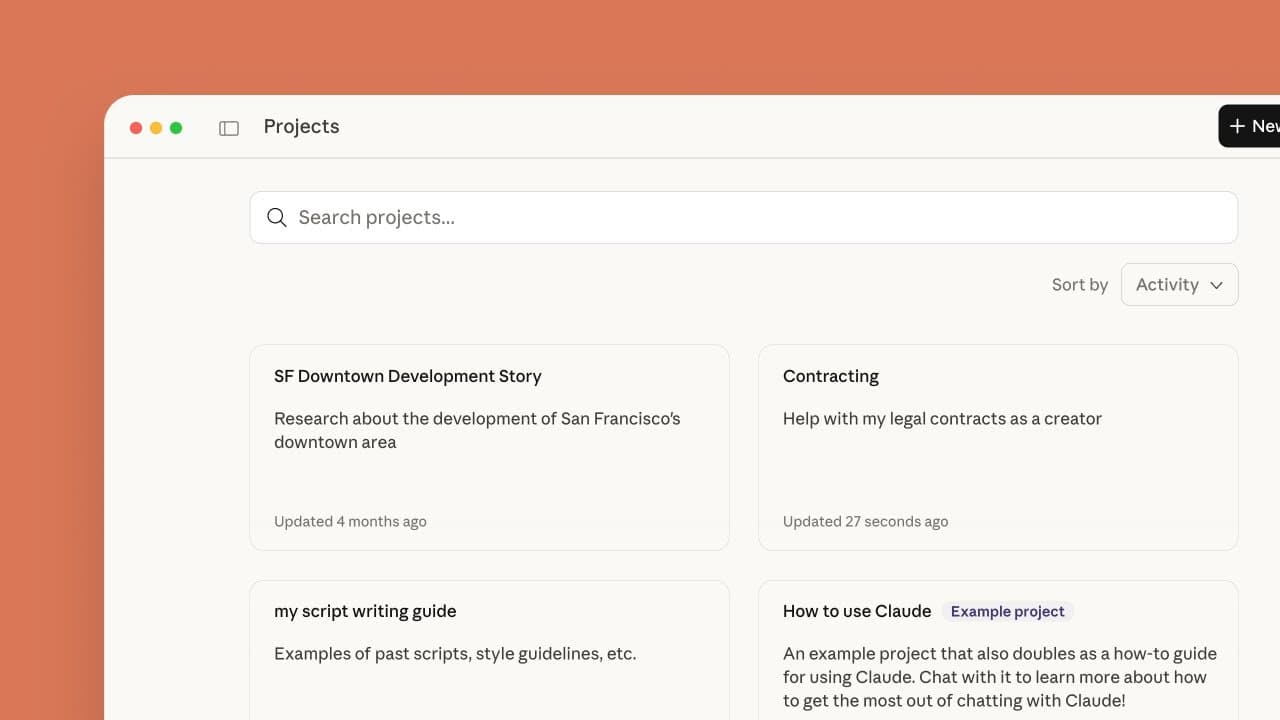
Claude Projects organize related chats, reusable knowledge, and custom instructions inside self-contained workspaces. Create a project, define its purpose and response instructions, then add relevant files so Claude can reference them across project conversations. Work-plan users can also share projects with teammates and assign viewing, editing, or creator-level permissions.
Transcript
What are projects and how do they improve working with Claude? With projects, Claude users can create self-contained environments with their own chat histories, specific knowledge bases, and customized settings. We are going to provide an overview of projects, what they are used for, how to create them, and some advanced features. Let's talk about ... Read More
Key Insights
- Claude Projects are self-contained work environments that combine their own chat histories, project-specific knowledge bases, and customized settings. This structure helps users organize related information and maintain a consistent working context for professional tasks, personal goals, and collaborative efforts.
- Project knowledge is reusable context that Claude automatically considers alongside every prompt within the project. Uploading relevant materials helps responses align with the team's goals, terminology, background, and existing documents without requiring users to attach the same information during every conversation.
- Retrieval augmented generation is automatically enabled when project knowledge approaches the context window limit. This processing method expands the project's capacity and allows Claude to work with larger collections of information while retrieving relevant context for project conversations.
- Project instructions are persistent guidance that applies to every chat in a project. They can specify tone, expertise level, response style, perspective, desired outcomes, or additional context, and they operate alongside user preferences and the currently selected style.
- Project files are shared knowledge resources that can include PDFs, documents, CSVs, text files, and content connected through Google Drive. Claude processes these materials and can reference them in any conversation conducted within the associated project.
- Chat context is not automatically transferred between separate conversations inside a project. Information that must remain available across disparate chats needs to be added to the project knowledge base instead of appearing only within an individual conversation.
- Project permissions are divided into view, edit, and creator levels. View members can access contents, knowledge, and chats without changing the project, while edit members can modify instructions, update knowledge, manage members, and actively contribute.
- Conversation uploads are temporary context that stays separate from the project's shared knowledge base. This option is useful for providing examples or supporting materials needed for one discussion without adding unnecessary content to the reusable project resources.
Install to Summarize YouTube Videos and Get Transcripts
Explore YouTube Video Summarizer or Get YouTube Transcript Extractor
Questions & Answers
Q: What are Projects in Claude.ai?
Projects in Claude.ai are self-contained environments created for related work. Each project can contain its own chat histories, knowledge base, customized instructions, visibility settings, and shared resources. Claude automatically considers the stored knowledge and instructions during project conversations, helping its responses reflect the project's goals, terminology, background information, preferred style, and desired outcomes.
Q: How do I create a project in Claude.ai?
To create a project, click New Project, enter a name, and describe what you want to achieve. Then click Create Project and choose whether the workspace should be private for personal use or public for team collaboration. After creation, add response instructions and relevant knowledge files. The project menu also lets you star, edit, archive, or delete the project.
Q: How do project instructions affect Claude's responses?
Project instructions tell Claude how to respond throughout every chat inside that project. You can specify the preferred tone, expertise level, response style, perspective, desired outcomes, or further details about the work. These instructions operate alongside user preferences and the selected style. Once saved, they are considered automatically whenever a new project conversation begins.
Q: What files can be added to a Claude project?
A Claude project can include PDFs, documents, CSVs, text files, and content connected through Google Drive. Files added through the project's files menu become part of its knowledge base and are available across its conversations. For example, existing branded materials can be uploaded so Claude can reference them while helping create new brand guidelines for a client.
Q: Does context carry across separate chats in a Claude project?
Context does not automatically carry between separate chats merely because they belong to the same project. Information that needs to be available across disparate conversations must be added to the project knowledge base. A file uploaded only during a conversation remains separate, which is useful when temporary context or examples are needed without adding them to the shared project resources.
Q: How does Claude handle a large project knowledge base?
Claude Projects can handle larger amounts of content by automatically using retrieval augmented generation when project knowledge approaches the context window limit. This mode expands the project's capacity and helps Claude retrieve useful information from the stored materials. As a result, users can maintain more project content while continuing to receive responses informed by relevant portions of that knowledge.
Q: What permission levels are available for shared Claude projects?
Shared Claude projects have three permission levels: view, edit, and creator. View members can see project contents, access knowledge, and participate in chats, but cannot change the project. Edit members can modify instructions, update knowledge, manage members, and contribute. Creators control the project and decide whether to share it with selected people or the wider organization.
Q: What kinds of work can Claude Projects support?
Claude Projects can support product development from ideation to launch, content creation across platforms, educational course design, personal finance tracking, and home renovation planning. These workspaces centralize relevant materials and decisions while giving Claude consistent context. Users can apply them to professional assignments, personal goals, or collaborative workflows and customize each project for specific needs.
Summary & Key Takeaways
-
Claude Projects provide self-contained environments for related work, combining separate chat histories with reusable knowledge and customized settings. Information stored in a project's knowledge base is considered alongside prompts, helping Claude produce responses that reflect relevant goals, terminology, background materials, preferred tone, expertise level, and desired outcomes across conversations.
-
Creating a project involves naming it, describing its intended goal, choosing its visibility, and defining instructions for Claude's responses. Users can then add PDFs, documents, CSVs, text files, or Google Drive content. Uploaded project knowledge becomes available across chats, while files uploaded during one conversation remain separate from that shared knowledge base.
-
Claude for work plans support collaborative projects with view, edit, and creator permission levels. Members can contribute documents, create chats, and build on shared work within one environment. Projects can support product development, content creation, course design, personal finance planning, home renovation, and other workflows requiring organized information and continuity.
Read in Other Languages (beta)
Share This Summary 📚
Summarize YouTube Videos and Get Video Transcripts with 1-Click
Try YouTube Summary with ChatGPT & Claude or YouTube Transcript Generator
Explore More Summaries from Anthropic 📚


Summarize YouTube Videos and Get Video Transcripts with 1-Click
Try YouTube Summary with ChatGPT & Claude or YouTube Transcript Generator