Testing a capacitive proximity sensor
TL;DR
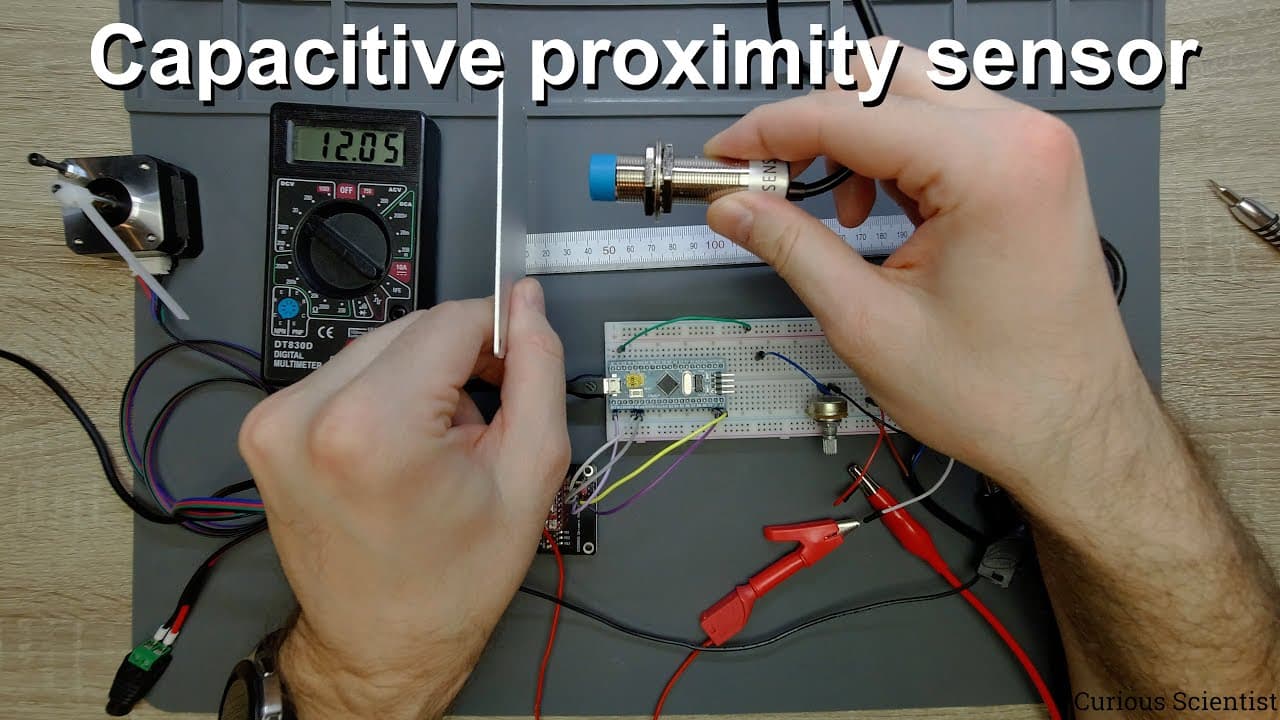
This video explains capacitive proximity sensors and how to integrate them with microcontrollers for automation.
Transcript
welcome everyone in this video i'm going to show you some basic things regarding proximity sensors so we have a capacitive proximity sensor here and this is a very simple but quite useful sensor if you want to switch something uh without any kind of mechanical contacts so this is why it is a proximity sensor so how it works is that the sensing side... Read More
Key Insights
- 🦾 Proximity sensors detect objects without mechanical interactions, enhancing reliability in various applications.
- 🧑🦼 Integrating proximity sensors with microcontrollers adds automation capabilities, enabling control of devices like motors through simple input signals.
- 😒 Adjustments to sensor settings can optimize performance for specific use cases, increasing detection accuracy based on application needs.
- 🅰️ NPN types are preferable for simple wiring and straightforward interactions with typical microcontrollers used in automation.
- ⚡ Using potentiometers for voltage adjustments mitigates risk when linking high-voltage sensors to sensitive microcontroller inputs.
- 🎮 These sensors can play diverse roles in automation, functioning as limit switches or inputs for non-contact controls.
- 😄 Simple coding examples provided illustrate the ease of programming such sensors, making them accessible for beginners in electronics projects.
Install to Summarize YouTube Videos and Get Transcripts
Explore YouTube Video Summarizer or Get YouTube Transcript Extractor
Questions & Answers
Q: What is a capacitive proximity sensor, and how does it function?
A capacitive proximity sensor detects the presence of nearby objects through changes in capacitance caused by an object’s electric field. The sensor emits an electric field from its sensing side, which changes when an object, such as a hand, comes within range (1-10 mm for this specific sensor), triggering an output signal based on the proximity detected.
Q: How can I connect a proximity sensor to a microcontroller safely?
To connect a proximity sensor to a microcontroller, one must ensure that the sensor's output voltage does not exceed the microcontroller's input voltage specifications (typically 5V). This can be achieved by using a potentiometer to lower the output voltage from the sensor to a safe level, ensuring compatibility and preventing potential damage to the microcontroller.
Q: What practical applications can a proximity sensor be used for?
A proximity sensor can be used in multiple applications such as automated systems for object detection, functioning as limit switches in robotics, controlling the direction of motors in response to detected objects, and serving as input mechanisms in non-contact interfaces to replace traditional mechanical switches.
Q: What is the significance of using an NPN type sensor?
An NPN type proximity sensor outputs a low signal (ground) when it detects an object, providing a clear and simple way to interface with microcontrollers. It is important to adapt the sensor output to the voltage levels the microcontroller expects, typically employing resistors or potentiometers to achieve the desired voltage, ensuring a reliable signal in automation setups.
Q: How do I adjust the sensitivity of the proximity sensor?
The sensitivity of the proximity sensor can be adjusted by turning a screw on the device, which changes the detection threshold. This allows for customization of how close an object must be before the sensor triggers, effectively setting a range within which the sensor will respond to nearby objects.
Q: Can this proximity sensor be used with other components?
Yes, the proximity sensor can be integrated with various electronic components, including microcontrollers to control motors or other devices. For example, it can be set up to control the direction of a stepper motor based on whether an object is detected, showcasing its versatility in automation projects.
Q: What is the coding approach to control a motor using a proximity sensor?
The coding approach discussed in the video involves reading the output from the proximity sensor and modifying the motor’s direction and speed accordingly. The simple code checks the sensor's state in a loop and changes direction based on whether an object is detected (sensor output goes low) or not (sensor output remains high).
Q: How quickly can the system react to the proximity sensor input in motor control applications?
The system can react almost instantaneously to inputs from the proximity sensor due to the rapid read and response cycle in the microcontroller code. This allows immediate direction changes in the motor as the sensor detects the presence or absence of objects, demonstrating high responsiveness in automation tasks.
Summary & Key Takeaways
-
This content introduces capacitive proximity sensors, explaining their basic function of detecting nearby objects without mechanical contacts, making them suitable for various automation applications.
-
The video demonstrates connecting a capacitive proximity sensor to a microcontroller, detailing how to manage the voltage levels to prevent damage while facilitating communication with components like stepper motors.
-
Practical usage scenarios are shared, including adjusting sensor sensitivity, controlling motor direction with sensor inputs, and coding examples to help viewers understand the sensor's integration with programmable systems.
Read in Other Languages (beta)
Share This Summary 📚
Summarize YouTube Videos and Get Video Transcripts with 1-Click
Try YouTube Summary with ChatGPT & Claude or YouTube Transcript Generator
Explore More Summaries from Curious Scientist 📚





Summarize YouTube Videos and Get Video Transcripts with 1-Click
Try YouTube Summary with ChatGPT & Claude or YouTube Transcript Generator