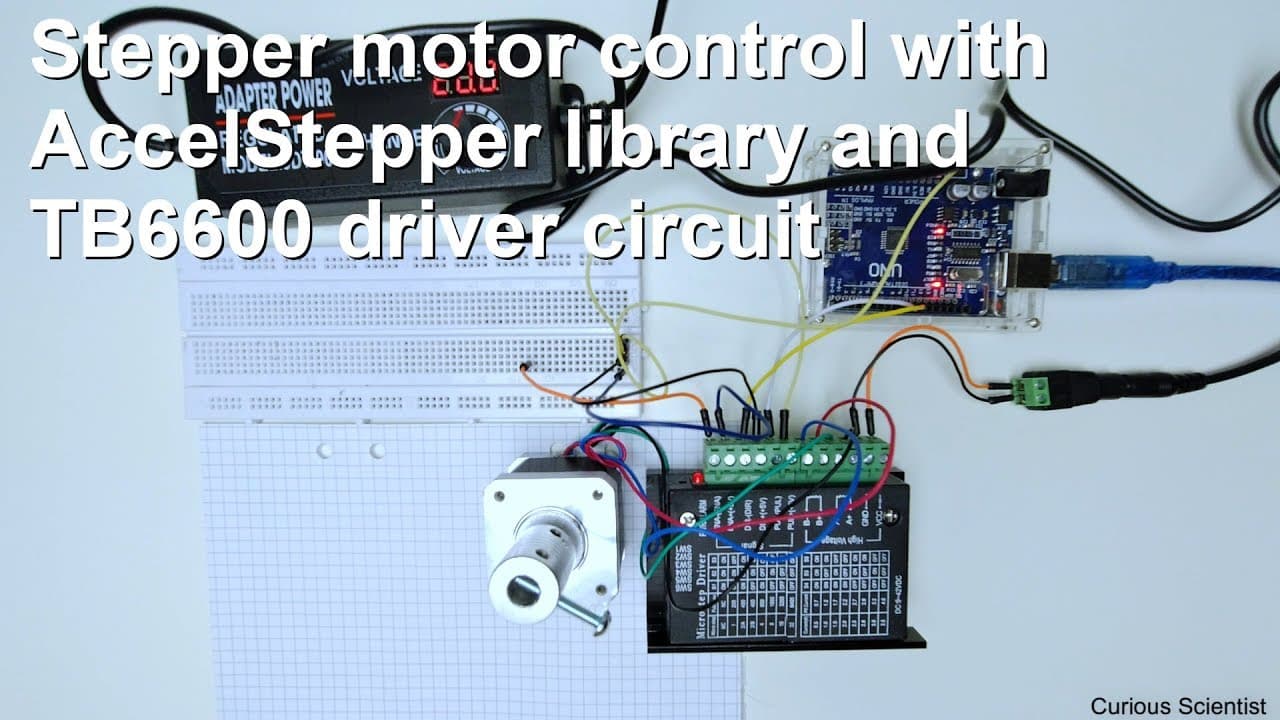
Arduino with TB6600 using AccelStepper library
TL;DR
Learn how to control a stepper motor with Arduino and TB6600 driver using a powerful library.
Transcript
welcome everyone in this video I'm going to show you how to control your stepper motor by using an Arduino and a TB 6,600 control circuit and the access that per library so this library is very good because it's very powerful and it's very flexible so you can control your stepper motor in many ways and it's a it's a very good library to control you... Read More
Key Insights
- 😄 The AccesStepper library is praised for its power and flexibility, enabling control of stepper motors with ease.
- 🧑🦼 Users can issue straightforward commands to move motors in multiple directions and handle complex tasks seamlessly.
- 🤩 Serial communication plays a key role in the motor's functionality, allowing for easy modification of parameters during operation.
- ✊ Temperature management is important when using stepper motors, emphasizing the need for proper power control to avoid overheating.
- 🧑🦼 The setup includes a variety of customizable options for micro-stepping and current limiting, which enhance the motor's performance.
- 🤝 Code organization matters for clarity; using if-statements can simplify control logic when dealing with a small number of commands.
- 🧑🦼 Users are encouraged to experiment with different speeds and accelerations to understand motor behavior better.
Install to Summarize YouTube Videos and Get Transcripts
Explore YouTube Video Summarizer or Get YouTube Transcript Extractor
Questions & Answers
Q: What components do I need to control a stepper motor using Arduino?
To control a stepper motor with Arduino, you'll need the Arduino board, a TB6600 stepper motor driver, a stepper motor, and connecting wires. Additionally, having the AccesStepper library installed on the Arduino IDE is crucial for coding and controlling the motor functions easily.
Q: How does the AccesStepper library enhance motor control?
The AccesStepper library offers a user-friendly interface for controlling stepper motors via an Arduino. It simplifies complex tasks like speed, acceleration, and direction management by allowing users to issue simple commands, making it suitable for both beginners and advanced users looking for flexibility in motion control.
Q: What are the commands used to control the motor?
The motor is controlled using several commands: 'S' starts the motor in a specified direction with defined steps and speed, 'C' reverses the direction, 'A' updates acceleration, and 'M' stops the motor immediately. Each command takes relevant parameters for full control during operation.
Q: Why is it essential to manage power output to the motor?
Proper management of power output to the motor is critical to prevent overheating and damage. The demonstration shows that disabling power when the motor is not in motion reduces heat buildup, prolonging the motor's lifespan and ensuring reliable operation throughout various tasks.
Q: How can I modify the speed and acceleration of the motor during operation?
Users can change the speed and acceleration while the motor is running by sending updated commands through the serial monitor. The presented code handles these updates, allowing for real-time adjustments and ensuring smooth transitions during motor operation.
Q: What is the significance of using absolute values in the code?
Absolute values are used to prevent infinite loops in the movement logic, particularly when the motor is commanded to move in a negative direction. By comparing the absolute position with the received step count, the software correctly determines when to stop the motor without misinterpretations of negative and positive values.
Summary & Key Takeaways
-
The video tutorial demonstrates how to control a stepper motor utilizing an Arduino and the TB6600 control circuit, emphasizing the flexibility and power of the AccesStepper library.
-
Viewers will learn how to set up the motor, including configuring speed, acceleration, and direction using simple serial commands, making it easy to customize motor movement.
-
The presenter explains the code in detail and provides practical demonstrations, showcasing various functionalities such as starting, stopping, and changing the speed and acceleration of the motor.
Read in Other Languages (beta)
Share This Summary 📚
Summarize YouTube Videos and Get Video Transcripts with 1-Click
Try YouTube Summary with ChatGPT & Claude or YouTube Transcript Generator
Explore More Summaries from Curious Scientist 📚

![Building a coil winder [Part 6] - A few improvements thumbnail](/_next/image?url=https%3A%2F%2Fi.ytimg.com%2Fvi%2F3eyxG_g2iUA%2Fhqdefault.jpg&w=750&q=75)


Summarize YouTube Videos and Get Video Transcripts with 1-Click
Try YouTube Summary with ChatGPT & Claude or YouTube Transcript Generator