How to Conduct a Three-Way ANOVA in GraphPad Prism?
TL;DR
To conduct a three-way ANOVA in GraphPad Prism, enter your data with one measurement variable and three nominal variables, select the appropriate analysis options, and define your factors. After running the analysis, interpret the results and use multiple comparisons to identify significant differences among groups.
Transcript
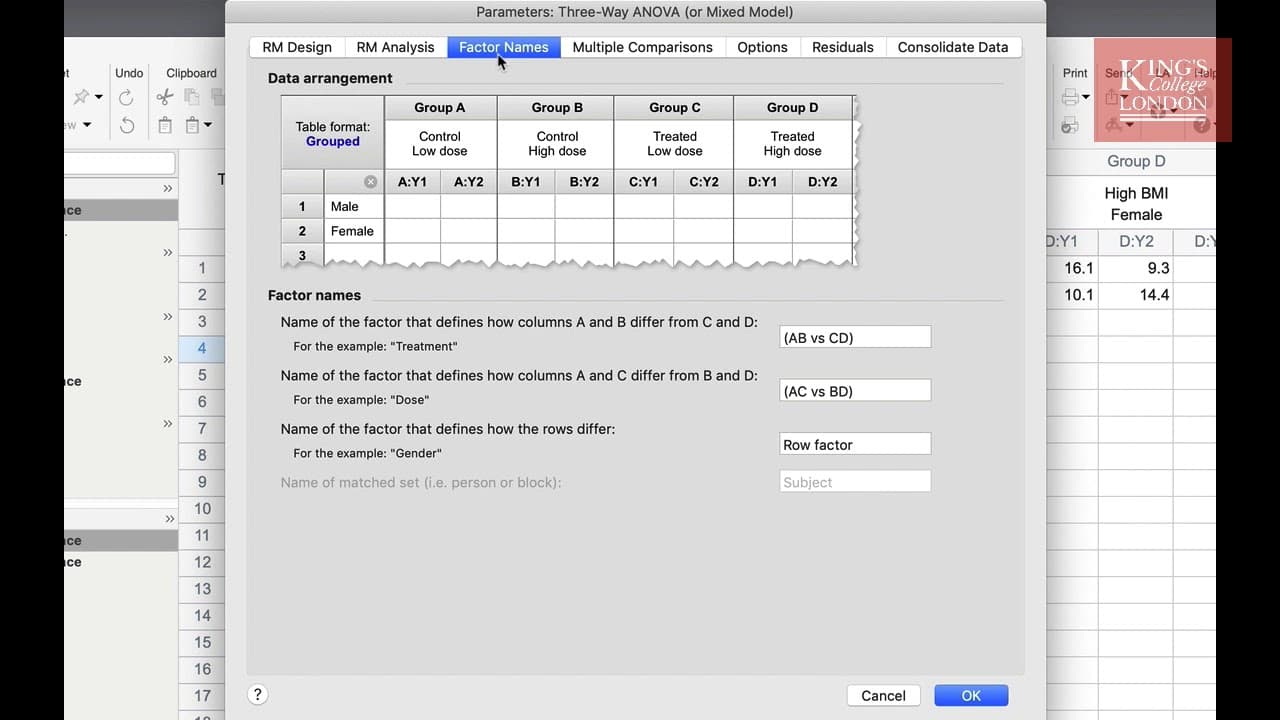
hello I'm James Clark from King's College London and in this short video I'm going to show you how to carry out a three-way ANOVA in graphpad prism while you would carry out a two-way anova when you have one measurement variable and up to two nominal variables you will carry out a 3-way ANOVA when you have a measurement variable and three nominal v... Read More
Key Insights
- 💨 Three-way ANOVA is useful for analyzing data with one measurement variable and three nominal variables.
- 🧑🏭 Factors should be defined based on how the groups differ and represent the different nominal variables.
- 👥 Multiple comparisons can be used to compare specific groups and identify significant differences.
Install to Summarize YouTube Videos and Get Transcripts
Explore YouTube Video Summarizer or Get YouTube Transcript Extractor
Questions & Answers
Q: What is the purpose of conducting a three-way ANOVA analysis?
The purpose of a three-way ANOVA analysis is to examine the influence of multiple factors on a measurement variable. It helps determine if there are significant interactions among the variables and their effects on the outcome.
Q: How do you define the factors in a three-way ANOVA analysis?
In a three-way ANOVA analysis, you define the factors that represent the different nominal variables. These factors are named based on how the groups differ. In the example, factors were named as low vs high BMI, male vs female, and low vs high smoking.
Q: What are multiple comparisons in a three-way ANOVA analysis?
Multiple comparisons in a three-way ANOVA analysis allow you to compare specific groups or columns. It helps identify significant differences between groups, such as comparing smokers and non-smokers within different BMI and gender groups.
Q: How are the results of a three-way ANOVA analysis interpreted?
The results of a three-way ANOVA analysis can be interpreted by examining the p-values and effect sizes for each factor. Significant p-values indicate that the factor has a significant impact on the outcome. In the example, smoking was found to only significantly influence VO2 Max in low BMI females.
Q: How do I run a three-way ANOVA in GraphPad Prism?
Enter and plot the data in a grouped table, open the data table, click Analyze, and select “Three-way ANOVA or mixed model” from the group analyses menu. Confirm the groups to analyze, choose the appropriate parameters, and click OK to view the results.
Q: How do I set up repeated measures for a three-way ANOVA in Prism?
Use the first two tabs of the three-way ANOVA parameters window to configure a repeated-measures design. You can specify which factors are matched and choose either repeated-measures ANOVA or a mixed-effects model.
Q: Can GraphPad Prism combine groups after a three-way ANOVA?
Yes, the Consolidate Data tab can combine columns A and B with C and D, or combine A and C with B and D for further sub-analysis. In the example, this could be used to examine low versus high BMI or male versus female data.
Summary & Key Takeaways
-
Three-way ANOVA is used when analyzing data with one measurement variable and three nominal variables.
-
The example in the video involves analyzing the exercise capacity of different subject groups based on BMI, gender, and smoking habits.
-
The process involves entering and plotting the data, selecting the groups to analyze, defining the factors, running multiple comparisons, and interpreting the results.
Read in Other Languages (beta)
Share This Summary 📚
Summarize YouTube Videos and Get Video Transcripts with 1-Click
Try YouTube Summary with ChatGPT & Claude or YouTube Transcript Generator
Explore More Summaries from Dory Video 📚

Summarize YouTube Videos and Get Video Transcripts with 1-Click
Try YouTube Summary with ChatGPT & Claude or YouTube Transcript Generator