How to Reverse Engineer Android APK Files
TL;DR
An Android APK is a renamed ZIP archive containing resources, a binary manifest, a cryptographic signature, and Dalvik bytecode in classes.dex. A basic reverse-engineering workflow extracts the APK, inspects decompiled or disassembled code, modifies resources or Smali source with APKTool, rebuilds and signs the package, then reinstalls it through ADB to verify the changed behavior.
Transcript
Thank you. Uh, I am Paul Oliva. I am a mobile security engineer with Via Forensics, and today I will be, uh, giving a high-level introduction to, uh, reverse engineering Android applications. Uh, first we will see, uh, how, uh, is, uh, an Android application like from, uh, the, the file that compounds it. Uh, then, uh, we will, uh, see a few method... Read More
Key Insights
- An Android APK is a ZIP archive with a different extension. Its contents include application resources, a binary Android manifest, signature data under META-INF, and classes.dex, which contains the bytecode executed by the Dalvik virtual machine.
- The Android manifest is a central source of application metadata. It can identify permissions used by the application, the application name, and the first activity launched, although the manifest inside a finished APK is stored in binary XML form.
- An installed APK can be retrieved from a device through backup applications or ADB. With debugging enabled, ADB can list installed packages, locate the selected package under the device's data application directory, and pull its APK for examination.
- APKTool is an open-source, multiplatform utility that bundles Smali and Baksmali capabilities. It converts Dalvik bytecode into readable Smali source, decodes application resources, permits edits, and rebuilds the changed files into a new APK package.
- Decompilation aims to recover source code resembling what the original developer wrote. Dex2jar converts Android DEX bytecode into a Java archive, allowing tools such as JD-GUI or JAD to display a Java-like representation of the application's logic.
- DEX-to-JAR conversion can discard metadata that exists in the original DEX file. A decompiler designed specifically for Android can process DEX directly and preserve more relevant information than a workflow that first translates the application into Java bytecode.
- Android-focused decompilers include the open-source decompiler in Androguard and the commercial JEB tool. The presentation describes JEB as widely used by professional reverse engineers and helpful with difficult obfuscation, while Androguard is suitable for many less complicated applications.
- A modified APK must be rebuilt, cryptographically signed, and installed before its behavior can be tested. In the demonstration, APKTool changes a Smali string from Hello Android to Goodbye Android, JarSigner signs the package, and ADB installs the altered application.
Install to Summarize YouTube Videos and Get Transcripts
Explore YouTube Video Summarizer or Get YouTube Transcript Extractor
Questions & Answers
Q: What files are contained inside an Android APK?
An Android APK is a ZIP archive renamed with the APK extension. It contains resources such as media files and images, a binary XML Android manifest, cryptographic signature information in the META-INF folder, and a classes.dex file. The classes.dex file stores compiled application bytecode that the Dalvik virtual machine executes on the Android device.
Q: How can an APK be extracted from an Android device?
An installed APK can be obtained with an application that backs up apps to an SD card, such as the examples APK Optik or Astro File Manager. Another method uses Android Debug Bridge. After ADB debugging is enabled in the device's developer settings, the pm list packages command identifies installed packages, and ADB can pull the selected APK from the device's data application directory.
Q: How can an Android application be downloaded without a phone?
The presentation describes an unofficial Google Play API written in Python. After its configuration file is supplied with Google account credentials and an Android device ID, it can search for and download applications from the command line. It also describes browser extensions and web services such as APK Downloader, which accept a package name or Google Play URL and generate a download link.
Q: What is the difference between disassembling and decompiling an APK?
Disassembling converts the binary Dalvik executable into a readable assembly-like representation called Smali. Decompiling instead attempts to reconstruct source code resembling the Java code written by the application's original author. Smali can be harder to read, but it is directly editable and can be rebuilt. Decompiled Java is easier to inspect, although it may not preserve every detail from the DEX file.
Q: How does APKTool help reverse engineer Android applications?
APKTool decodes an APK into a directory containing application resources and readable Smali files. An analyst can inspect and modify those files, including code and displayed strings, and then ask APKTool to build them into a new APK. The tool is open source, written in Java, multiplatform, and bundles the Smali and Baksmali functionality needed to transform Dalvik bytecode.
Q: Why can Android-specific decompilers be better than Dex2jar?
Dex2jar converts DEX bytecode into Java bytecode packaged as a JAR, which allows existing Java decompilers to process it. However, the conversion can lose metadata stored in the DEX file. Android-specific decompilers work directly from DEX to Java-like source, allowing them to retain and interpret that information. The presentation identifies Androguard's decompiler and JEB as two such options.
Q: How was the demonstration application modified and tested?
The demonstration first installed and launched a Hello World application through ADB. Dex2jar and JD-GUI were used to inspect its decompiled source, then APKTool decoded the APK into resources and Smali files. The presenter replaced the Hello Android string with Goodbye Android, rebuilt the APK, signed it with JarSigner, uninstalled the original application, installed the modified package through ADB, and launched it to confirm the change.
Q: What tools does Santoku Linux provide for Android analysis?
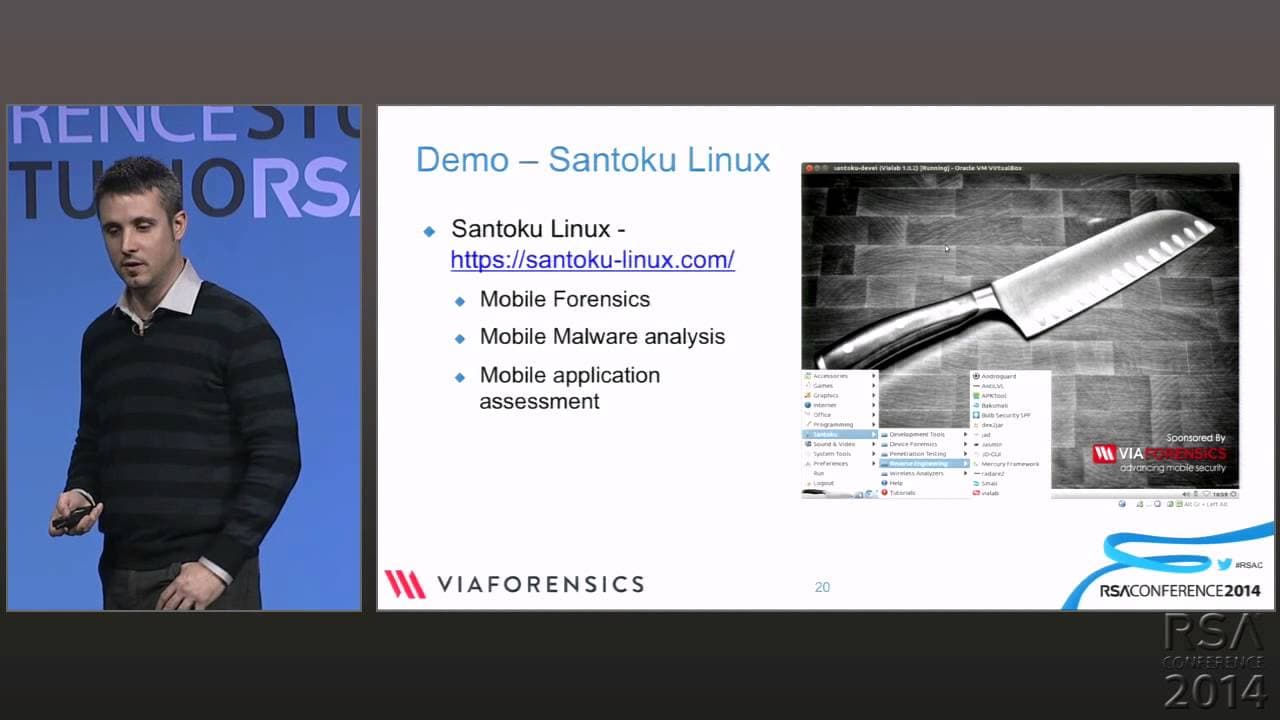
Santoku Linux is presented as a Linux distribution with open-source tools already installed and ready to use. Its tool collection supports mobile forensics, malware analysis, and mobile application assessment. For the demonstrated Android workflow, it provides an environment where utilities for APK extraction, bytecode conversion, decompilation, Smali editing, rebuilding, signing, and device interaction can be used without separately setting up the computer.
Summary & Key Takeaways
-
Android applications are distributed as APK files, which are ZIP archives containing resources, a binary Android manifest, cryptographic signature information, and compiled Dalvik bytecode in classes.dex. The manifest identifies details such as permissions, the application name, and the first activity launched when the application runs on an Android device.
-
An APK can be obtained by backing up an installed application, using ADB commands to identify and pull its package, or downloading it from Google Play through the unofficial methods described. After extraction, APKTool can decode resources and Dalvik bytecode into editable Smali files and rebuild the modified package.
-
Decompilation can convert DEX bytecode into source resembling the original Java code. Dex2jar enables existing Java decompilers to process an application, but the conversion can lose DEX metadata. Android-focused tools such as Androguard's decompiler and JEB work directly with DEX files, while Santoku Linux bundles relevant mobile-analysis tools.
Read in Other Languages (beta)
Share This Summary 📚
Summarize YouTube Videos and Get Video Transcripts with 1-Click
Try YouTube Summary with ChatGPT & Claude or YouTube Transcript Generator
Explore More Summaries from RSAC Cybersecurity 📚




Summarize YouTube Videos and Get Video Transcripts with 1-Click
Try YouTube Summary with ChatGPT & Claude or YouTube Transcript Generator