How To Make a Cumulative Relative Frequency Table
TL;DR
To make a cumulative relative frequency table, list each value in ascending order, count its frequency, divide each frequency by the total, and progressively add the relative frequencies. In the example, 25 observations produce relative frequencies from 0.08 to 0.32, and the final cumulative relative frequency is 1.0. Read on for the exact calculations and checks used at every step.
Transcript
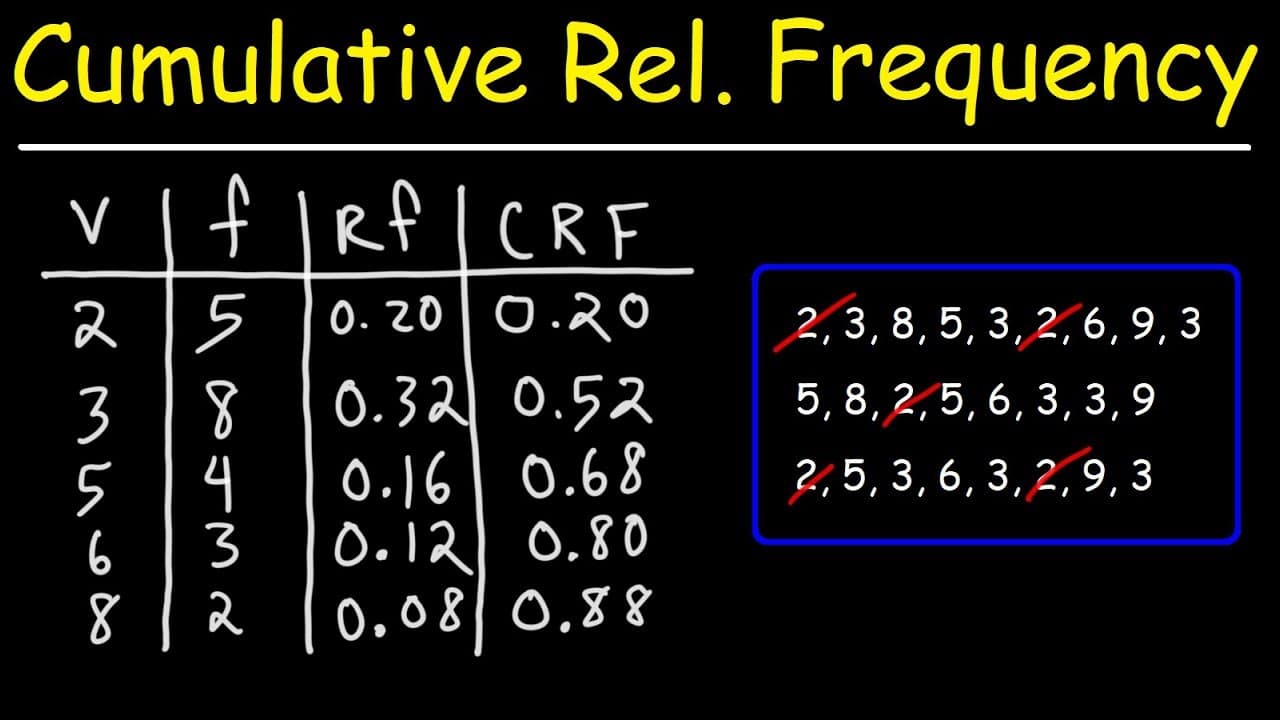
in this video we're going to focus on making a cumulative relative frequency table using the data that we see here above so let's begin by making the table in the first column i'm going to write v for value in the second column i'm going to put f for frequency the third column will be rf for relative frequency and in the last column will be crf for... Read More
Key Insights
- 🎮 The video demonstrates the process of creating a cumulative relative frequency table by organizing data and calculating frequency, relative frequency, and cumulative relative frequency.
- 🚰 Cumulative relative frequency tables provide a useful visual representation of the distribution and significance of values in a dataset.
- 👷 Understanding how to construct and interpret cumulative relative frequency tables is beneficial for statistical analysis.
- 🍹 The sum of relative frequencies in a cumulative relative frequency table should always be equal to 1, indicating the entirety of the dataset.
- 🚰 Cumulative relative frequency tables help identify the most common and rare values in a dataset.
- 🪈 The process involves arranging values in ascending order and calculating how frequently each value occurs.
- #️⃣ Frequency represents the number of occurrences for each value, while relative frequency compares the proportion of each value with the total frequency.
Install to Summarize YouTube Videos and Get Transcripts
Explore YouTube Video Summarizer or Get YouTube Transcript Extractor
Questions & Answers
Q: How do you make a cumulative relative frequency table?
Create four columns labeled value, frequency, relative frequency, and cumulative relative frequency. List the values in ascending order, count each value, divide every frequency by the total frequency, and then progressively add the relative frequencies.
Q: What values and frequencies are used in the example?
The values are 2, 3, 5, 6, 8, and 9. Their respective frequencies are 5, 8, 4, 3, 2, and 3.
Q: Why are 4 and 7 omitted from the table?
The dataset contains no 4s or 7s. The table therefore moves from 3 to 5 and from 6 to 8.
Q: What is the total frequency of the dataset?
The total frequency is 25. It is found by adding 5, 8, 4, 3, 2, and 3.
Q: How is relative frequency calculated?
Divide a value's frequency by the total frequency of 25. For example, the frequency of 2 is 5, so its relative frequency is 5 divided by 25, or 0.20.
Q: What are the relative frequencies in the example?
For values 2, 3, 5, 6, 8, and 9, the relative frequencies are 0.20, 0.32, 0.16, 0.12, 0.08, and 0.12. These values add up to 1.
Q: How is cumulative relative frequency calculated?
Start with the first relative frequency, 0.20, and add each subsequent relative frequency to the running total. The sequence is 0.20, 0.52, 0.68, 0.80, 0.88, and 1.0.
Q: How can you check a cumulative relative frequency table?
Add the relative frequency column and verify that its total is 1. In this example, the final cumulative relative frequency is also 1.0.
Summary & Key Takeaways
-
The video demonstrates the process of making a cumulative relative frequency table using provided data.
-
It starts by labeling columns for value, frequency, relative frequency, and cumulative relative frequency.
-
The video shows step-by-step calculations for frequency, relative frequency, and cumulative relative frequency.
Read in Other Languages (beta)
Share This Summary 📚
Summarize YouTube Videos and Get Video Transcripts with 1-Click
Try YouTube Summary with ChatGPT & Claude or YouTube Transcript Generator
Explore More Summaries from The Organic Chemistry Tutor 📚


Summarize YouTube Videos and Get Video Transcripts with 1-Click
Try YouTube Summary with ChatGPT & Claude or YouTube Transcript Generator