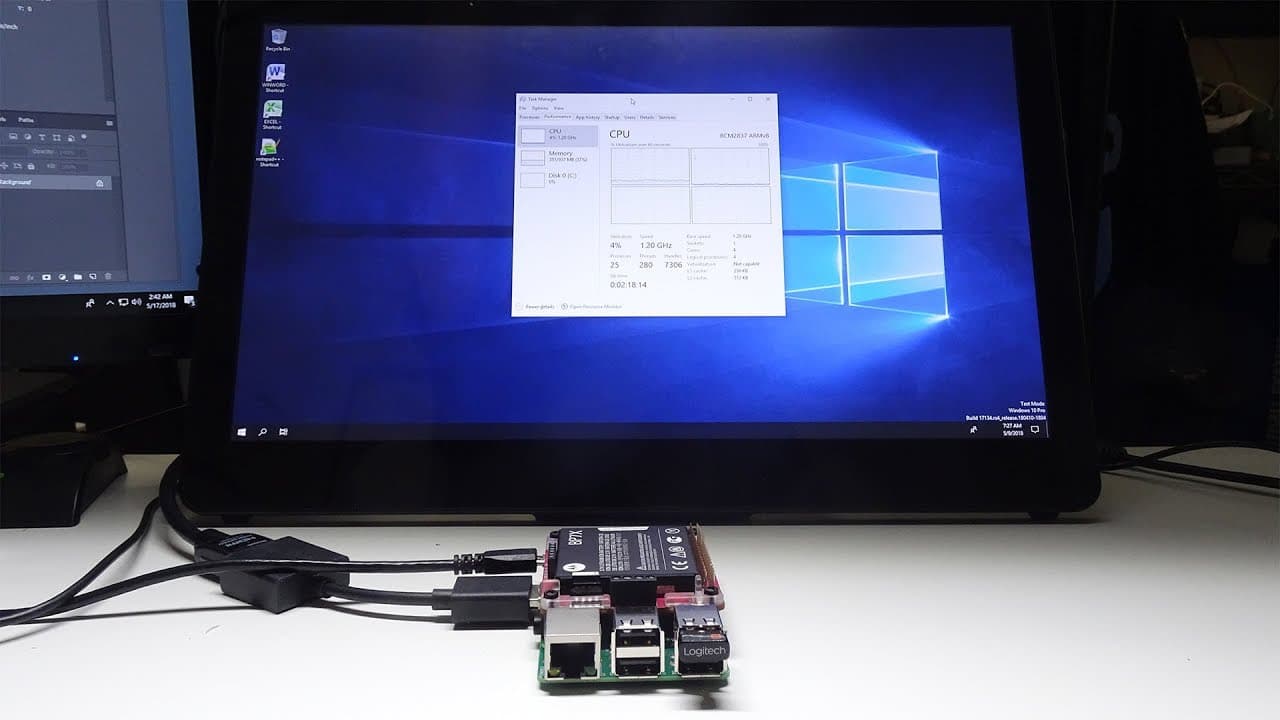
Windows 10 on ARM (WoA) on raspberry pi 3b
TL;DR
Windows 10 can be run on Raspberry Pi, but it faces several driver issues.
Transcript
you guys going on it's down here from Nova spirit tank and if you notice from the title below yes we are gonna be checking out windows 10 on Raspberry Pi and this is not the IOT version so let's get started so before we begin I want to thank everybody on the injury's UEFI build now there's a discussion going on over there at the time of making this... Read More
Key Insights
- 😘 The installation of Windows 10 on Raspberry Pi is a novel proof of concept, indicating significant potential for low-cost computing.
- ☠️ Speed limitations are primarily associated with the performance of the SD card, which could affect overall user experience.
- 🐭 Only basic functionalities, such as using a keyboard and mouse, are currently operational, emphasizing the need for extensive driver development.
- 🪛 The Raspberry Pi B model is currently the only compatible option, as drivers do not support the B+ model.
- 👤 Despite its limitations, users can conduct various tasks, such as running simple office applications, thus showcasing the Pi's capabilities beyond standard uses.
- 👤 Users are encouraged to back up the installation image to simplify recovery if issues arise during operation.
- 📽️ The project highlights active community engagement, showcasing how collaboration can drive innovation in computing.
Install to Summarize YouTube Videos and Get Transcripts
Explore YouTube Video Summarizer or Get YouTube Transcript Extractor
Questions & Answers
Q: What is the main achievement presented in the video regarding Windows 10 and Raspberry Pi?
The video demonstrates that Windows 10 can be installed and run on a Raspberry Pi, specifically the Raspberry Pi B model. The process showcases the operating system booting up and functioning, despite encountering several limitations primarily related to driver support for USB, networking, and sound.
Q: Why does the installation process take four to six hours?
The lengthy installation process is due to the need for manual configurations and the slow speed of the SD card used for the Raspberry Pi. This necessitates careful steps to ensure all components and drivers are properly set up, explaining why users should anticipate spending several hours to achieve a fully functional setup.
Q: What are the current limitations of running Windows 10 on Raspberry Pi?
Currently, the setup faces significant limitations, including non-functional network and sound drivers, which hinder overall usability. Additionally, while some applications can run, the user experiences interruptions with USB drivers, leading to potential halts during operations, making it less reliable for everyday tasks.
Q: How does Windows-on-Windows functionality benefit Raspberry Pi users?
Windows-on-Windows functionality allows users to run 32-bit applications on the ARM version of Windows 10, opening up a wide range of software that normally wouldn’t be compatible. This feature enables the installation and operation of applications like Microsoft Office, making the Raspberry Pi more versatile despite its limitations.
Summary & Key Takeaways
-
The video explores the installation and operation of Windows 10 on a Raspberry Pi, highlighting the successful booting process and initial performance.
-
Challenges include suboptimal speed due to limited drivers, particularly lack of sound and network functionality, rendering it a work in progress.
-
Despite these hurdles, the Raspberry Pi demonstrates the ability to run 32-bit applications through a Windows-on-Windows setup, showcasing its potential.
Read in Other Languages (beta)
Share This Summary 📚
Summarize YouTube Videos and Get Video Transcripts with 1-Click
Try YouTube Summary with ChatGPT & Claude or YouTube Transcript Generator
Explore More Summaries from Novaspirit Tech 📚






Summarize YouTube Videos and Get Video Transcripts with 1-Click
Try YouTube Summary with ChatGPT & Claude or YouTube Transcript Generator