ADS1256 - Reading a single conversion result using RDATA
TL;DR
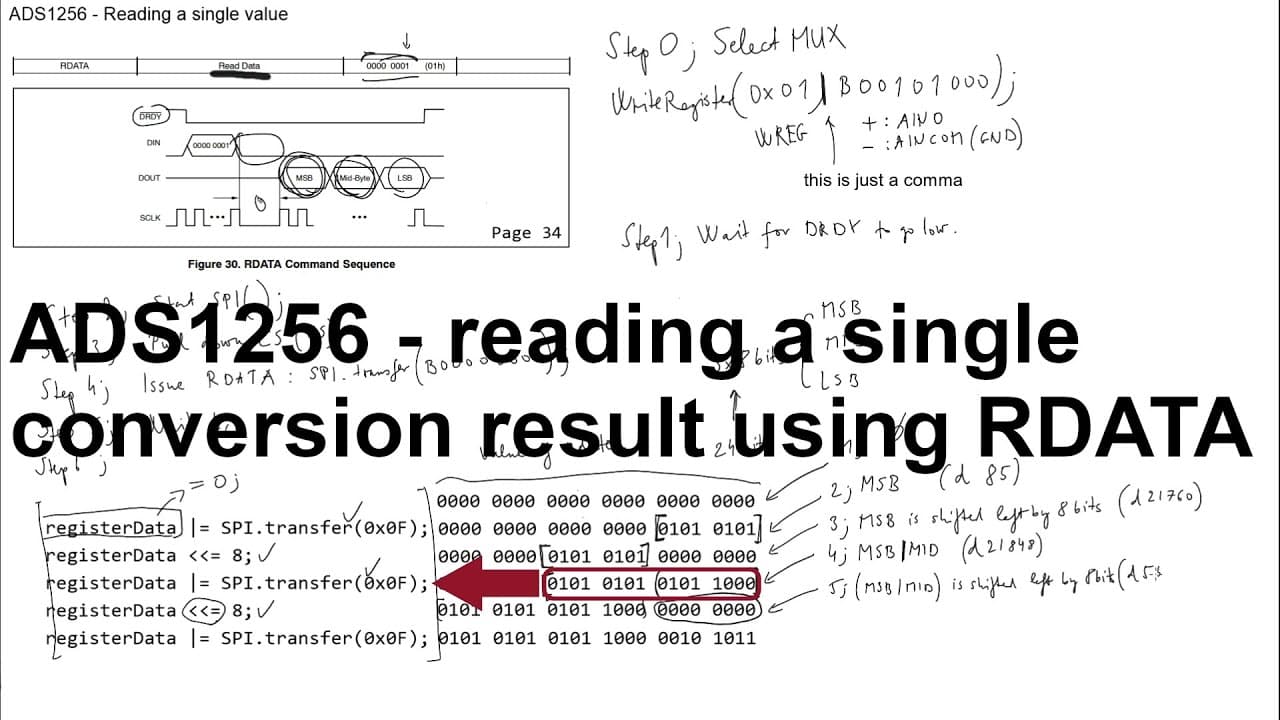
This video explains reading single values from the AD1256 ADC after selecting inputs.
Transcript
welcome everyone in this video I'm going to continue the progress of the introduction of this ad as 1256 ad converter so previously I showed you how to read and how to write the registers so basically how to submit a command to the device and how to see what kind of settings are applied for this device so the next step from here can be for example ... Read More
Key Insights
- 🏛️ The AD1256 ADC requires an understanding of its operational principles, which is built upon in sequential video tutorials.
- ❓ Proper setup and sequencing are vital for successful data acquisition, necessitating a systematic approach to command submission and data interpretation.
- 🫠 Reading from the ADC involves careful timing considerations to ensure data is ready before being processed.
- 🚫 The importance of correctly identifying and managing the sign bit in the data stream is crucial for interpreting results accurately.
- 🫦 Managing byte order and accurate data transmission is necessary to compile the complete 24-bit reading from the ADC.
- ⚡ Conversion from digital values to voltage requires an appreciation of the ADC's reference levels and total resolution.
- 💦 The video aims to demystify the steps and challenges involved in working with ADCs, making it more approachable for learners.
Install to Summarize YouTube Videos and Get Transcripts
Explore YouTube Video Summarizer or Get YouTube Transcript Extractor
Questions & Answers
Q: What prior knowledge should viewers have before watching this video?
Viewers are strongly encouraged to watch the previous video that covers the basics of reading and writing registers in the AD1256 ADC. This foundational knowledge is essential for understanding the more complicated aspects of reading single values presented in the current video.
Q: How is the reading of a single value from the AD1256 ADC initiated?
To initiate the reading of a single value, the video explains that one must first wait for the data-ready signal to go low, indicating that the device is ready for communication. Once the signal confirms readiness, the appropriate read command can be issued to retrieve the conversion data.
Q: What is the significance of timing, specifically T6, in this process?
Timing, particularly the delay denoted as T6, is crucial as it dictates the waiting period after submitting the command before actual data can be read. The video urges viewers to understand and calculate this timing to ensure accurate data retrieval from the ADC.
Q: How are the multiple bytes of data received from the ADC combined?
The video describes that the ADC sends three bytes of data which are the MSB, Mid byte, and LSB. To combine them, each byte is shifted into position using bitwise operations and a series of shifts to form a complete 24-bit number representing the ADC reading.
Q: What method is used to identify whether the data is positive or negative?
The first bit of the 24-bit number acts as a sign bit, where '0' indicates a positive value and '1' a negative value. If the sign bit is '1', the actual value is computed by subtracting 2 to the power of 24 from the data to represent it correctly in the context of negative values.
Q: How can the digital value received be converted back to voltage?
To convert the ADC's digital output into voltage, one must understand that the digital range corresponds to the voltage scale specified (0-5 volts for positive values). The specific digital value is divided by the total number of steps (2^23 - 1 due to the sign bit) and then multiplied by the reference voltage, yielding the corresponding voltage value.
Summary & Key Takeaways
-
The video builds upon previous discussions about the AD1256 ADC, focusing on how to read a single conversion value effectively from the device.
-
It emphasizes the importance of prior knowledge of the device’s register settings and command structure for successful data acquisition.
-
A detailed process is outlined, including the steps necessary to initialize communication and interpret the received data, including managing the sign bit for proper voltage representation.
Read in Other Languages (beta)
Share This Summary 📚
Summarize YouTube Videos and Get Video Transcripts with 1-Click
Try YouTube Summary with ChatGPT & Claude or YouTube Transcript Generator
Explore More Summaries from Curious Scientist 📚
![Building a Peltier cooler-based cooling box - First iteration, improvements [Part 2/6] thumbnail](/_next/image?url=https%3A%2F%2Fi.ytimg.com%2Fvi%2F0YlNw0EGnzI%2Fhqdefault.jpg&w=750&q=75)
Summarize YouTube Videos and Get Video Transcripts with 1-Click
Try YouTube Summary with ChatGPT & Claude or YouTube Transcript Generator