Midjourney + ChatGPT For Web Design Tutorial
TL;DR
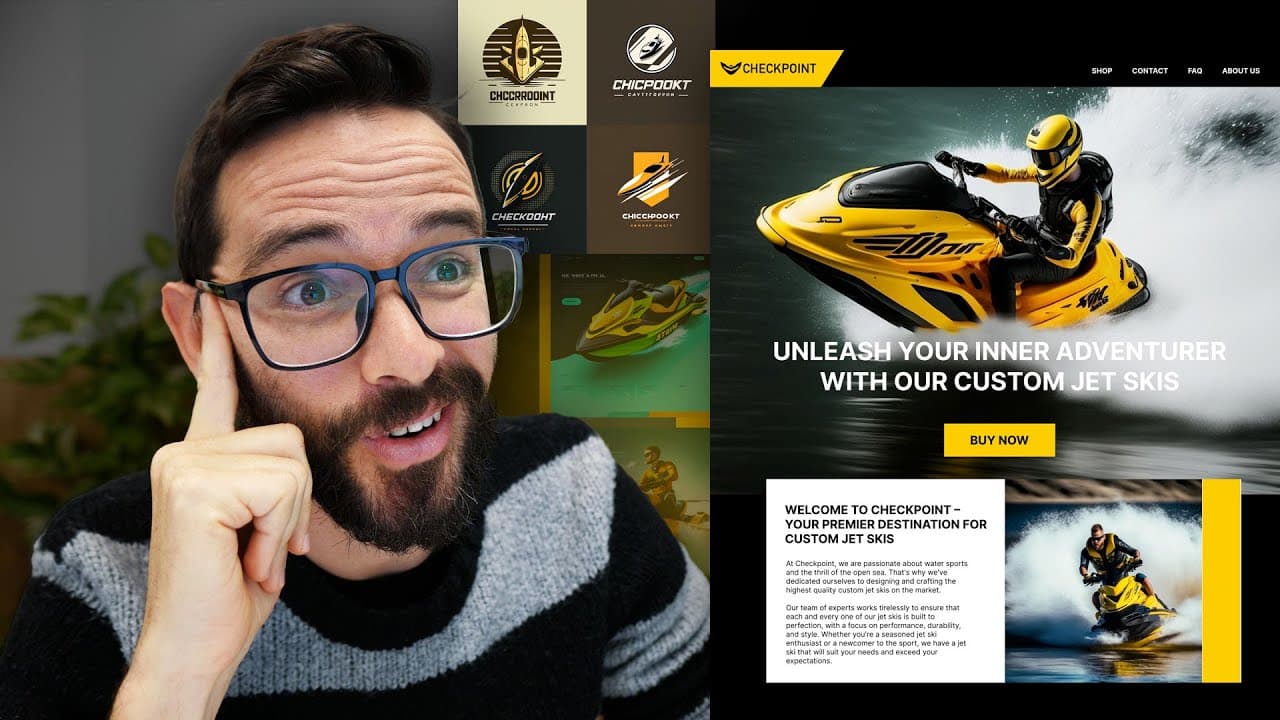
Watch as the creator utilizes AI tools, including mid-journey and chat GPT, to generate design ideas and content for a jet ski company website.
Transcript
creating pretty images with AI tools is nice but can it actually help me do my real job client work well in this video I'm going to give this a try I'm going to generate a random client brief I'm going to try to solve this brief with actual design tools AI tools with mid-journey to create images and tragically to write text and help me come up with... Read More
Key Insights
- 🎯 AI tools can help designers generate images and content for client work, improving efficiency and creativity.
- 📝 Mid Journey is an AI tool that creates images within Discord, allowing designers to generate sketches and variations for design concepts.
- 🎨 The generated images can be explored and modified to fit specific design briefs, helping designers ideate and iterate quickly.
- 🏘️ The randomly generated website brief for a company called Checkpoint focuses on creating a premium e-commerce site for high-performance jet skis.
- 🖼️ Mid Journey provides options for website designs that convey a sense of bravery and status, with one layout option fitting the brief well.
- 🖥️ The high-resolution image generated by Mid Journey serves as a reference for the website's hero image and layout elements.
- 🔀 Using design tools like Photoshop and Figma, designers can clean up and manipulate AI-generated images to fit their design needs.
- 🎖️ AI tools, such as Mid Journey and Chat GPT, accelerate the design process by generating design elements and providing content ideas for different sections of a website.
Install to Summarize YouTube Videos and Get Transcripts
Explore YouTube Video Summarizer or Get YouTube Transcript Extractor
Questions & Answers
Q: How does mid-journey work in generating design images?
Mid-journey is an AI tool that works within Discord. Users write a prompt, such as "modern landing page for a premium jet ski company," and specify relevant tags like "website ux UI." Mid-journey then generates four design options based on the prompt and tags, which users can further modify and explore.
Q: What design elements and sections did the creator focus on for the jet ski company website?
The creator focused on the hero section, including a high-resolution image of a jet ski rider, a bold headline, and a call-to-action button. They also worked on the navigation, which included pages like home, shop, about us, contact, FAQ, and potentially a blog section.
Q: How did the creator generate content for the about section of the website?
Using chat GPT, the creator requested chat GPT to write an about section for the jet ski company. Chat GPT responded with a paragraph welcoming visitors to the premiere destination for custom jet skis and expressing their passion for water sports. The creator then formatted and incorporated this content into the about section on the website.
Q: How did the creator generate a logo for the jet ski company?
The creator used mid-journey to generate logo options for the jet ski company. After exploring different prompts, they found a suitable logo with a wordmark style that felt minimal and abstract, aligning with their vision for the company. They then used Adobe Illustrator to trace and clean up the logo, integrating it into the website design in Figma.
Summary & Key Takeaways
-
The creator starts by using Good Brief i.o to generate a random client brief for a jet ski company website.
-
They then utilize mid-journey, an AI tool within Discord, to create images based on design prompts and explore different design concepts for the website.
-
Using chat GPT, another AI tool, they generate headlines and content for the website sections, including the hero section and the about section.
Read in Other Languages (beta)
Share This Summary 📚
Summarize YouTube Videos and Get Video Transcripts with 1-Click
Try YouTube Summary with ChatGPT & Claude or YouTube Transcript Generator
Explore More Summaries from Flux Academy 📚

Summarize YouTube Videos and Get Video Transcripts with 1-Click
Try YouTube Summary with ChatGPT & Claude or YouTube Transcript Generator