Best Web Highlighters in 2026 (Tested and Compared)

Aug 03, 2026
9 min read
71 views
Glasp is the best web highlighter for learners: it highlights web pages, PDFs, YouTube transcripts, and even images for free, works in every major browser, and turns what you keep into an exportable library that Notion, Obsidian, and your AI assistant can use. That said, different highlighters are built for different jobs. Hypothesis is the best choice for classroom annotation and discussion, Weava for citation-heavy student research, and Raindrop.io if you want light highlighting inside a bookmark manager. This guide compares them honestly, including where each one falls short.
What Actually Separates Web Highlighters
Every tool here can paint text yellow. The differences that matter show up after you highlight:
Where do highlights live? Anchored to the page (you see them when you revisit), collected in a library (you can browse and search them), or both.
What can you highlight? Plain web pages are table stakes; PDFs, YouTube videos, and images are not.
Can your highlights leave? For learners, this is the big one. Highlights you can't export to your notes app, flashcards, or AI tools are knowledge you'll eventually lose.
We compare the six tools below on those three questions.
The 6 Best Web Highlighters
1. Glasp: Best for Learners Who Want to Keep and Reuse Highlights
Platform: Extension for Chrome, Safari, Edge, Brave, Firefox, and Opera; web app; iOS and Android apps
Price: Free plan with unlimited public highlights. Pro is $15/month, or $150/year ($12.50/month billed annually), with a 40% student discount on the yearly plan
Highlights: Web pages, PDFs (uploaded and web-hosted), YouTube transcripts, images, and Kindle books, in 4 colors with notes and tags
Where they live: Both on the page and in your searchable library
Best link: glasp.co
Glasp is built on a simple idea: a highlight should be the start of something, not a yellow smear you never see again. Everything you highlight, across articles, PDFs, YouTube videos, images, and Kindle, lands in one library with tags, notes, and sources, synced across the extension and the mobile apps.
The reuse layer is where it pulls away from the pack. Your library exports to Notion, Obsidian, Roam, Readwise, Tana, Workflowy, Zotero, and plain files, turns into Anki flashcards in one click, and connects to Claude and ChatGPT through a free MCP connector, so you can ask your AI about everything you've highlighted. There is also a social layer: you can see what other readers highlighted on the same page, which is surprisingly good at pointing you to the parts worth reading.
The honest caveats: on the free plan, highlights are public by default (private highlights are a Pro feature) and PDF uploads are capped at 30 files, and while the mobile apps handle web-article highlighting and YouTube summaries, PDF and image highlighting remain desktop workflows.
Best for: Students and lifelong learners who want highlights that become notes, flashcards, and AI context, not just marks on a page.
2. Hypothesis: Best for Classroom and Group Annotation
Platform: Chrome extension (works on Brave, Vivaldi, Edge); bookmarklet for Firefox and Safari; no mobile apps
Price: Free for personal use. Schools pay for the LMS integration
Highlights: Web pages, PDFs, and EPUBs, with public, private, and group visibility
Where they live: Anchored to the page, as a conversation layer
Hypothesis treats annotation as a public conversation. Your highlights and notes sit on the page itself, visible to you, a private group, or the whole world, and other people can reply. That model has made it the standard for social annotation in higher education, where it plugs directly into learning management systems and is used by hundreds of institutions.
As a personal knowledge tool, it is more limited: there are no mobile apps, and getting your annotations out into a notes app is not the workflow it is designed around. It shines when the point is discussing a text together.
Best for: Classes, book clubs, and research groups annotating the same documents.
3. Weava: Best for Citation-Heavy Student Research
Platform: Chrome extension; iOS app
Price: Free (unlimited highlights, 100 MB storage). Premium $3.99/month
Highlights: Web pages and PDFs, organized into folders and sub-folders
Where they live: In a folder-based library built for projects
Weava is organized the way a term paper is: folders per project, sub-folders per theme, highlights collected under each, and one-click citation generation in academic formats. The free tier is generous where students need it (unlimited highlights and notes), and Premium unlocks collaboration and more colors and storage.
Outside that workflow it is thinner: no Android app, fewer export destinations than Glasp or Raindrop, and no AI or review layer. It is a research organizer, and a good one.
Best for: Students collecting sources for essays and theses who need citations handled.
4. Raindrop.io: Best Highlighting Inside a Bookmark Manager
Platform: Web, Mac, Windows, iOS, Android; extensions for Chrome, Safari, Firefox, Edge
Price: Free (unlimited bookmarks, collections, and highlights). Pro is about $3/month billed annually (price varies by region)
Highlights: Text on any saved web page, PDF, or EPUB, attached to the bookmark
Where they live: Inside your bookmark library
If you think in links first and passages second, Raindrop flips the model the right way around: save the page into a visual collection, then highlight the parts that mattered. The free tier has no meaningful limits on bookmarks or highlights, it covers PDFs and EPUBs as well as web pages, and the apps span every platform.
The tradeoff is that highlights are a feature of bookmarks, not the center of the product. There is no YouTube or image highlighting, notes on highlights require Pro, and there is no review loop; for pulling highlights out into other tools, the dedicated highlighters do it better.
Best for: Bookmark-first organizers who want their saved links and key passages in one beautiful place.
5. Diigo: Best Budget Veteran
Platform: Chrome and Firefox extensions, bookmarklet for other browsers; iOS and Android apps
Price: Free (100 highlights total, with ads). Standard $40/year for unlimited web and PDF highlights, ad-free; Professional $59/year adds unlimited PDF storage and outliners
Highlights: Web pages in multiple colors with sticky notes; PDFs on paid plans
Where they live: On the page and in a library, with outliners for organizing
Diigo has been doing web annotation since before most of this list existed, and the fundamentals still work: highlights, sticky notes, tags, groups, and outliners for turning research into structure. The paid plans are cheap, and the teacher plan is free.
The honest read: the product feels dated, the free tier's 100-highlight lifetime cap is the tightest limit on this list, and development is quiet. It earns its spot on price and track record, not momentum.
Best for: Budget-minded researchers who want a proven tool and don't mind an old-school interface.
6. Liner: Best If You Want AI Search with Highlighting on the Side
Platform: Web; Chrome extension; iOS and Android apps
Price: Free (with ads and daily limits). Pro $17.99/month, or $14.99/month billed annually
Highlights: Web pages, YouTube, and PDFs via the extension
Where they live: In your Liner account, feeding its AI features
Liner started as a highlighter and has pivoted hard into AI research: its main product today is an AI search and research agent with cited answers and an academic mode. The extension still highlights across the web, YouTube, and PDFs, and your highlights feed the AI's context.
If highlighting is your primary need, that pivot works against it: the highlight library and export story get less attention than the AI features, and the Pro price is the highest here, priced as an AI product rather than a highlighter.
Best for: People who mainly want an AI research assistant and treat highlighting as an input to it.
Quick Comparison
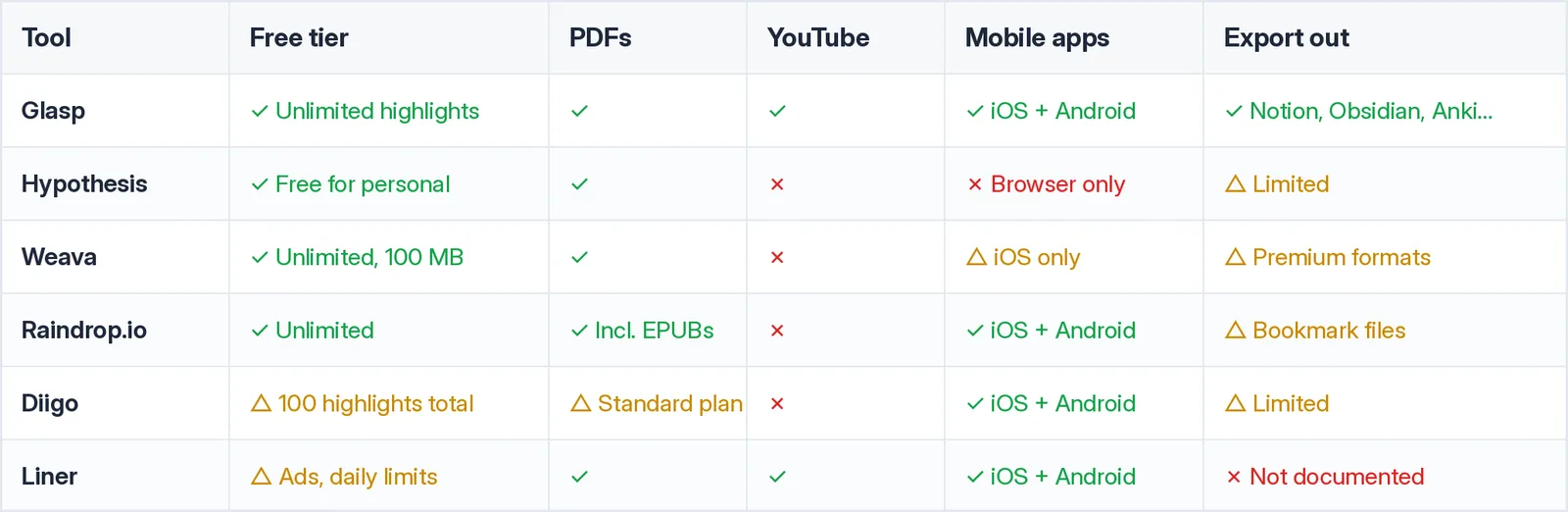
Also worth a look: Memex, a highlighter with an unusual pay-once model ($250 lifetime plus AI usage credits, alongside a limited free tier) instead of a subscription. It is alive and interesting, but the pricing model puts it in a different category from the tools above.
How to Start Highlighting with Glasp
Install the Glasp extension for your browser (Chrome, Safari, Edge, Brave, Firefox, or Opera).
Select text on any page and pick a color. Your highlight is saved to your library instantly, with the source attached.
Add a note or tag if you want context, and use the sidebar to see everything you've kept from the page.
When you need your highlights elsewhere, export them: to Notion or Obsidian, as Markdown or CSV files, as Anki flashcards, or straight into Claude and ChatGPT via the MCP connector.
The same account highlights PDFs, YouTube transcripts, and images, so your whole reading life ends up in one library.
Frequently Asked Questions
Q: What is the best web highlighter?
For most learners, Glasp: free unlimited highlighting across web pages, PDFs, YouTube, and images, in every major browser, with exports to Notion, Obsidian, Anki, and AI assistants. If your use case is classroom discussion, pick Hypothesis; for citation-driven research on a budget, pick Weava.
Q: What is the best free web highlighter?
Glasp and Raindrop.io have the strongest free tiers, both with unlimited highlights. Weava's free plan is also solid for students. Diigo's free plan caps you at 100 highlights total, which serious users will outgrow quickly.
Q: Which web highlighters work on PDFs?
Glasp (uploaded and web-hosted PDFs), Hypothesis, Weava, Liner, and Raindrop all highlight PDFs. On Diigo, the free tier's 100-highlight lifetime cap covers web and PDF highlights together, and unlimited highlighting starts at the Standard plan ($40/year).
Q: Can I highlight YouTube videos?
With Glasp, yes: it shows the video's transcript and lets you highlight lines, each linked back to its timestamp. Liner also supports YouTube highlighting. The other tools here are text-only.
Q: Which highlighter is best for students?
For writing papers, Weava (folders and citations). For assigned readings and class discussion, Hypothesis. For building long-term knowledge, notes, flashcards, and review, Glasp, which also offers a student discount on Pro.
Q: Can I export my highlights to Notion or Obsidian?
Glasp exports to both (plus Roam, Readwise, Tana, Workflowy, Zotero, and plain files), and Weava and Diigo offer more limited export formats. With Hypothesis and Liner, getting highlights out is not a core workflow, so check carefully if portability matters to you.
Q: Do highlights stay on the page when I come back?
Yes, for all six tools: revisit a page with the extension active and your highlights reappear. The difference is what else you get; Glasp, Weava, Raindrop, and Diigo also keep a central library, while Hypothesis is primarily the on-page layer.
Related Articles
👉 Try it free: glasp.co
Before You Leave
Highlighting only pays off if the highlights go somewhere. Whichever tool you choose, make sure your marks add up to something: a library you can search, notes you can export, knowledge you can review. That is the standard Glasp was built for, and the free plan is all you need to find out.