How Can You Enhance Metadata in Obsidian MD?
TL;DR
Enhance your Obsidian MD experience by utilizing community plugins to maximize the new properties feature. This allows you to automate metadata management, making it easier to organize your notes efficiently.
Transcript
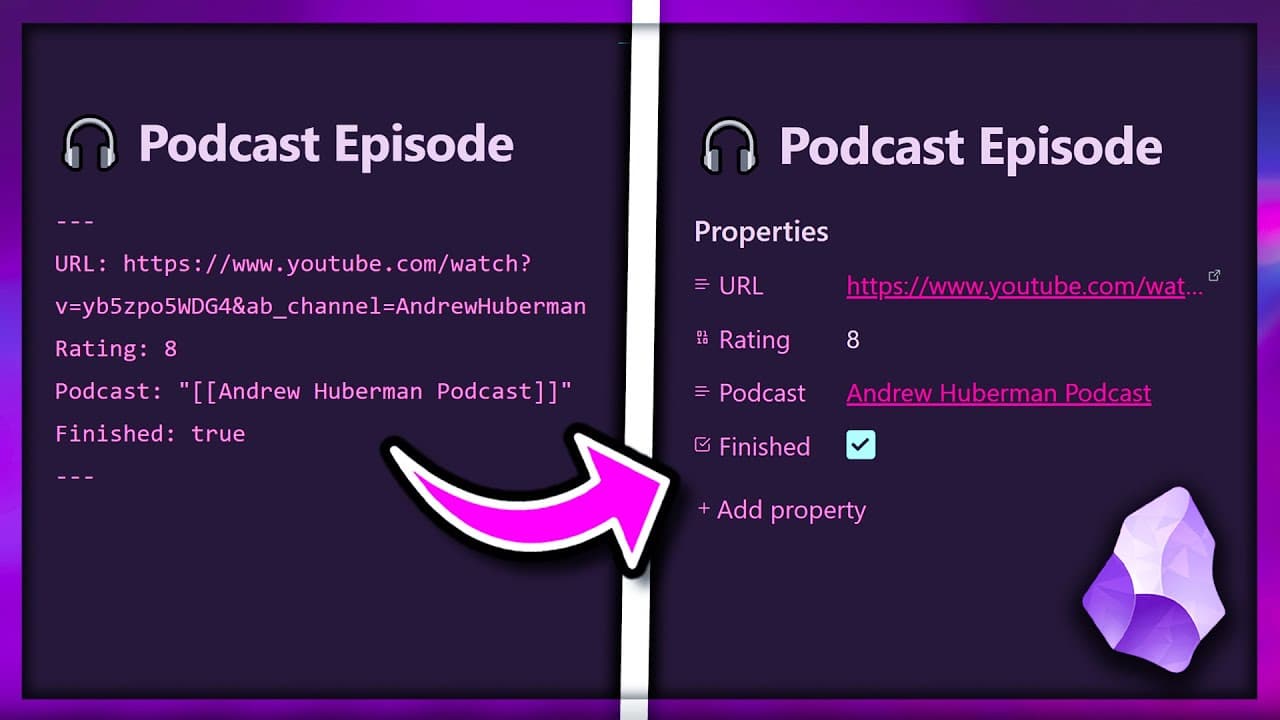
obsidian just turned these ugly metadata fields of your notes into shiny user-friendly properties just like notion but as useful as this new feature is there's still a lot of missing functionality and hidden potential so in this video I'll show you some ways to enhance them with Community plugins so you can go from a properties beginner to Pro powe... Read More
Key Insights
- 💨 Obsidian's new properties feature enhances note organization and management by providing user-friendly ways to add and update metadata fields.
- 🫵 Viewing and editing properties through the sidebar improves efficiency, especially for long documents.
- 👤 Templates and variables automate the creation and population of properties, saving time and effort for users.
- 👻 The Data View and Inline Front Matter Sync plugins offer further enhancements to Obsidian's properties feature, allowing users to create inline fields and sync their content with property values.
- 🍻 Utilizing Obsidian links in conjunction with properties enables easy navigation to specific sections of notes.
- 🧡 The power of community plugins expands the functionality and potential of Obsidian's properties feature, offering a range of customization options for users.
- ❓ Exploring the documentation and resources provided by the Obsidian community is essential for maximizing the benefits of the properties feature.
Install to Summarize YouTube Videos and Get Transcripts
Explore YouTube Video Summarizer or Get YouTube Transcript Extractor
Questions & Answers
Q: What is Obsidian's new properties feature?
Obsidian's new properties feature allows users to add metadata fields to notes, providing a more user-friendly way to manage and update values.
Q: How can properties be viewed and edited?
Properties can be viewed and edited through the sidebar, making it easier to manage values in long documents without scrolling up.
Q: Can templates automate the creation of properties?
Yes, templates can automate the creation of properties. By using the Templator plugin, users can create templates with pre-defined fields that are automatically applied to new notes.
Q: How can variables be used to automate values in properties?
Variables, such as date variables, file variables, and front matter variables, can be used to automatically populate values in properties. Users can utilize moment functions and format options to convert and calculate values dynamically.
Summary & Key Takeaways
-
Obsidian has introduced a new properties feature that allows users to add metadata fields to their notes, providing a more user-friendly way to manage and update values.
-
Users can view and edit properties through the sidebar, making it easier to manage values in long documents.
-
Templates and variables can automate the creation and population of fields, improving efficiency and organization.
Read in Other Languages (beta)
Share This Summary 📚
Summarize YouTube Videos and Get Video Transcripts with 1-Click
Try YouTube Summary with ChatGPT & Claude or YouTube Transcript Generator
Explore More Summaries from John Mavrick 📚


Summarize YouTube Videos and Get Video Transcripts with 1-Click
Try YouTube Summary with ChatGPT & Claude or YouTube Transcript Generator