How to build a no code calendar AI agent with n8n
TL;DR
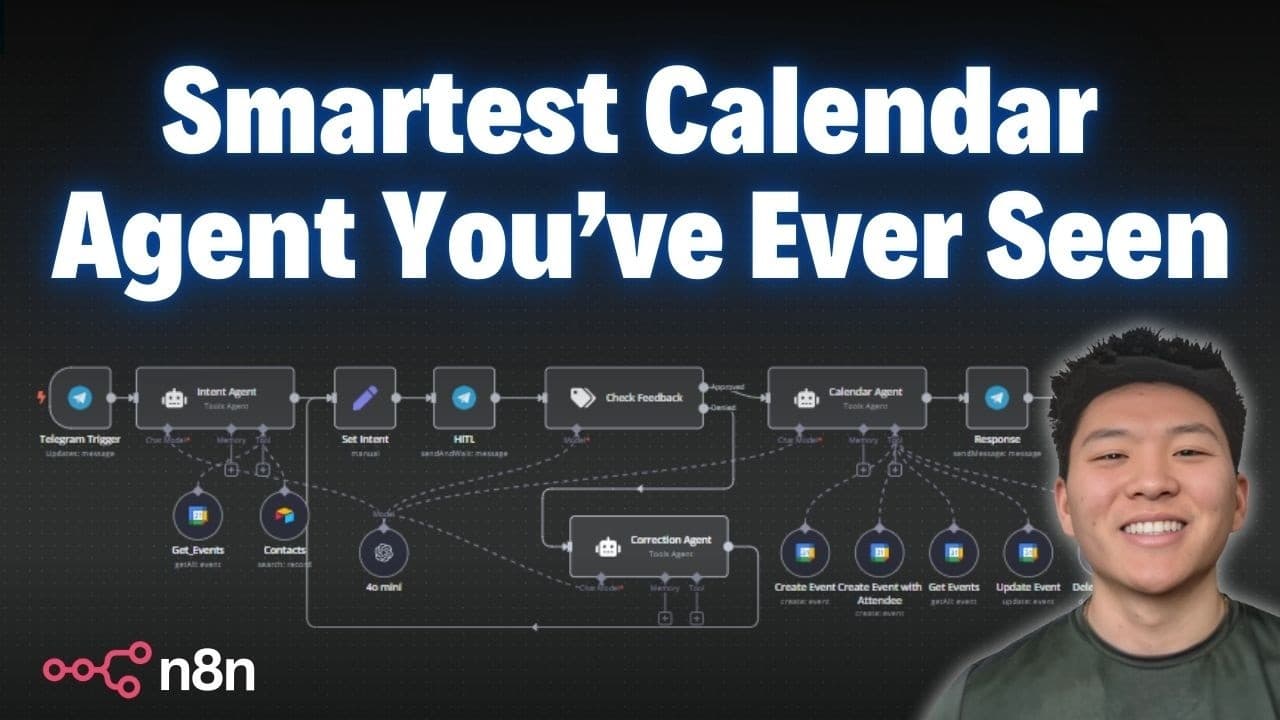
The video demonstrates a no code calendar AI agent built in n8n that prevents scheduling conflicts, verifies attendee details, and requires user confirmation before acting. It uses an intent agent to parse requests, a correction step for feedback, and a calendar agent to create update or delete events via Telegram prompts.
Transcript
what we'll be looking at today is a human in- thee Loop calendar agent this thing is super intelligent it's going to make sure you don't have any conflicting events it's going to make sure you're scheduling events at the right time with the right attendees and it's not going to do anything until you personally say okay I'm good to go with that the ... Read More
Key Insights
- The system is designed to prevent conflicts by checking existing events before creating or moving an appointment, ensuring scheduling accuracy.
- The key to reliability is requiring explicit user confirmation before any calendar action is executed, even after a proposed change is suggested by the intent agent.
- The workflow uses a get events tool to fetch current calendar data and a contacts tool to verify attendee emails, minimizing misaddressed invites.
- The correction agent combines original intent with user feedback to generate a revised plan that is then re validated before action.
- The Telegram integration serves as the feedback channel where users approve or edit intents in real time, maintaining human control.
- Two distinct agents operate in sequence: an intent agent to plan and a calendar agent to execute, with checks at each stage to prevent errors.
- The system outputs include comprehensive event details such as date time and attendee emails to ensure transparency for the user.
- No coding is required, as the entire flow is built with n8n nodes and configurable prompts, simplifying automation for non developers.
Install to Summarize YouTube Videos and Get Transcripts
Explore YouTube Video Summarizer or Get YouTube Transcript Extractor
Questions & Answers
Q: How does the system prevent scheduling conflicts before creating an event
The system uses a get events tool to fetch existing calendar entries within a specified time window before proposing a new event. If a conflict is detected, the user is prompted to resolve it by changing the time or date. This ensures that no overlapping appointments are created and keeps the calendar accurate.
Q: What role does the intent agent play in the workflow
The intent agent receives the user message via Telegram and determines the underlying scheduling goal. It uses the available tools, like get events and contacts, to gather necessary details such as attendee emails and existing events. It then creates an initial intent that guides subsequent steps in the workflow.
Q: How is attendee information verified and used
Attendee information is verified using a contacts tool that searches for records to obtain the correct email addresses. If multiple records exist for a name, the system outputs the email and type of contact. This prevents wrong invites and ensures invitations reach the intended recipient.
Q: What happens when a user needs to change an already proposed time
If a user requests a change, the feedback is sent to a correction agent that revises the original intent. The corrected intent is then re checked and, once approved, passed to the calendar agent to update the event. This loop ensures user preferences are accurately reflected.
Q: What is the function of the correction agent
The correction agent receives the original intent and user feedback and combines them to generate a revised intent. This revised plan is then sent back for user approval via Telegram. The correction step ensures that any misinterpretations are addressed before the calendar action proceeds.
Q: How does Telegram facilitate user interaction in this workflow
Telegram acts as the real time feedback channel where the user sees proposed actions like creating, moving, or deleting events and can approve, modify, or deny them. This keeps the user in control while the automation handles the heavy lifting behind the scenes.
Q: What actions can the calendar agent perform
The calendar agent can create events, create events with attendees, get events, update events, and delete events. Each action requires the necessary data such as event details and attendee emails, and is gated by user confirmation to prevent unintended changes.
Q: Why is a no code approach advantageous in calendar automation
A no code approach lowers the barrier to automation by enabling users to build complex workflows without programming. It leverages visual nodes to connect data sources like calendars and contacts, while providing safety nets such as human confirmation, conflict checks, and feedback loops to maintain reliability and control.
Summary & Key Takeaways
-
The video walks through a no code workflow that uses an intent agent to extract scheduling intent from user messages and then confirms details with the user before any calendar action is taken, ensuring accuracy and avoiding conflicts.
-
A human in the loop mechanism is shown to continuously validate and revise the plan based on user feedback, with a correction agent re drafting the intent when needed, before calendar changes occur.
-
The final workflow integrates Google Calendar, a contacts database, and Telegram for interactive approval, demonstrating how to manage events with safe user oversight in a no code environment.
Read in Other Languages (beta)
Share This Summary 📚
Summarize YouTube Videos and Get Video Transcripts with 1-Click
Try YouTube Summary with ChatGPT & Claude or YouTube Transcript Generator
Explore More Summaries from Nate Herk | AI Automation 📚






Summarize YouTube Videos and Get Video Transcripts with 1-Click
Try YouTube Summary with ChatGPT & Claude or YouTube Transcript Generator