How to Create Subtitles for Your YouTube Videos
TL;DR
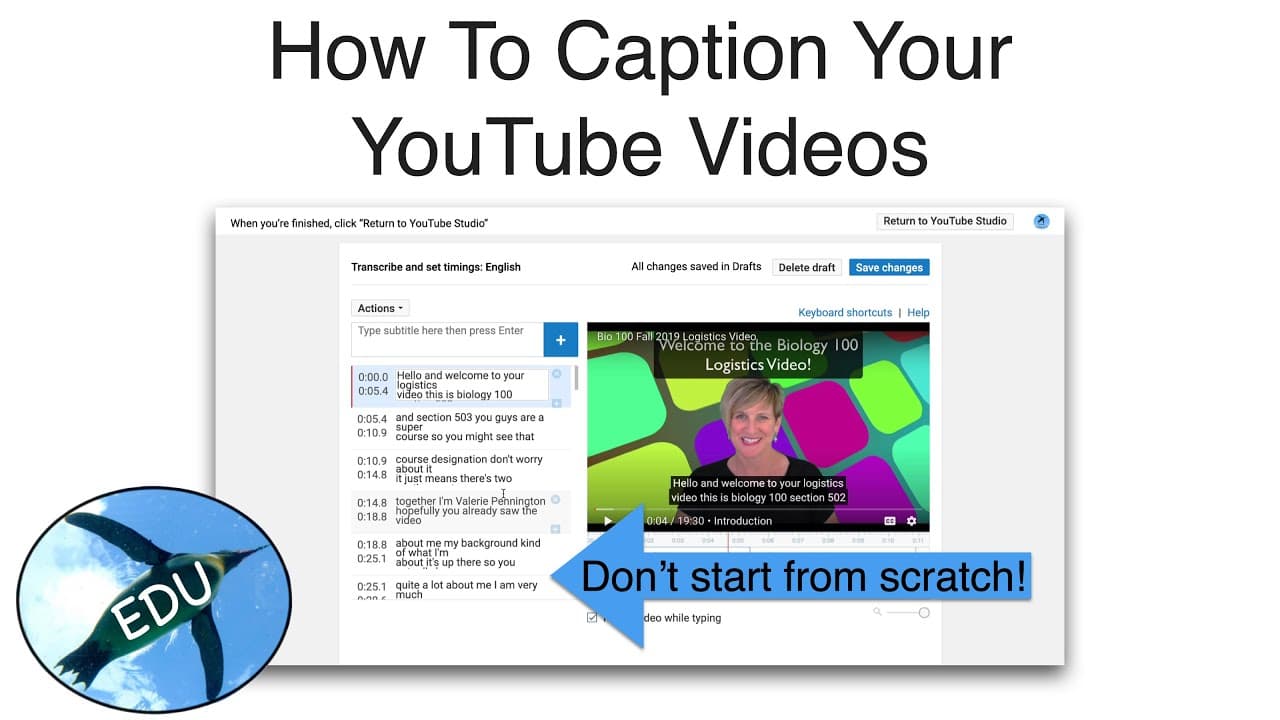
To create subtitles for your YouTube videos, access the YouTube Studio and use the auto-generated captions as a starting point. Edit these captions for punctuation and accuracy, then save your changes to publish the subtitles. Using timestamps in your video description can also help viewers navigate specific content easily.
Transcript
Hello everyone it's Valerie Pennington here, also known as the Penguin Prof and i want to show you how you can do your own subtitles on your YouTube channel. So we've got a new interface here and this is the new YouTube Studio and like everything, there are some things about it that are great and some that are not so great, but one of the things th... Read More
Key Insights
- 😚 The new YouTube Studio interface offers improved closed captioning capabilities.
- 🫵 Using timestamps in the video description can enhance the viewer's experience.
- 💨 Editing auto-generated captions in the classic studio is a convenient way to create accurate subtitles.
- 🫵 Subtitles help increase accessibility and improve the overall viewing experience.
- 🥰 Providing subtitles can attract a wider audience, including those with hearing impairments.
- 🪜 Adding punctuation and capitalization to subtitles improves readability.
- 🥳 Including timestamps in the description helps viewers easily navigate to specific parts of the video.
Install to Summarize YouTube Videos and Get Transcripts
Explore YouTube Video Summarizer or Get YouTube Transcript Extractor
Questions & Answers
Q: How can I create my own subtitles on YouTube?
To create subtitles, go to the video details and select "subtitles in cc." If you have a file, you can upload it. Otherwise, edit the auto-generated captions in the classic studio to make corrections and add punctuation.
Q: Why should I use timestamps in the video description?
Including timestamps in the description box helps viewers find specific content easily. It's also helpful for creators to refer viewers to specific parts of the video when responding to comments or messages.
Q: Are the auto-generated captions accurate?
Auto-generated captions are usually about 70% accurate but lack punctuation and capitalization. Editing them in the classic studio allows for corrections and improvements.
Q: How do I publish the subtitles on my video?
After making corrections and edits, save the changes. The subtitles will be automatically uploaded, published, and displayed as CC on your video.
Summary & Key Takeaways
-
The new YouTube Studio interface has improved the ability to create closed captions for videos.
-
Filtering videos to Unlisted and using timestamps in the description box makes it easier for viewers to find specific content.
-
Editing auto-generated captions in the classic studio is a simple way to create accurate subtitles for videos.
Read in Other Languages (beta)
Share This Summary 📚
Summarize YouTube Videos and Get Video Transcripts with 1-Click
Try YouTube Summary with ChatGPT & Claude or YouTube Transcript Generator
Explore More Summaries from ThePenguinProf 📚

Summarize YouTube Videos and Get Video Transcripts with 1-Click
Try YouTube Summary with ChatGPT & Claude or YouTube Transcript Generator