How to Deploy and Secure a Full-Stack Web App
TL;DR
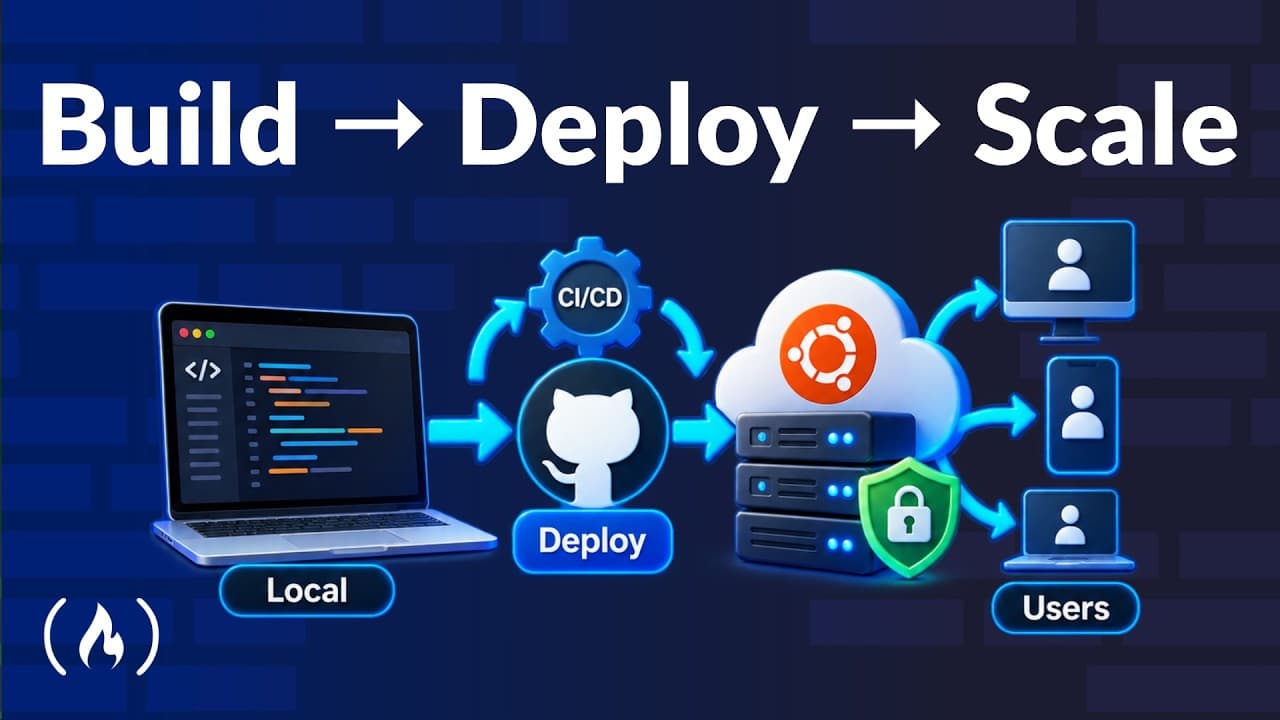
Deploy a local web application by renting an Ubuntu server, configuring SSH key access and a firewall, installing its runtimes, and running its services behind Nginx. Secure public traffic with HTTPS, distribute static assets through Cloudflare, back up application data, and automate later deployments through GitHub Actions only after completing the process manually.
Transcript
Taking a web application from local development to a live secure production environment can be daunting if you've never looked under the hood. In this comprehensive step-by-step course, you will learn to manually configure an Ubuntu server, set up essential runtimes and search services, and establish automated CI/CD pipelines. By doing everything h... Read More
Key Insights
- Manual deployment is the course's foundation because configuring each component directly reveals what managed platforms normally hide. Once the complete process is understood, automation becomes easier to appreciate and troubleshoot, and moving to a managed deployment platform becomes a simpler transition.
- Production hosting is the step that makes a locally developed application accessible to users. The course rents a server, installs Ubuntu and the required software, transfers the source code, and runs the application's backend, frontend, and search components in that environment.
- SSH key authentication is the required method for connecting to the server in this setup. Password-based connections are disabled, direct root access is blocked, and a separate user is created to reduce the risks associated with an exposed internet-facing machine.
- Swap memory is disk space used to help a small server when its available RAM is insufficient. The course introduces it after software compilation causes memory problems, allowing necessary packages to be installed without immediately moving to a server with more physical memory.
- The backend runtime is managed through Supervisor, Gunicorn, and Uvicorn, with Nginx serving as a reverse proxy. Nginx connects to the backend through Unix sockets, creating a structured path between incoming web requests and the Python application process.
- Meilisearch is self-hosted on the same server rather than obtained through a cloud offering. A dedicated user and a systemd background service manage it, while a batch script creates backups that can restore its data after a failure.
- SSH tunneling is the method used to connect a Meilisearch dashboard to the remote server without opening another public port. This provides administrative access to the search data while keeping the service from being exposed directly through an additional network entry point.
- Automation is introduced only after source transfer, installation, and application startup have been completed manually. The final workflow connects the project to GitHub and uses GitHub Actions so a deployment can be triggered without signing into the server and repeating every command.
- More videos from this channel:
- More from this channel: freeCodeCamp.org
Install to Summarize YouTube Videos and Get Transcripts
Explore YouTube Video Summarizer or Get YouTube Transcript Extractor
Questions & Answers
Q: How do you deploy a full-stack web application to an Ubuntu server?
Rent a server, install Ubuntu and the software required by the application, then transfer the source code from a local machine or GitHub. Configure the Python environment and run the backend with Supervisor, Gunicorn, and Uvicorn. Place Nginx in front as a reverse proxy using Unix sockets, then configure the frontend, search service, domain, DNS, HTTPS, and firewall.
Q: Why should beginners deploy a web application manually before using automation?
Manual deployment shows what happens behind the abstraction provided by managed platforms. Installing software, transferring code, starting services, configuring networking, and resolving resource limits gives beginners a foundation for understanding production systems. After they have completed those tasks themselves, the benefits of automation become clear, and moving to a managed platform or automated pipeline becomes easier.
Q: How should SSH access to a production server be secured?
Use an SSH key for authentication, disable the ability to connect with a password, and prevent direct login as the root user. Create a separate user for normal server access instead. The course also adds a firewall because a newly created web server is visible online and needs restrictions on who or what can reach its services.
Q: What is swap memory used for during application deployment?
Swap memory helps when a small server does not have enough RAM for a demanding task. In the course's deployment, some software installation requires compilation and can cause Linux to run out of memory. Allocating part of the server's SSD as swap supplies additional working space so the installation can proceed despite the machine's limited RAM.
Q: How are FastAPI, Gunicorn, Uvicorn, Supervisor, and Nginx used together?
The example backend uses FastAPI and is operated with a combination of Supervisor, Gunicorn, and Uvicorn. Nginx acts as the reverse proxy in front of that backend and connects to it through Unix sockets. Together, these components provide a managed application runtime and route incoming requests from the web server to the Python backend process.
Q: How can Meilisearch be self-hosted and backed up on the server?
Install Meilisearch on the same server as the application instead of using a cloud offering. Create a separate user to manage it and configure systemd to launch and control it as a background service. Export local data and load it onto the server, then create a batch script that produces backups for restoration if the hosted data is lost or damaged.
Q: How do you add HTTPS and improve global delivery for a deployed app?
Register a domain, configure its DNS records, and obtain a certificate so users connect through HTTPS instead of a browser-flagged insecure HTTP connection. Because the Let's Encrypt certificates described in the course are valid for three months, create a script to renew them automatically. Serve static frontend assets through Cloudflare to reduce latency for users far from the server's location.
Q: How can GitHub Actions automate deployment after manual setup?
First complete the deployment manually by copying the project to the server and running the commands that start its backend and frontend services. Then connect the project to GitHub and create a GitHub Actions workflow around that established process. The resulting pipeline lets the developer trigger deployment with a button instead of signing into the server and repeating the commands manually.
Summary & Key Takeaways
-
The course begins with a new server and builds the production environment manually. It covers Ubuntu, SSH key authentication, disabling password and root access, creating a separate user, and configuring a firewall. This foundation helps beginners understand how an internet-facing machine is prepared before application code and supporting services are installed.
-
The example application combines a FastAPI backend, a Vue.js frontend, and Meilisearch. Its runtime setup includes Python, a virtual environment, swap memory for memory-intensive installation work, Supervisor, Gunicorn, Uvicorn, Nginx, and Unix sockets. Meilisearch runs as a self-hosted systemd service with backups and private dashboard access through SSH tunneling.
-
Public delivery requires a registered domain, DNS configuration, HTTPS certificates, automatic certificate renewal, and globally distributed frontend assets. Cloudflare serves the static frontend to reduce latency for users far from the server. After every deployment task has been performed manually, GitHub and GitHub Actions provide a button-driven automated deployment workflow.
Read in Other Languages (beta)
Share This Summary 📚
Summarize YouTube Videos and Get Video Transcripts with 1-Click
Try YouTube Summary with ChatGPT & Claude or YouTube Transcript Generator
Explore More Summaries from freeCodeCamp.org 📚




Summarize YouTube Videos and Get Video Transcripts with 1-Click
Try YouTube Summary with ChatGPT & Claude or YouTube Transcript Generator