ADS1256 - Registers and demonstration
TL;DR
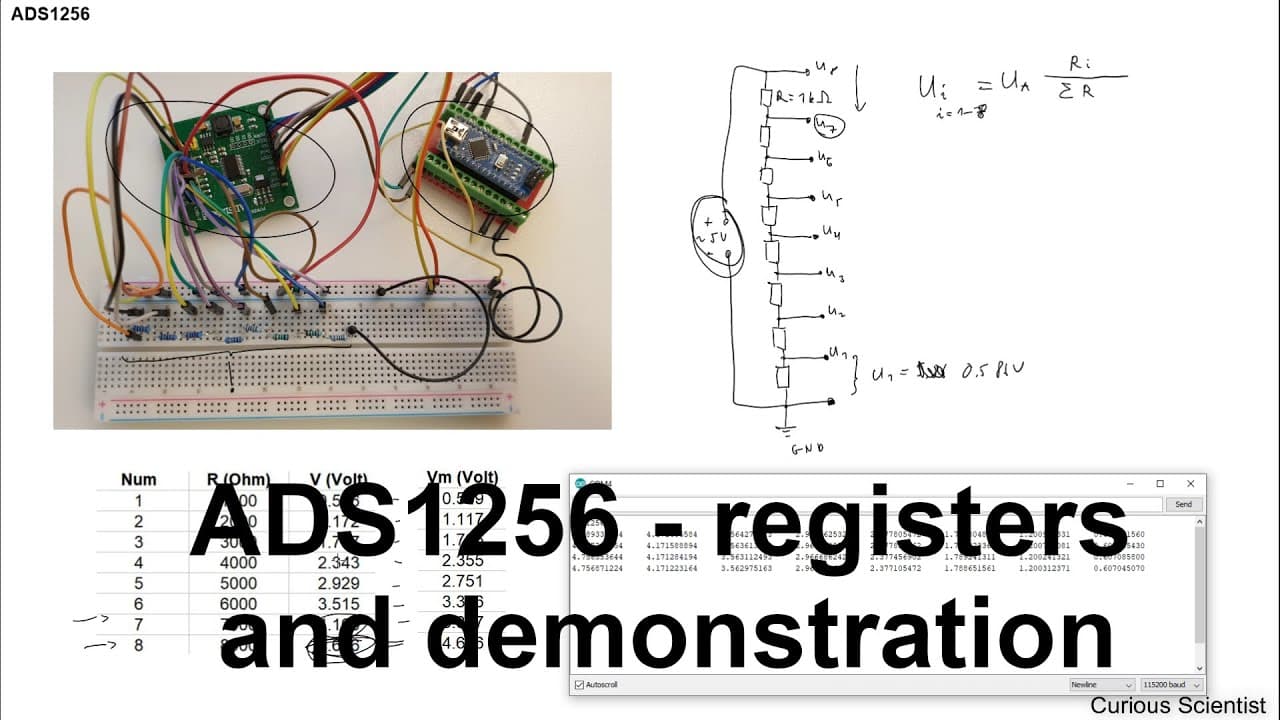
This video demonstrates how to set up the ABS 1256 AD converter using Arduino Nano.
Transcript
welcome everyone in this video I'm going to show you how to set up the ABS 1256 ad converter we will use an Arduino Nano to connect the circuit board with the computer and to demonstrate some capabilities of this circuit I built a small voltage divider or resistor ladder and I will connect the terminals of this circuit to this ladder and measure th... Read More
Key Insights
- 🫠 The ABS 1256 AD converter is versatile for various analog-to-digital conversion tasks, making it essential for microcontroller applications.
- ®️ Understanding the register configurations is vital for utilizing the full capabilities of the converter and adjusting parameters for specific applications.
- ❤️🩹 Different measurement modes (single-ended vs. differential) can be leveraged for improved accuracy depending on the project's requirements.
- 🖐️ The gain settings through the PGA play a significant role in maintaining measurement precision across varying voltage levels.
- 👤 Users can employ the Arduino platform for easy integration and control of the ABS 1256, simplifying project development.
- ❓ The correlation between measured values from the converter and a multimeter reinforces the reliability of this setup.
- 🦮 Comprehensive guides and source files enhance accessibility for hobbyists and professionals aiming to replicate the circuit effectively.
Install to Summarize YouTube Videos and Get Transcripts
Explore YouTube Video Summarizer or Get YouTube Transcript Extractor
Questions & Answers
Q: What is the primary purpose of the ABS 1256 AD converter?
The ABS 1256 AD converter's primary purpose is to convert analog signals into digital data for processing by microcontrollers, such as Arduino. It allows for precise voltage measurements by configuring various registers related to gain, input modes, and sampling rates, enabling diverse applications in electronic projects.
Q: How can the sampling rate of the ABS 1256 AD converter be adjusted?
The sampling rate of the ABS 1256 AD converter can be adjusted through a specific register called the data rate register. By setting this register to different binary values, users can dictate the speed of measurements in samples per second. The maximum achievable rate can reach up to 30,000 samples per second, depending on the configuration.
Q: What is the significance of the multiplexer register in the setup?
The multiplexer (MUX) register is significant because it determines the input channels for the converter. It allows the user to select one or more channels as positive or negative inputs, facilitating differential or single-ended measurements. This ability enhances measurement precision and flexibility based on the application requirements.
Q: Why is the programmable gain amplifier (PGA) important in the configuration?
The programmable gain amplifier (PGA) is crucial as it adjusts the sensitivity of the AD converter to accommodate different voltage ranges. By changing the PGA setting, users can ensure high resolution even when measuring lower reference voltages. It helps preserve measurement accuracy by optimizing the range of input signals, reducing noise interference.
Q: How does the video demonstrate the circuit's functionality?
The video demonstrates the circuit's functionality by connecting the ABS 1256 AD converter to an Arduino Nano and a resistor ladder circuit. It showcases how to measure voltages across several channels, verifying the converter's precision by comparing measured values with those calculated using a multimeter, underscoring the circuit's effective operation.
Q: What resources are provided for viewers to replicate the setup?
The video provides source code and detailed circuit diagrams in the description, encouraging viewers to replicate the ABS 1256 AD converter setup. It also offers specific connections and component configurations, ensuring that users have everything needed to successfully implement the project.
Summary & Key Takeaways
-
The video tutorial provides a detailed guide on setting up the ABS 1256 AD converter with an Arduino Nano, including circuit connections.
-
It explains the importance of registers in configuring the converter, such as settings for sampling rate, gain, and input modes.
-
The tutorial concludes with examples of measurement results from a resistor ladder circuit, showcasing the converter's precise functionality.
Read in Other Languages (beta)
Share This Summary 📚
Summarize YouTube Videos and Get Video Transcripts with 1-Click
Try YouTube Summary with ChatGPT & Claude or YouTube Transcript Generator
Explore More Summaries from Curious Scientist 📚



Summarize YouTube Videos and Get Video Transcripts with 1-Click
Try YouTube Summary with ChatGPT & Claude or YouTube Transcript Generator