How Can Developers Build Apps Faster with Microsoft Power Platform? | BRK270HFS
TL;DR
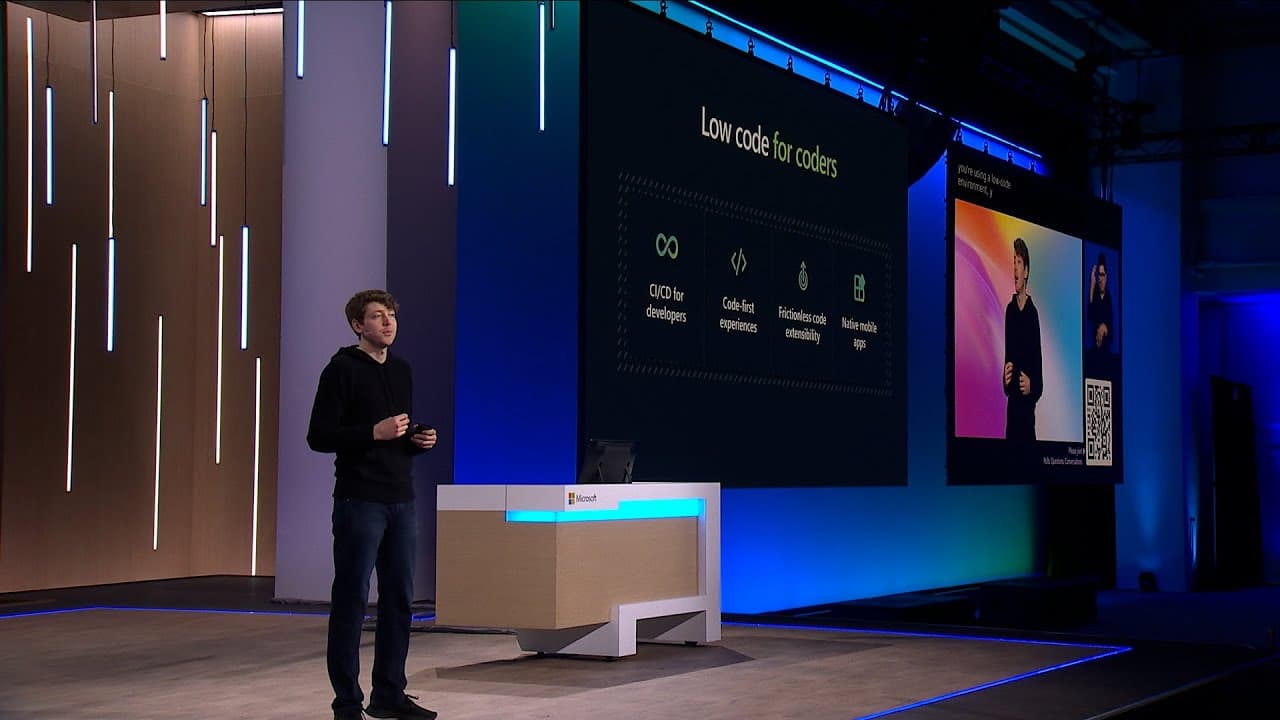
Developers can build apps faster with Microsoft Power Platform by combining visual low-code tools, Copilot, Dataverse, Power Fx, AI Builder, and conventional code. The platform supports web and mobile apps, automation, analytics, chatbots, and business websites, while more than 1,000 connectors link existing data systems. Read on to see how its products, extensibility, and development workflow fit together.
Transcript
ANNOUNCER: Please welcome, Corporate Vice President, Business Applications and Platforms, Charles Lamanna. CHARLES LAMANNA: Hello, everyone. Thank you so much for joining us in this session about the Power Platform here at Build. I hope it's been a wonderful day and a half. Lots of AI topics, lots of Copilots, and lots of excitement. I'm glad that ... Read More
Key Insights
- Power Platform is Microsoft's low-code development offering, covering analytics, web and mobile apps, workflow automation, robotic process automation, conversational experiences, and business websites through a collection of visually oriented products.
- Low code is compatible with conventional development because Power Platform solutions can incorporate JavaScript, TypeScript, custom visuals, custom controls, Azure API services, and registered backend systems whenever visual tools alone do not meet the requirements.
- Dataverse is the low-code data platform built into Power Platform, providing storage and management for relational, structured, and unstructured data that can be exposed through products such as Power Apps and Power BI.
- Power Fx is an Excel-like low-code expression language that supports logic, calculations, and mathematics, giving makers an intermediate option before they need to move into conventional programming code.
- Power Platform had more than 33 million monthly active users at the time of the presentation, and professional developers represented 25 percent of its makers and builders across hundreds of thousands of organizations.
- Microsoft's modern development toolchain combines GitHub for source control and CI/CD, Azure for hosted code, services, and backend data platforms, Visual Studio as an IDE, and Power Platform for rapid solution development.
- Power Apps Copilot can analyze an uploaded Excel spreadsheet, infer an appropriate Dataverse table schema, allow table and column adjustments, and generate a connected, responsive application from that data within minutes.
- Power Platform provides more than 1,000 data connectors for systems such as Salesforce, SAP, Oracle databases, and AS/400, making existing organizational data accessible to low-code applications and related services.
Install to Summarize YouTube Videos and Get Transcripts
Explore YouTube Video Summarizer or Get YouTube Transcript Extractor
Questions & Answers
Q: What is Microsoft Power Platform used for?
Microsoft Power Platform is a low-code offering for analytics, application development, automation, chatbots, and business websites. Its products include Power BI, Power Apps, Power Automate, Power Virtual Agents, and Power Pages.
Q: How does Microsoft Power Platform help developers build apps faster?
Power Platform provides visual, low-code experiences that reduce the work needed to build common business solutions. Developers can use Power Fx for logic and calculations, AI Builder for AI capabilities, and conventional code when deeper customization is required.
Q: Can professional developers use conventional code with Power Platform?
Yes. Developers can add JavaScript, TypeScript, custom visuals, custom controls, Azure API services, and registered backend systems to Power Platform solutions. The platform extends existing development skills rather than replacing them.
Q: What is Dataverse in Microsoft Power Platform?
Dataverse is the low-code data platform built into Power Platform. It stores and manages relational, structured, and unstructured data, then exposes that data through products such as Power Apps and Power BI.
Q: How does Power Apps Copilot turn Excel data into an app?
Power Apps Copilot can analyze an uploaded Excel file and propose a matching Dataverse table schema. The developer can adjust the table and columns before Copilot generates a connected, responsive application from the data.
Q: What is Power Fx used for?
Power Fx is a low-code expression language described as being much like Excel. Developers can use it for logic, calculations, and mathematics before moving to conventional programming code.
Q: What data sources can Power Platform connect to?
Power Platform provides more than 1,000 data connectors for existing organizational systems. Examples named in the page include Salesforce, SAP, Oracle databases, and AS/400 systems.
Q: Which development tools work alongside Microsoft Power Platform?
The presented toolchain combines GitHub, Azure, Visual Studio, and Power Platform. GitHub handles source control and CI/CD, Azure hosts code, services, and backend data platforms, Visual Studio serves as the IDE, and Power Platform supports rapid solution development.
Summary & Key Takeaways
-
Definition: Microsoft Power Platform is Microsoft's low-code development offering for building business solutions.
-
Tool: Power BI supports analytics, reporting, and data visualization.
-
Tool: Power Apps builds web and mobile applications, while Power Automate handles workflows and robotic process automation.
-
Tool: Power Virtual Agents creates chatbots and conversational experiences, while Power Pages builds business websites.
-
Definition: Dataverse stores and manages relational, structured, and unstructured data for use in Power Apps, Power BI, and other services.
-
Tool: AI Builder exposes AI capabilities and models through low-code experiences inside Power Platform.
-
Definition: Power Fx is an Excel-like expression language for logic, calculations, and mathematics.
-
Number: Power Platform had over 33 million monthly active users across hundreds of thousands of organizations.
-
Number: Professional developers represented 25 percent of Power Platform makers and builders.
-
Number: More than 1,000 data connectors support systems including Salesforce, SAP, Oracle databases, and AS/400.
-
Step 1: Upload an Excel file so Power Apps Copilot can analyze its contents and propose a Dataverse table schema.
-
Step 2: Adjust the proposed table or columns, then generate a connected, responsive application from the data.
Read in Other Languages (beta)
Share This Summary 📚
Summarize YouTube Videos and Get Video Transcripts with 1-Click
Try YouTube Summary with ChatGPT & Claude or YouTube Transcript Generator
Explore More Summaries from Microsoft Developer 📚
![Exploring and comparing different LLMs [Pt 2] | Generative AI for Beginners thumbnail](/_next/image?url=https%3A%2F%2Fi.ytimg.com%2Fvi%2FKIRUeDKscfI%2Fhqdefault.jpg&w=750&q=75)
![Setting up our Bash Environment [3 of 20] | Bash for Beginners thumbnail](/_next/image?url=https%3A%2F%2Fi.ytimg.com%2Fvi%2FdfYTrhQuSdA%2Fhqdefault.jpg&w=750&q=75)
![What are Conditional Statements in Bash? [15 of 20] | Bash for Beginners thumbnail](/_next/image?url=https%3A%2F%2Fi.ytimg.com%2Fvi%2Fgg9LzZ4d9cI%2Fhqdefault.jpg&w=750&q=75)

Summarize YouTube Videos and Get Video Transcripts with 1-Click
Try YouTube Summary with ChatGPT & Claude or YouTube Transcript Generator