How to Create an Efficient Dual Monitor Desk Setup
TL;DR
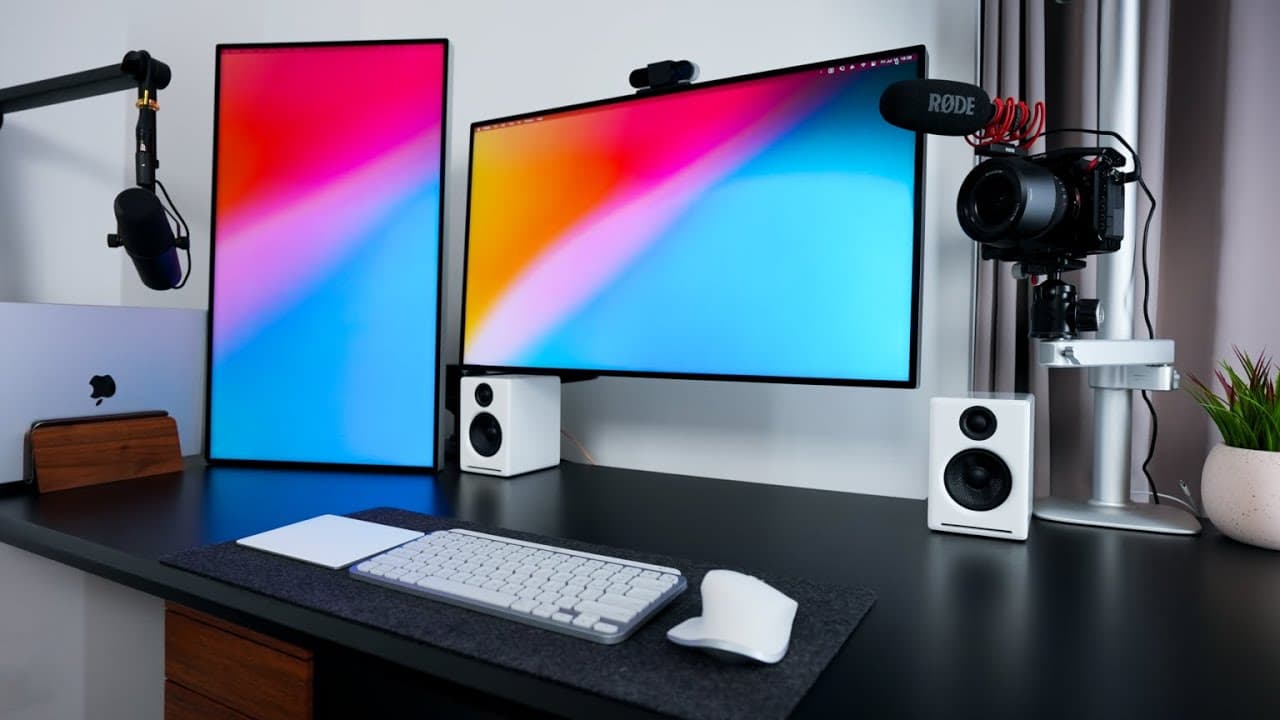
To create an efficient dual monitor desk setup, start with a sturdy desk and two monitors that complement your workflow. Use reliable peripherals and accessories like a Docking Station, quality microphone, and effective cable management to enhance productivity and maintain an organized space.
Transcript
[Applause] so hey friends welcome back to the channel today we're talking about this this dual monitor desk setup and how i've sort of optimized it for my life i film youtube videos with the setup i work from home with the setup i browse question my website with the setup that's really nobody's business so you know let's just get started starting o... Read More
Key Insights
- 💁 The host emphasizes the importance of balance between form and function when customizing a desk setup.
- 💦 Utilizing dual monitors enhances multitasking capabilities for work, filming, and browsing purposes.
- 🎙️ Accessorizing with Logitech peripherals and additional gadgets like camera equipment and microphone enhances efficiency and productivity.
- 🖐️ Cable management plays a crucial role in maintaining a clean and organized workspace.
- 💁 Investing in quality furniture like the IKEA gaming desk and Herman Miller chair ensures comfort and durability in a workstation.
- 💁 Integration of accessories like the Grovemade desk pad and Thunderbolt 4 docking station streamlines connectivity and enhances workflow efficiency.
- 🎹 Attention to detail in peripheral selection, such as Logitech MX Keys Mini keyboard and Apple Magic Trackpad 2, reflects a personalized and optimized workstation setup.
Install to Summarize YouTube Videos and Get Transcripts
Explore YouTube Video Summarizer or Get YouTube Transcript Extractor
Questions & Answers
Q: How did the host optimize their desk setup for a variety of tasks?
The host strategically chose a larger IKEA gaming desk to accommodate multiple monitors, Logitech peripherals, and additional accessories for work, filming, and leisure activities.
Q: What are the key components of the dual monitor setup mentioned in the content?
The setup includes two Apple Pro Display XDR monitors, Logitech MX Master 3S mouse, Logitech MX Keys Mini keyboard, Apple Magic Trackpad 2, Grovemade desk pad, and Thunderbolt 4 docking station for seamless connectivity.
Q: How does the host manage cable organization in their workspace?
The host utilizes power strips and cable clips to streamline cable management, ensuring a clean and organized workspace with minimal clutter and easy access to power outlets.
Q: What tips and recommendations does the host provide for creating an efficient desk setup?
The host suggests using specific accessories like Logitech MX Keys Mini keyboard, Grovemade desk pad, Thunderbolt 4 docking station, and Shure SM7B microphone for enhanced productivity and functionality in a dual monitor desk setup.
Summary & Key Takeaways
-
The content discusses a personalized dual monitor desk setup optimized for work, gaming, and leisure activities.
-
The host details the assembly of the IKEA UpSpell gaming desk, dual Apple Pro Display XDR monitors, and Logitech peripherals for seamless multitasking.
-
Additional accessories like Grovemade desk pad, Thunderbolt 4 docking station, Shure SM7B microphone, and camera equipment enhance the overall productivity and aesthetics of the setup.
Read in Other Languages (beta)
Share This Summary 📚
Summarize YouTube Videos and Get Video Transcripts with 1-Click
Try YouTube Summary with ChatGPT & Claude or YouTube Transcript Generator
Explore More Summaries from Jeff Su 📚






Summarize YouTube Videos and Get Video Transcripts with 1-Click
Try YouTube Summary with ChatGPT & Claude or YouTube Transcript Generator