- Pensado's Place - Into The Lair 20: Treating Snoop Dogg's Vocal Track
TL;DR
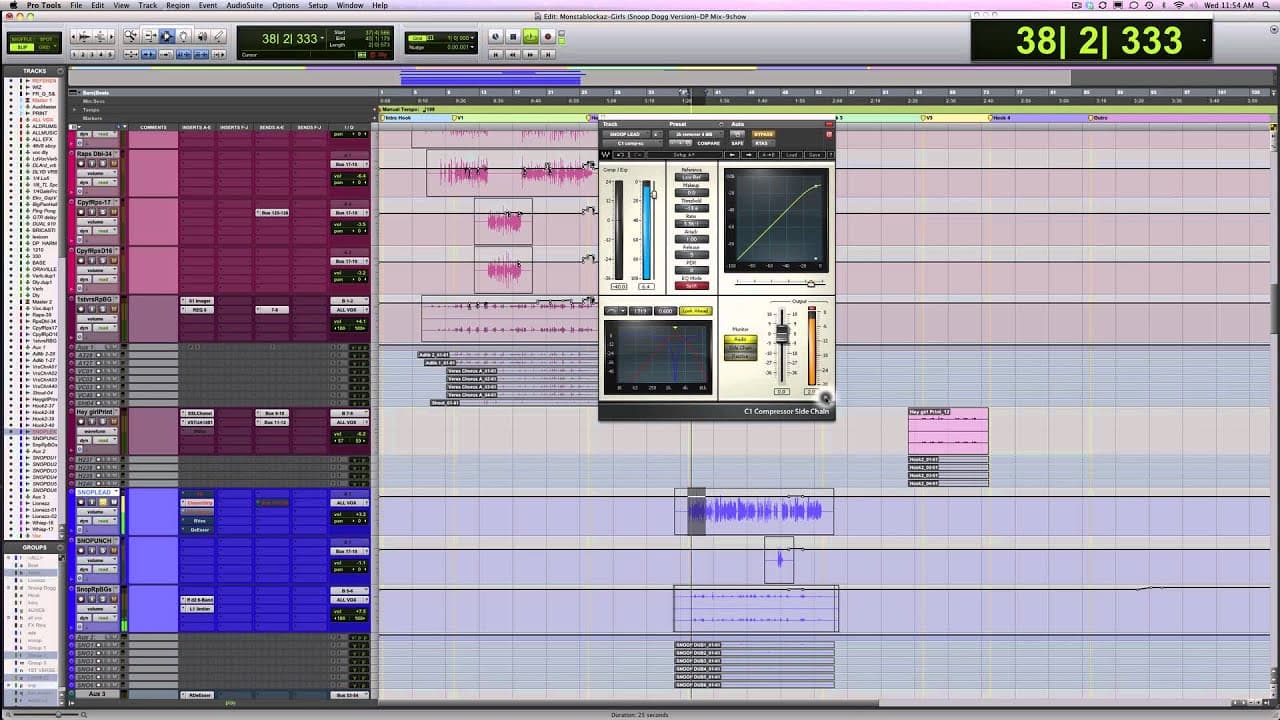
To mix Snoop Dogg's vocals effectively, start by assessing the rough mix and understanding the artist's vision. Use tools like channel strips and compressors to enhance the vocal presence, focusing on specific frequency adjustments. Incorporating effects such as doubler and delay can further elevate the character of the mix while maintaining a cohesive sound.
Transcript
hey guys welcome to another ITL into the lair I had a good week there's an interesting week and I've gotten so many questions recently that a lot of them we've covered bits and pieces and so what I'm going to try to do today is organized a lot of these questions into one concentrated ITL Will's gonna edit it down for us and make sure I don't get to... Read More
Key Insights
- 😫 Initial assessment and communication are crucial in understanding the music and setting the direction for the mix.
- 🔨 Tools like Channel Strips, Compressors, and EQs are essential for enhancing different elements of a mix.
- 👂 Adding effects like Doubler, delay, and imaging can elevate the overall sound quality and creativity of a mix.
- 👣 Parallel processing enables a dynamic and nuanced mix without altering the original tracks.
- 🧑🎨 Collaboration between the mixer, producer, and artist ensures the final mix aligns with the creator's vision.
- 🔨 A balanced approach to mastering tools like L2 helps maintain the integrity and clarity of the mix.
Install to Summarize YouTube Videos and Get Transcripts
Explore YouTube Video Summarizer or Get YouTube Transcript Extractor
Questions & Answers
Q: What is the importance of assessing an mp3 or rough mix before diving into a full mix?
Assessing the initial mp3 or rough mix allows the mixer to understand the current state of the music, identify areas that need improvement, and set the direction for the final mix.
Q: How does communication with the producer or artist contribute to the success of a mix?
Communicating with the producer or artist helps align the mixer's vision with the creator's intent, ensuring that the final mix reflects the desired sound and style of the music.
Q: What tools and techniques are used to enhance vocals in a mix?
Tools like Channel Strips and EQs can be used to boost vocal clarity and presence, while Compressors help control dynamics, and effects like Doubler and delay add depth and texture to the vocals.
Q: Why is parallel processing important in mixing music?
Parallel processing allows for the blending of the original signal with processed versions to achieve a fuller, more dynamic sound without compromising the integrity of the original tracks.
Summary
In this video, the speaker discusses the process of starting a mix and getting into a mix. He talks about receiving an mp3 and making notes on his first impressions of the rough mix. He also explains the importance of understanding the vision of the producer or artist before completing the mix. The speaker then goes on to show his process of working on a mix for a group called fYI and specifically focuses on enhancing the vocals of artists such as Snoop and Addis. He demonstrates the use of plugins and effects to achieve the desired sound. Finally, he touches on the treatment of drums, the use of compressors and parallel chains, and the mixing process for vocals, drums, music, and effects.
Questions & Answers
Q: How does the speaker usually start the process of getting into a mix?
The speaker usually starts by requesting an mp3 of the mix to understand what he is getting into and to evaluate if any additional time may be required. He also takes notes on his first impressions of the rough mix, which helps him identify areas that can be improved.
Q: What is the speaker's most important contribution to the mix?
The speaker believes his most important contribution to the mix is understanding what aspects of the mix are great and what can be improved. This helps him enhance the overall quality of the mix.
Q: Why does the speaker listen to the rough mix before starting the mix?
The speaker listens to the rough mix to get a sense of the overall sound of the mix and to identify areas that can be enhanced. It also helps him understand the artist or producer's vision for the song.
Q: How does the speaker approach working on a mix with multiple artists?
The speaker starts by focusing on one artist, in this case Snoop, to establish a reference sound. He then uses this reference to work on the vocals of the other artists and ensures that they complement each other in the mix.
Q: How does the speaker enhance Snoop's vocals in the mix?
The speaker uses a channel strip and adjusts the EQ settings to add a little 10k and 8k boost, which enhances the clarity and presence of Snoop's vocals. He also uses a compressor to control the dynamics and adds some top-end to give it a polished sound.
Q: What effect does the speaker use to enhance the vocals?
The speaker uses a Waves Doubler plugin with tuning, detuning, and a sizable delay to create a unique effect for the vocals. He then adds EQ and sends it to a reverb and a delay to further enhance the sound.
Q: How does the speaker approach the treatment of drums in the mix?
The speaker adds a sample to the original drums to enhance the sound and creates a parallel chain with a compressor and a low-end boost. This parallel chain adds depth and impact to the drums.
Q: What plugins does the speaker use on the vocal, drums, music, and effects?
The speaker uses a UAD 1081 top in on the vocal aux, an L2 limiter on the drums, and a combination of plugins for effects such as the Waves Doubler, S1 Imager, and Lexicon.
Q: How does the speaker approach mixing vocals, drums, music, and effects in the stereo buss?
The speaker sends the vocals, drums, music, and effects to their own aux channels and then routes them to the stereo buss. He also adds some processing, such as the UAD 1081 top in on the vocal aux and an L2 limiter on the drums, to enhance the overall mix.
Q: How does the speaker use the L2 limiter on the drums?
The speaker uses the L2 limiter on the drums to control the overall level and ensure that it doesn't exceed a decrease of 1 dB. He adjusts the settings based on the desired sound, keeping in mind the guidelines set by the artist or the producer.
Takeaways
In this video, the speaker provides insights into his process of starting and getting into a mix. He emphasizes the importance of understanding the vision of the producer or artist and shares his approach to enhancing vocals, drums, music, and effects in the mix. The speaker demonstrates the use of various plugins and effects, showcasing how they can be utilized to achieve a desired sound. Overall, this video offers valuable information for anyone interested in the mixing process and provides useful tips that can be applied in their own projects.
Summary & Key Takeaways
-
Exploring the step-by-step process of mixing music, involving initial assessment, communication with the artist or producer, and enhancing the elements of the mix.
-
Demonstrating the use of tools like Channel Strips, Compressors, and EQs to improve vocals, drums, and overall sound quality.
-
Showcasing the creativity in adding effects like Doubler, delay, and imaging to create an impactful mix.
Read in Other Languages (beta)
Share This Summary 📚
Summarize YouTube Videos and Get Video Transcripts with 1-Click
Try YouTube Summary with ChatGPT & Claude or YouTube Transcript Generator
Explore More Summaries from This Week in Startups 📚





Summarize YouTube Videos and Get Video Transcripts with 1-Click
Try YouTube Summary with ChatGPT & Claude or YouTube Transcript Generator