How to Build Reusable AI Creative Workflows
TL;DR
Build reusable creative systems instead of repeatedly prompting separate AI tools for individual assets. A node-based workflow can combine multiple generation models with manual editing, image analysis, and reusable templates, giving teams more control while making it faster to produce variations, compare outputs, and preserve successful processes for future projects.
Transcript
If you are like me and you are sick of just prompting endless chat GBT and Google Gemini to get an image or a video and you're just in that death spiral of making cool creative for your company, this is the show for you. I have the best expert in the world, Lore, who is the CEO and co-founder of Weebi. He's joining us to show you some mindblowing w... Read More
Key Insights
- Creative craft is shifting from making individual pixels to building systems that increase production speed and scale. The durable skill is creating a process that can be reused when an asset changes, another version is required, or additional team members need to produce related work.
- AI models are improving quickly, so creative workflows should be designed for future capabilities rather than limited to what one model can accomplish today. A reusable system makes it easier to incorporate stronger generation capabilities as they become available without rebuilding the entire creative process.
- Scattered AI tools create repeated setup work because brand colors, visual style, prompts, and prior decisions may need to be entered again. Bringing models, workflows, and editing operations into one environment reduces this fragmentation and keeps related creative steps connected.
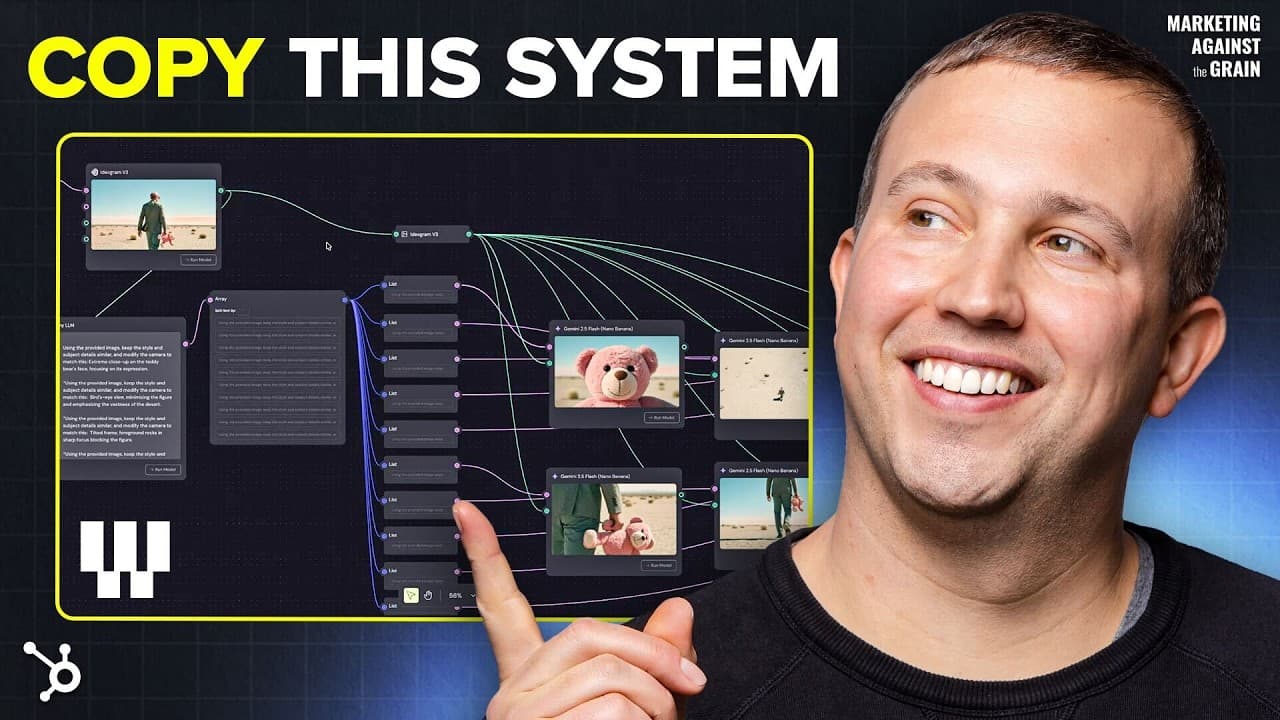
- A node-based editor works by passing an input through connected boxes that produce outputs from left to right. A text prompt can connect to several image-generation models simultaneously, allowing creators to inspect different interpretations of the same task within one organized workflow.
- Generative models can produce substantially different results from an identical prompt. Running several models on the same input exposes those differences directly and helps creators select an appropriate output rather than relying on repeated iterations with only one model.
- Manual editing remains essential when a creator needs precise and repeatable control. Masking can isolate layers, blur can create depth of field, and levels can correct color without consuming generative credits or requiring unreliable instructions such as moving an element by two pixels.
- A reusable creative machine separates the workflow from its current input. In the demonstrated angle-generation system, an LLM analyzes a scene, proposes ten new viewpoints, and supports the generation of corresponding images, while replacing the original image allows the entire system to run again.
- Human creative judgment remains important because generated variations are not all perfect or consistent. The system can produce enough useful options to accelerate exploration, but a person still evaluates the results, performs controlled edits, and decides which assets satisfy the creative objective.
- More videos from this channel:
- More from this channel: Marketing Against the Grain
Install to Summarize YouTube Videos and Get Transcripts
Explore YouTube Video Summarizer or Get YouTube Transcript Extractor
Questions & Answers
Q: How do you build a reusable AI creative workflow?
Build the workflow as a connected system of inputs, generation steps, analysis operations, and editing controls. In the demonstrated node-based approach, information moves from left to right, and every node accepts an input and returns an output. Once the system works, replace the original image or text input and run the same connected process again to generate a new set of results.
Q: Why are creative systems better than repeated AI prompting?
Creative systems preserve a successful process so creators do not have to reconstruct prompts and decisions for every new asset. Repeated prompting can become an endless cycle, especially when an output must be changed, reproduced, or handed to another team member. A reusable workflow keeps the relevant steps connected and can produce new variations when its starting input changes.
Q: How can multiple AI models be compared in one workflow?
Connect one prompt node to several image-generation models and run the same task through each model. The demonstration uses this method to show how models create visibly different images from identical guidance. A selected image can then serve as the first frame for multiple video models, making their interpretations of a second prompt easy to compare within the same workspace.
Q: Why should manual editing tools be combined with generative AI?
Manual tools provide precise control when prompting is unreliable or unnecessary. The demonstrated workflow uses masking to isolate layers, blur to control depth of field, and levels to correct color before creating a video. These operations do not require a generative model or consume generation credits, and they avoid trying to express exact spatial adjustments through repeated natural-language instructions.
Q: How does AI generate new camera angles from one image?
The demonstrated system begins with a source image and uses an LLM to analyze its scene. The model then proposes ten ideas for alternative angles, which become inputs for generating new images. Some results may be inconsistent or imperfect, but the process produces multiple candidates. Replacing the source image allows the same angle-generation system to create a completely new collection.
Q: How can teams maintain control over AI-generated creative assets?
Teams can combine generative steps with explicit layers, masks, color adjustments, and other traditional editing operations inside a repeatable workflow. This preserves manual control over details that are difficult to specify through prompts. The workflow can also be reused by a designer, marketer, or another team member, reducing the need for each person to recreate the entire generation process independently.
Q: What problem does an all-in-one AI creative workspace solve?
An integrated workspace reduces the fragmentation caused by generating images, videos, and related assets in separate tools. The conversation describes users repeatedly entering brand colors and style guidance while outputs remain scattered across services. Keeping multiple models, editing tools, and reusable systems together makes comparisons easier and reduces the need to change subscriptions whenever a different model becomes useful.
Q: How much does Weavy cost and what does it include?
Weavy offers a free tier, and paid subscriptions start at $19 per month. According to the discussion, the product provides access to multiple AI models focused largely on media generation and editing, alongside traditional editing tools. It also supports node-based workflows and reusable creative systems, allowing users to compare models, refine assets manually, and scale established production processes.
Summary & Key Takeaways
-
AI creative work is shifting from manually producing individual pixels toward designing repeatable processes. Because generation models produce varied results and improve quickly, creators benefit from workflows that can compare models, retain successful steps, and be rerun with new inputs instead of restarting a long prompting process whenever an asset needs to change.
-
Weavy demonstrates a node-based editor in which information moves from left to right through connected operations. One prompt can feed several image models, while a selected result can become the opening frame for several video models. This structure makes model comparison visible and keeps related generation work together in one workspace.
-
Creative control does not need to be surrendered to generative models. Traditional operations such as masking, layer isolation, blur, levels, and color correction can be incorporated into the same workflow. More advanced systems can analyze an image, propose ten camera-angle ideas, generate variations, and repeat the entire process when the source image changes.
Read in Other Languages (beta)
Share This Summary 📚
Summarize YouTube Videos and Get Video Transcripts with 1-Click
Try YouTube Summary with ChatGPT & Claude or YouTube Transcript Generator
Explore More Summaries from Marketing Against the Grain 📚



Summarize YouTube Videos and Get Video Transcripts with 1-Click
Try YouTube Summary with ChatGPT & Claude or YouTube Transcript Generator