How to Automate Overdue Invoice Follow-Ups
TL;DR
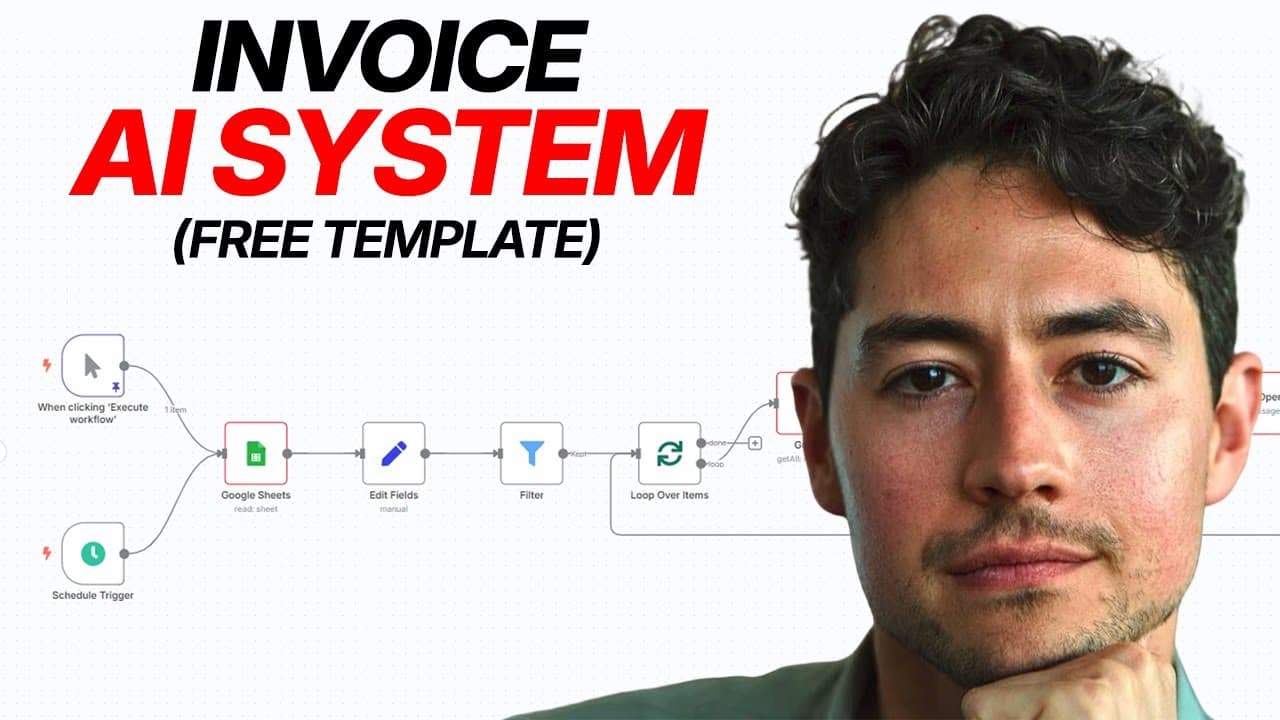
Automate overdue invoice follow-ups by checking invoice dates, reviewing the client’s recent email history, and drafting a context-aware reminder only when contact is appropriate. The workflow uses n8n, an invoice data source, email records, and OpenAI to produce increasingly urgent but professional messages, helping agencies and freelancers recover missed payments while reducing manual tracking and repetitive collection work.
Transcript
How many times you guys kicked yourselves for not following up on an unpaid invoice? Well, over the next 20 minutes, I'm going to build a smart invoice collection system in front of you live in NAN that automatically follows up on overdue invoices and can easily generate an additional 10 to $15,000 per year in missed payments for the average agency... Read More
Key Insights
- Invoice follow-up automation is a cash-flow tool that monitors unpaid invoices and contacts clients without requiring the business owner to track every due date or repeatedly compose reminder emails by hand.
- The workflow is source-agnostic because its initial data node can retrieve invoice records from Google Sheets or be replaced with a connector for Stripe, QuickBooks, Xero, or another platform used by the business.
- Follow-up timing is controlled by calculating the distance between the invoice’s sent date and the current date, then allowing the workflow to proceed only when that distance matches a configured reminder interval.
- Conversation history is essential context because a client may have already explained a payment delay, requested more time, or provided information that should change whether a reminder is sent and how it is worded.
- AI-generated reminders are based on templates but modified for each recipient, allowing the system to preserve a consistent collection process while accounting for the tone and details of the existing client relationship.
- Professional escalation is built into the workflow through increasingly urgent reminders at precise intervals, helping the business pursue payment consistently without starting with language that is unnecessarily confrontational.
- Draft creation is a practical deployment option because it lets a person review context-aware reminders before sending them, while businesses comfortable with the workflow can configure it to send messages automatically.
- Payment-event monitoring can close the automation loop by detecting when an invoice is paid and updating its status at the source, preventing the workflow from continuing to pursue a settled invoice.
Install to Summarize YouTube Videos and Get Transcripts
Explore YouTube Video Summarizer or Get YouTube Transcript Extractor
Questions & Answers
Q: How do you automate overdue invoice follow-ups in n8n?
Build an n8n workflow that retrieves invoice records, compares each sent date with the current date, and filters for invoices that match the selected follow-up cadence. For each qualifying record, retrieve recent email history, process that context with OpenAI, and generate a tailored reminder. The final step can either save the message as a draft for review or send it automatically.
Q: What data source can an automated invoice reminder system use?
The workflow can use Google Sheets as a simple, platform-independent invoice source, but its first node can be replaced with another service. The transcript specifically identifies Stripe, QuickBooks, and Xero as possible alternatives. The essential requirement is a source that provides the invoice information needed to determine payment status, timing, recipient details, and whether follow-up should continue.
Q: How does the workflow decide when to send an invoice reminder?
The workflow checks the invoice’s sent date and calculates the distance between that date and the current date. It then compares the result with the configured follow-up intervals. If the elapsed time matches an interval, the invoice proceeds through the workflow. If it does not match, the workflow stops processing that invoice until a later scheduled run.
Q: Why should invoice reminders include recent email history?
Recent email history reveals whether the client has already discussed the invoice or explained a delay. A client may have requested additional time, described a payment problem, or supplied other relevant context. Feeding those exchanges into the AI helps the workflow avoid inappropriate reminders and lets it adjust the timing, content, and tone of the next message to the actual situation.
Q: How does AI personalize an overdue invoice email?
The system starts with a follow-up template and supplies OpenAI with the relevant invoice information and recent conversation history. OpenAI then modifies the template to fit the recipient’s circumstances. The resulting email can reference the invoice naturally, offer assistance if payment is difficult, and maintain a professional tone while remaining distinct from a generic automated reminder.
Q: Should automated invoice emails be drafted or sent immediately?
The workflow supports either approach. Creating drafts gives the business owner an opportunity to inspect each message before it reaches the client, which is useful while validating the automation or handling sensitive relationships. Once the workflow is trusted, it can be configured to send reminders directly. The appropriate choice depends on how much human review the business wants to retain.
Q: How can payment events stop future invoice reminders?
A connected payment or invoicing platform can emit an event when the client pays. The workflow can receive that event through a webhook and update the original invoice record from unpaid to paid. This closes the loop because later workflow runs can recognize the changed status and exclude the settled invoice instead of continuing to draft or send unnecessary reminders.
Q: Can the same follow-up workflow support tasks besides invoicing?
The same general logic can support other follow-up situations, including sales calls and cold email outreach. The workflow still retrieves records, evaluates whether a follow-up is due, gathers relevant communication history, and creates a context-aware message. To adapt it, the user can replace the invoice source and collection templates with the records, timing rules, and message templates required by the new process.
Summary & Key Takeaways
-
The workflow begins by retrieving invoices from a data source such as Google Sheets, Stripe, QuickBooks, or Xero. It compares each invoice’s sent date with the current date, identifies records that match the chosen follow-up cadence, and allows only qualifying unpaid invoices to continue through the collection process.
-
Before creating a reminder, the system retrieves recent email exchanges with the client and combines them into a usable conversation history. This context helps the AI recognize payment explanations, requests for additional time, and other circumstances that could make a standard reminder inaccurate, poorly timed, or unnecessarily aggressive.
-
OpenAI adapts a base follow-up template to the invoice and conversation context, producing a professional message unique to the recipient. The workflow can create drafts for human review or send messages automatically. Payment events from connected invoicing platforms could also update invoice status and close the automation loop.
Read in Other Languages (beta)
Share This Summary 📚
Summarize YouTube Videos and Get Video Transcripts with 1-Click
Try YouTube Summary with ChatGPT & Claude or YouTube Transcript Generator
Explore More Summaries from Nick Saraev 📚




Summarize YouTube Videos and Get Video Transcripts with 1-Click
Try YouTube Summary with ChatGPT & Claude or YouTube Transcript Generator