How Can N8N Agents Generate Thousands of Ad Creatives with OpenAI?
TL;DR
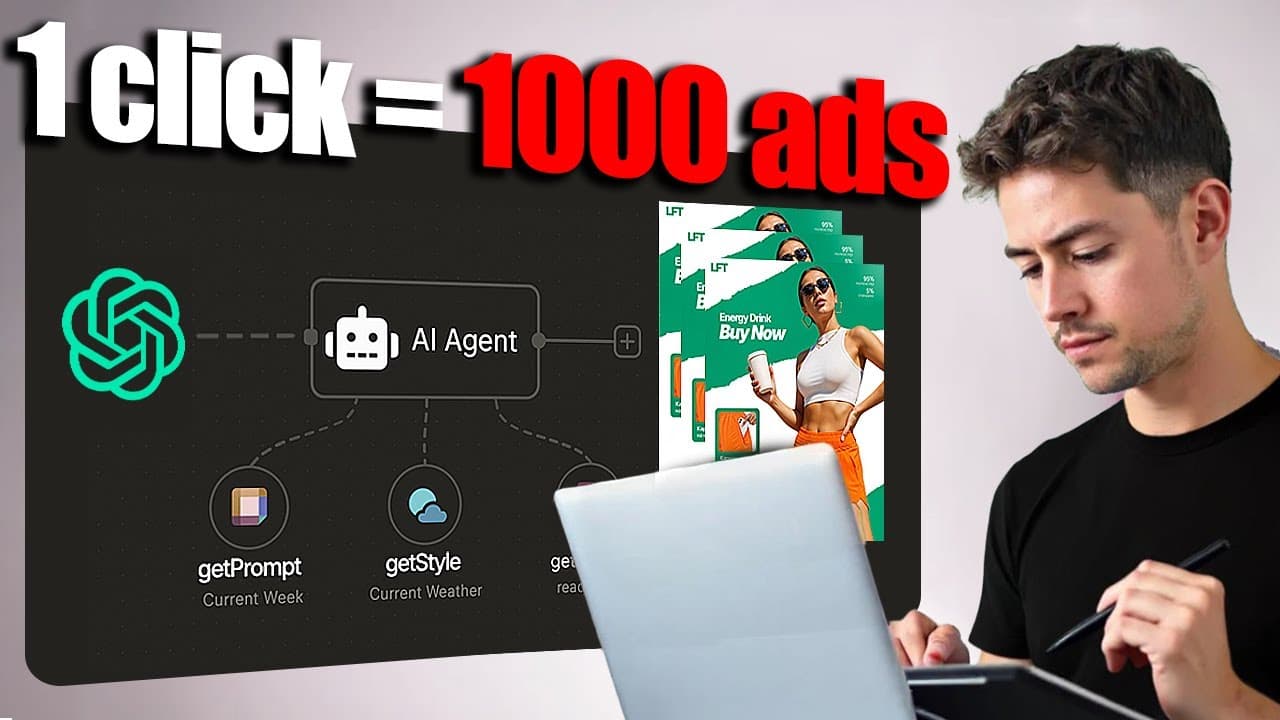
An N8N AI agent can generate thousands of ad creatives by analyzing reference images, creating change requests, and sending each request with its source image to GPT Image 1. Teams upload references to a Google Drive source folder and receive variants in a destination folder for review or testing. Read on to understand the inputs, workflow stages, and potential 80%-plus creative-time savings.
Transcript
Hey, today I'm going to be building a system that can turn a single click into thousands of highquality ad creatives that reproduce winning static image ads using NADN and OpenAI. I'm going to build the whole system live in front of you. Going to keep in the detours and any stumbling blocks along the way and you guys can catch the template in the d... Read More
Key Insights
- The workflow is a connected AI agent and image-spinning backend that converts source advertisements into numerous modified creatives. Users supply reference images, brand directions, a call to action, and the desired number of samples, while the automation manages analysis, variation, generation, and storage.
- Google Drive is the user-facing interface for the proposed system. Teams upload inspirational advertisements to a source folder and retrieve completed variants from a destination folder, avoiding a more technically demanding workflow or integration with a project management platform.
- Image analysis is the first generation stage. The workflow examines each original advertisement and creates a detailed description, giving subsequent AI steps structured information about the source design before any change requests or new images are produced.
- Change requests are generated by AI rather than hardcoded manually. They can modify elements such as company names, logos, brand colors, copy, typography, visual style, calls to action, and decorative details while preserving the source advertisement as a reference.
- GPT Image 1 works by receiving a source image alongside an AI-generated change request. This combination allows the system to create many distinct results while remaining close to the core elements that made the original design visually effective.
- High-volume generation replaces reliance on a perfect first attempt. The creator proposes generating 100, 1,000, or even 10,000 variants, depending on budget, because additional iterations provide more opportunities for a standout creative to appear among the results.
- Creative review remains part of the proposed process. An agency team can scan the destination folder and select the best five from 100 outputs, or it can theoretically connect generated advertisements directly to an advertising system and test them against one another.
- The system is intended as a productized service for creative agencies or an internal company tool. The creator estimates it could save more than 80% of creative time and potentially reduce copywriting time, depending on the quality of the generated results.
Install to Summarize YouTube Videos and Get Transcripts
Explore YouTube Video Summarizer or Get YouTube Transcript Extractor
Questions & Answers
Q: How can N8N and OpenAI generate ad creative variants?
An N8N AI agent retrieves reference ads from a Google Drive source folder and analyzes each image to produce a detailed description. AI then creates change requests, and GPT Image 1 receives each request alongside the original image. The completed variants are saved in a destination folder for review or testing.
Q: What information should users give the ad generation agent?
Users can specify brand colors, visual style, typography, company name, logo placement, decorative elements, call-to-action copy, and the number of samples per image. The demonstration requested light blue pastel tones, a cute flat and minimalistic style, serif and sans serif fonts, outlines, a LeftClick logo, a mouse pointer, and the CTA “build scalable systems today.”
Q: Why does the workflow use reference advertisements?
Reference ads give the system an established visual concept or formula to follow. The creator reasons that an ad being run by a known company may have undergone testing, although its success is not guaranteed. The workflow changes key brand elements while retaining the core qualities that made the source design stand out.
Q: How does the N8N agent modify each source image?
The workflow first analyzes the image and generates a detailed description. AI uses that description to formulate change requests for elements such as logos, company names, brand colors, text, and illustration style. GPT Image 1 applies each request while using the original image as its reference.
Q: Why generate dozens, hundreds, or thousands of ad creatives?
The workflow does not rely on producing one perfect result. Generating 50, 100, 1,000, or even 10,000 candidates gives a creative team more opportunities to find a strong ad combination. The practical volume depends on the available budget.
Q: How should a creative agency review the generated ads?
The team can inspect the destination Google Drive folder from a bird’s-eye view and shortlist the strongest results. One proposed example is selecting the best five creatives from 100 outputs. Alternatively, the generated ads could be connected directly to an advertising system and tested against one another.
Q: Why is Google Drive used as the workflow interface?
Google Drive provides a simple source-and-destination structure for agency users. The team uploads templates or inspirational ads to one folder and retrieves generated variants from another. This keeps the client-facing process to a straightforward input and output.
Q: How much creative time could this ad generation system save?
The creator estimates that the system could save a PPC agency more than 80% of its creative time when used at scale. It might also reduce copywriting time, depending on the quality of the generated content. The workflow is intended to become either a productized agency solution or an internal company tool.
Summary & Key Takeaways
-
The proposed system uses two Google Drive folders as a simple interface. A team places reference ads in the source folder, submits branding and generation instructions through an AI agent, and receives modified creatives in the destination folder. This black-box design minimizes the number of technical steps required from creative agency users.
-
Each source image is analyzed to produce a detailed description. AI then generates change requests that can vary branding, colors, typography, text, illustration style, logos, calls to action, and other elements. GPT Image 1 receives the original image with each request, producing variants that retain the reference advertisement’s core structural qualities.
-
The workflow is designed for high-volume creative iteration rather than expecting one perfect result. Agencies can generate dozens, hundreds, thousands, or even 10,000 variants depending on budget, review them from a bird’s-eye view, and select the strongest candidates. The creator estimates that the approach could save agencies more than 80% of creative time.
Read in Other Languages (beta)
Share This Summary 📚
Summarize YouTube Videos and Get Video Transcripts with 1-Click
Try YouTube Summary with ChatGPT & Claude or YouTube Transcript Generator
Explore More Summaries from Nick Saraev 📚
Summarize YouTube Videos and Get Video Transcripts with 1-Click
Try YouTube Summary with ChatGPT & Claude or YouTube Transcript Generator