How to Create a Variable Power Supply from a Laptop Adapter
TL;DR
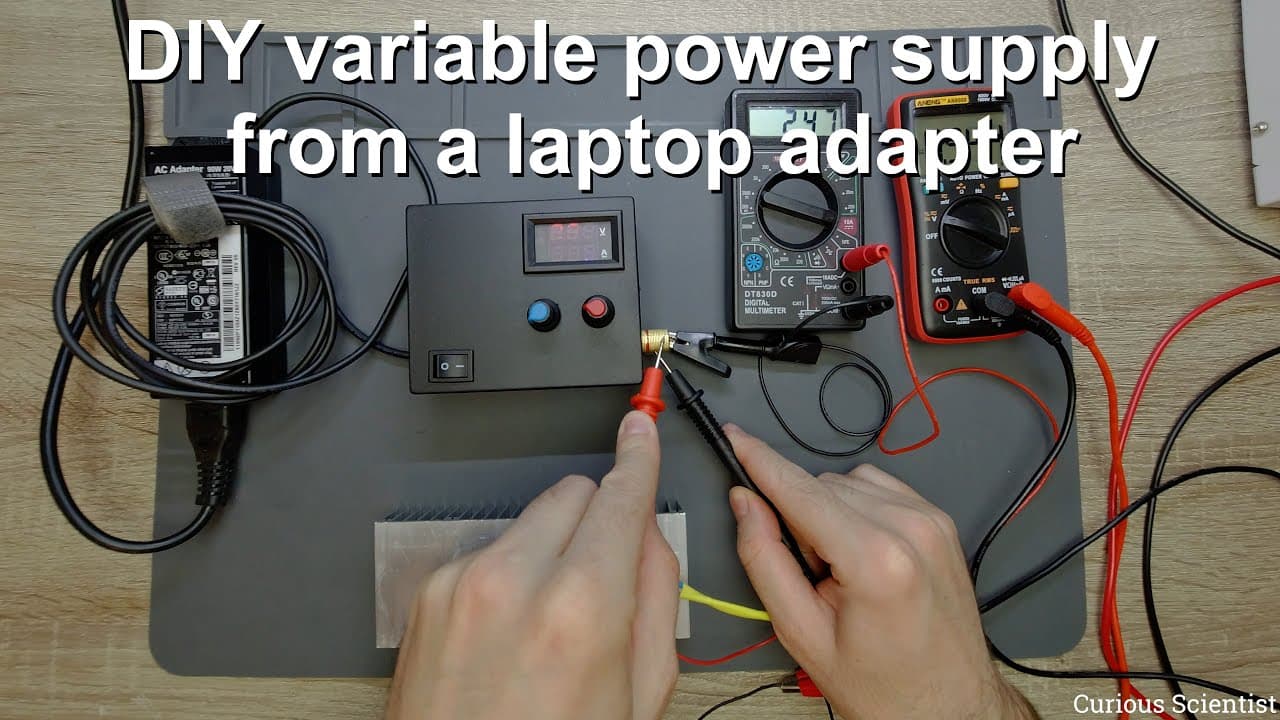
To transform a laptop power supply into a variable power supply, use a DC-DC converter and replace the standard potentiometers with accessible ones in an enclosure. This allows output voltage and current to be adjusted for various projects, demonstrating a practical method for recycling old electronics.
Transcript
welcome everyone in this video i'm going to build a variable power supply so the reason why i built this is because i got a few uh old laptop power supplies something like this it's an old lenovo power supply it has 20 volts as an output voltage and it can provide 4.5 amperes so 90 watts in total and it has this big dc jack which is suitable for la... Read More
Key Insights
- ✊ The transformation of a laptop power supply into a variable power supply is a practical way to repurpose old electronics and reduce waste.
- 📽️ Proper understanding of electrical components—such as potentiometers, DC-DC converters, and multimeters—is crucial for safely and effectively completing the project.
- 🤗 The video emphasizes hands-on learning, showcasing how DIY electronics projects can enhance understanding of electrical engineering concepts.
- 👻 Adjusting voltage and current via potentiometers allows users to customize power outputs for specific applications, improving project versatility.
- 😒 The incorporation of measurement devices like voltmeters and ammeters enhances the capability to monitor circuit performance in real time, providing valuable feedback during use.
- 📽️ Clear guidelines about potentiometer polarity and resistance values highlight the importance of component compatibility and awareness in electronic projects.
- ❓ The reuse of components from discarded electronics not only fosters creativity but also contributes positively to environmental sustainability.
Install to Summarize YouTube Videos and Get Transcripts
Explore YouTube Video Summarizer or Get YouTube Transcript Extractor
Questions & Answers
Q: What components are needed to convert a laptop power supply into a variable power supply?
To convert a laptop power supply into a variable power supply, you'll need a DC-DC converter, replacement potentiometers, a voltmeter, a current meter, an enclosure, banana plugs for connections, and a power switch to isolate the circuit. These components will work together to enable adjustable voltage and current outputs.
Q: Why is it important to know the polarity of the potentiometers when replacing them?
Knowing the polarity of potentiometers is crucial because they control the voltage and current regulation in the circuit. If the potentiometers are incorrectly connected, the circuit could either fail to operate correctly or deliver inappropriate voltage/current levels, risking damage to connected devices.
Q: How does the DC-DC converter function in this setup?
The DC-DC converter functions by taking the fixed 20 volts output from the laptop power supply and stepping it down or controlling its output voltage and current based on user adjustments of the potentiometers. This allows for greater flexibility in powering various projects with differing voltage requirements.
Q: What is the significance of using the correct resistance value for the potentiometers?
Using the correct resistance value for potentiometers is vital because inappropriate values can disrupt the voltage and current regulation within the circuit. If the resistance is higher or lower than specified (in this case, 10 kilo-ohms), it can lead to malfunctioning of the power supply, making it critical to match component specifications.
Q: How can users verify the output voltage and current of the power supply?
Users can verify the output voltage and current by connecting multimeters appropriately. One multimeter is used to measure the output voltage connected in parallel with the power supply, while another multimeter measures the current flowing through the load connected in series. This setup allows for real-time monitoring of both parameters.
Q: What safety considerations should be kept in mind when building this power supply?
Safety considerations include ensuring proper insulation of all electrical connections to prevent shorts, confirming the circuit can handle the power ratings without overheating, being cautious while handling the components, particularly the capacitors, and ensuring the power supply's switches and connections are correctly wired to avoid electrical hazards.
Summary & Key Takeaways
-
The video focuses on transforming a laptop power supply into a variable output supply using a DC-DC converter, making it more versatile for various projects.
-
Step-by-step guidance is provided on disassembling the existing wiring, replacing potentiometers, and integrating additional components such as a voltmeter and current meter for better usability.
-
Final testing confirms the power supply's functionality, showcasing how it can supply varying voltage and current levels suitable for different electronic applications.
Read in Other Languages (beta)
Share This Summary 📚
Summarize YouTube Videos and Get Video Transcripts with 1-Click
Try YouTube Summary with ChatGPT & Claude or YouTube Transcript Generator
Explore More Summaries from Curious Scientist 📚



![Building a coil winder [Part 6] - A few improvements thumbnail](/_next/image?url=https%3A%2F%2Fi.ytimg.com%2Fvi%2F3eyxG_g2iUA%2Fhqdefault.jpg&w=750&q=75)
Summarize YouTube Videos and Get Video Transcripts with 1-Click
Try YouTube Summary with ChatGPT & Claude or YouTube Transcript Generator