How to Use the Edpuzzle Chrome Extension for Video Editing
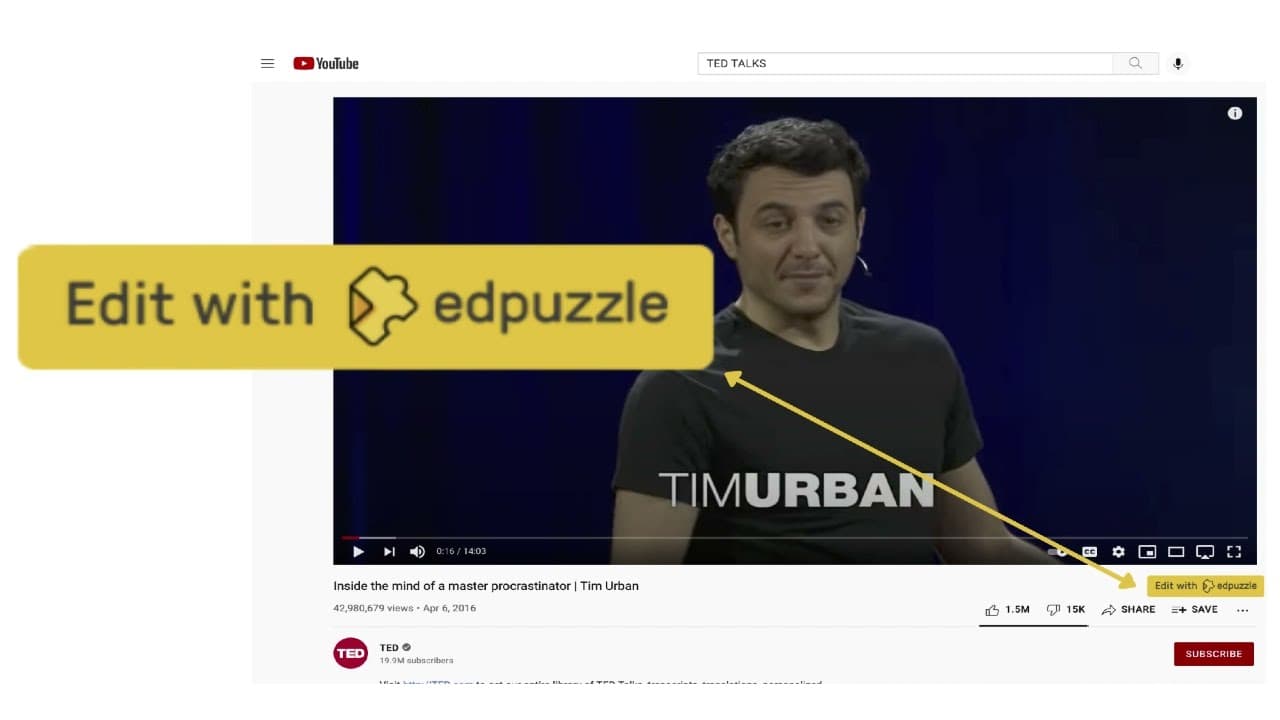
TL;DR
The Edpuzzle Chrome extension allows users to efficiently import YouTube videos and perform basic screen recordings directly into Edpuzzle. By simplifying the video creation process and eliminating manual steps, it saves educators valuable time and enhances their ability to engage students with interactive content.
Transcript
if you're an edpuzzle user and you have access to the chrome web browser then you may want to check out the edpuzzle chrome extension because i think it will make the process of creating videos in that puzzle a lot more efficient so the first thing you'll have to do is to locate the link where you can access this extension i will add it in the desc... Read More
Key Insights
- 🎮 The Edpuzzle Chrome extension simplifies video creation by enabling direct import from YouTube.
- 👤 Users can efficiently add questions and trim videos within Edpuzzle using the extension.
- 👻 Basic screen recording features allow for tutorial creation and webpage navigation demonstrations.
- 🧑🎓 Educators can save time and enhance student engagement by using the extension for video creation.
- 🧑🎓 The extension streamlines the process for sharing videos with students through Edpuzzle assignments.
- 🕸️ Installation and access to the Edpuzzle Chrome extension are straightforward through the Chrome web store.
- 💻 Utilizing the extension can significantly reduce the intimidation of screen recording for educators.
Install to Summarize YouTube Videos and Get Transcripts
Explore YouTube Video Summarizer or Get YouTube Transcript Extractor
Questions & Answers
Q: How does the Edpuzzle Chrome extension simplify video creation?
The extension allows users to directly import videos from YouTube into Edpuzzle with a click of a button, eliminating the need for manual URL pasting and video location.
Q: What feature does the Edpuzzle Chrome extension offer for screen recording?
The extension provides basic screen recording capabilities, allowing users to create tutorial videos or demonstrate navigation on web pages efficiently within Edpuzzle.
Q: Why is the Edpuzzle Chrome extension beneficial for educators?
Educators can save time and streamline their video creation process without the need for advanced screen recording tools, enhancing their ability to engage students in the learning process.
Q: How can users access and install the Edpuzzle Chrome extension?
Users can find the Edpuzzle Chrome extension in the Chrome web store by searching for Edpuzzle, then following the installation prompts to add it to their browser for video editing convenience.
Summary & Key Takeaways
-
The Edpuzzle Chrome extension simplifies the process of creating videos by allowing direct import from YouTube and basic screen recording.
-
Users can access the extension through the Chrome web store, enabling efficient video editing and question adding within Edpuzzle.
-
This tool saves time by eliminating the need to manually locate and import videos, making it ideal for educators.
Read in Other Languages (beta)
Share This Summary 📚
Summarize YouTube Videos and Get Video Transcripts with 1-Click
Try YouTube Summary with ChatGPT & Claude or YouTube Transcript Generator
Explore More Summaries from EdTech Hustle 📚



![Keynote: Remove The Background of Any Photo [Using Instant Alpha] thumbnail](/_next/image?url=https%3A%2F%2Fi.ytimg.com%2Fvi%2F0Ji-uTffzJE%2Fhqdefault.jpg&w=750&q=75)


Summarize YouTube Videos and Get Video Transcripts with 1-Click
Try YouTube Summary with ChatGPT & Claude or YouTube Transcript Generator