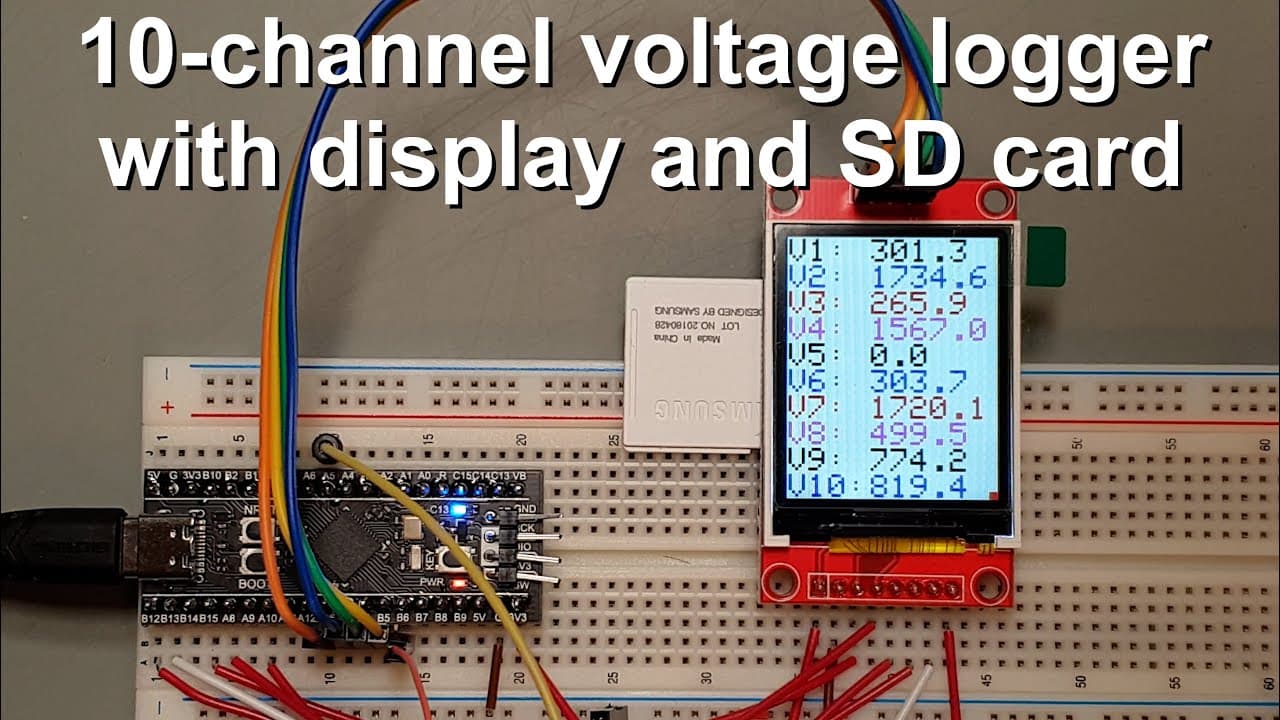
10-channel voltage logger with display and SD card
TL;DR
This video demonstrates a versatile voltage logger using an STM32 microcontroller and LCD display.
Transcript
welcome everyone in this video I'm going to show you my new project this will be a rather simple but quite useful and Powerful project and I will use this project for some of my future projects as well and you can also use this as some kind of backbone for many projects which are relevant to this kind of thing and what you can see here is is relati... Read More
Key Insights
- 🚄 The STM32F401 microcontroller is a powerful choice, offering more GPIO pins and high-speed capabilities compared to standard Arduino boards.
- 👤 The project demonstrates effective data visualization through LCD interfaces, significantly improving user interaction and accessibility.
- ❓ Understanding the operational nuances of SPI communications is vital when integrating multiple devices, as conflicts can impair system functionality.
- ⚡ The voltage logger's design allows users to extend its application beyond voltage measurement, making it adaptable to various sensors.
- 👨💻 Notably, predefined arrays and iterative loops facilitate efficient coding practices in this project, enhancing readability and functionality.
- ✋ The project includes a user-friendly interface for starting and stopping data logging, simplifying operation for individuals with varying technical backgrounds.
- ⚡ Emphasizing the importance of correct reference voltage in analog measurements directly impacts the accuracy of readings.
Install to Summarize YouTube Videos and Get Transcripts
Explore YouTube Video Summarizer or Get YouTube Transcript Extractor
Questions & Answers
Q: What is the main function of the voltage logger in this project?
The primary function of the voltage logger is to measure voltage from up to ten analog channels, display the readings on an LCD, and log the data to an SD card for further analysis. It is a versatile tool that can be adapted to monitor various types of data by utilizing different sensors connected to the STM32 microcontroller.
Q: Why was it necessary to use two separate SPI buses in this design?
Using two separate SPI buses was crucial in preventing data conflicts between the display and the SD card. When sharing a single SPI bus, accessing one device while the other is active causes disruptions and could lead to code crashes or display issues. By utilizing multiple buses, the project ensures seamless operation and reliability.
Q: How does the user initiate and stop the logging process?
The user can initiate logging by navigating to the start button on the display and pressing it for a long duration. This action begins data collection and changes the indicator square to green. Stopping the logging is accomplished in a similar manner by accessing the stop button, which eventually closes the current log file, allowing the user to start a new log session afterward.
Q: What key components were used in this voltage logger project?
The voltage logger project utilized a 1.8-inch LCD display with a resolution of 128x160 pixels, an STM32F401 microcontroller which provides high processing capabilities, and an SD card for logging data. Additionally, various wiring and components facilitate connections between the microcontroller, display, and other devices necessary for voltage measurement.
Summary & Key Takeaways
-
The project showcases a voltage logger designed with an STM32 microcontroller and a simple LCD display, enabling data logging to an SD card.
-
Key components include a 128x160 pixel display and an STM32F401CCU6 microcontroller, which offers extensive connectivity options and processing power.
-
The logger provides real-time voltage readings, demonstrating effective functionality while addressing the intricacies of configuring SPI buses for both the display and SD card.
Read in Other Languages (beta)
Share This Summary 📚
Summarize YouTube Videos and Get Video Transcripts with 1-Click
Try YouTube Summary with ChatGPT & Claude or YouTube Transcript Generator
Explore More Summaries from Curious Scientist 📚
![Building a coil winder [Part 6] - A few improvements thumbnail](/_next/image?url=https%3A%2F%2Fi.ytimg.com%2Fvi%2F3eyxG_g2iUA%2Fhqdefault.jpg&w=750&q=75)



Summarize YouTube Videos and Get Video Transcripts with 1-Click
Try YouTube Summary with ChatGPT & Claude or YouTube Transcript Generator