How to Efficiently Edit Podcasts with AI Tools
TL;DR
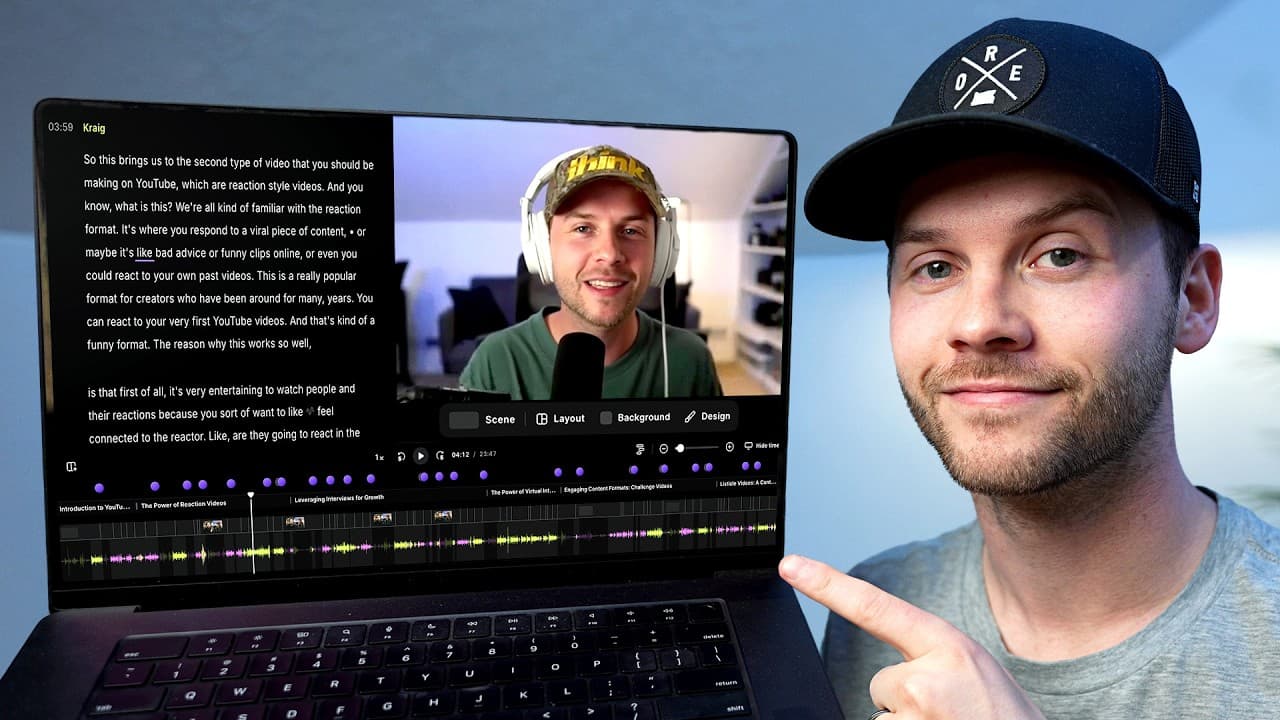
Using Riverside's all-in-one creative studio, podcasters can significantly reduce editing time by utilizing its AI-powered features. These include automatic transcription, editing assistance, and audio enhancement tools. The platform also offers seamless publishing to multiple platforms, making the entire process from recording to distribution more efficient.
Transcript
If you create long- form content of any kind, whether it's podcast, YouTube videos, interviews, etc., you know that the most timeconsuming part is not actually hitting record. It's everything that comes afterwards. You record something great, but then spend hours editing it down, cleaning up the audio, writing titles and descriptions just to put ou... Read More
Key Insights
- Riverside is an all-in-one platform for recording and editing podcasts.
- AI tools in Riverside can automatically remove unnecessary parts and enhance audio quality.
- The platform provides automatic transcription and captioning for video content.
- Riverside's smart layouts adjust camera angles based on who is speaking.
- Magic Clip feature creates short clips from full-length episodes for social media.
- Co-Creator AI assists in generating titles, descriptions, and show notes.
- Riverside offers hosting and distribution to platforms like Spotify and YouTube.
- Customizable branding and layout options enhance video presentation.
Install to Summarize YouTube Videos and Get Transcripts
Explore YouTube Video Summarizer or Get YouTube Transcript Extractor
Questions & Answers
Q: How does Riverside simplify podcast editing?
Riverside simplifies podcast editing by offering an all-in-one platform that integrates recording, editing, and publishing tools. Its AI features, such as automatic transcription and editing, allow users to quickly clean up audio, remove unnecessary parts, and enhance sound quality. This reduces the time and effort typically required in post-production.
Q: What AI tools does Riverside offer for podcast editing?
Riverside offers several AI tools for podcast editing, including automatic transcription, audio enhancement, and the Co-Creator AI assistant. These tools help remove filler words, improve audio clarity, and assist in creating marketing materials like titles and descriptions, making the editing process more efficient and accessible.
Q: How can Riverside help in creating social media content from podcasts?
Riverside's Magic Clip feature automatically generates short clips from full-length podcast episodes, suitable for sharing on social media platforms like YouTube Shorts and Instagram Reels. This feature allows users to quickly create engaging content that can help promote their podcasts and reach a wider audience.
Q: What are the benefits of using Riverside's Co-Creator AI?
Riverside's Co-Creator AI assists users in generating episode titles, descriptions, and show notes, enhancing the discoverability and marketing of their podcasts. It also provides suggestions for editing and content packaging, streamlining the production process and allowing creators to focus on content quality.
Q: Can Riverside handle podcast distribution?
Yes, Riverside can handle podcast distribution. The platform offers hosting and allows users to publish their episodes directly to platforms like Spotify, Apple Podcasts, and YouTube. This integrated distribution feature ensures that creators can manage their entire podcast workflow from a single platform.
Q: How does Riverside's smart layout feature work?
Riverside's smart layout feature automatically adjusts camera angles based on who is speaking during a podcast recording. This dynamic adjustment creates a more engaging viewing experience by switching between solo and side-by-side shots, emphasizing the speaker and enhancing the overall presentation.
Q: What customization options does Riverside offer for video branding?
Riverside offers various customization options for video branding, including the ability to add logos, adjust layout positions, and modify caption styles. These features allow creators to tailor the visual presentation of their podcasts, ensuring consistent branding and a professional appearance.
Q: How does Riverside enhance audio quality in podcasts?
Riverside enhances audio quality through its Magic Audio feature, which reduces background noise and improves voice clarity. Users can adjust the enhancement level to suit their preferences, ensuring that the final audio output is crisp and clear, contributing to a more professional-sounding podcast.
Summary & Key Takeaways
-
Riverside's platform enables podcasters to simplify their workflow by integrating recording, editing, and publishing tools. Its AI features, like automatic editing and audio enhancement, save time and effort. Users can also generate marketing materials and distribute content to multiple platforms directly from the platform.
-
The Co-Creator AI in Riverside assists users in creating engaging content packages, including titles and descriptions, enhancing discoverability. The platform's smart layouts and automatic captioning further streamline the editing process, making it accessible even for those with limited video editing experience.
-
Riverside supports end-to-end podcast production, offering features like Magic Clips for social media sharing and integrated distribution to major platforms. Its user-friendly interface and AI tools make it an ideal choice for content creators looking to optimize their podcasting workflow.
Read in Other Languages (beta)
Share This Summary 📚
Summarize YouTube Videos and Get Video Transcripts with 1-Click
Try YouTube Summary with ChatGPT & Claude or YouTube Transcript Generator
Explore More Summaries from Think Media 📚


Summarize YouTube Videos and Get Video Transcripts with 1-Click
Try YouTube Summary with ChatGPT & Claude or YouTube Transcript Generator