Building a digital control circuit for the SZBK07 DC-DC buck converter
TL;DR
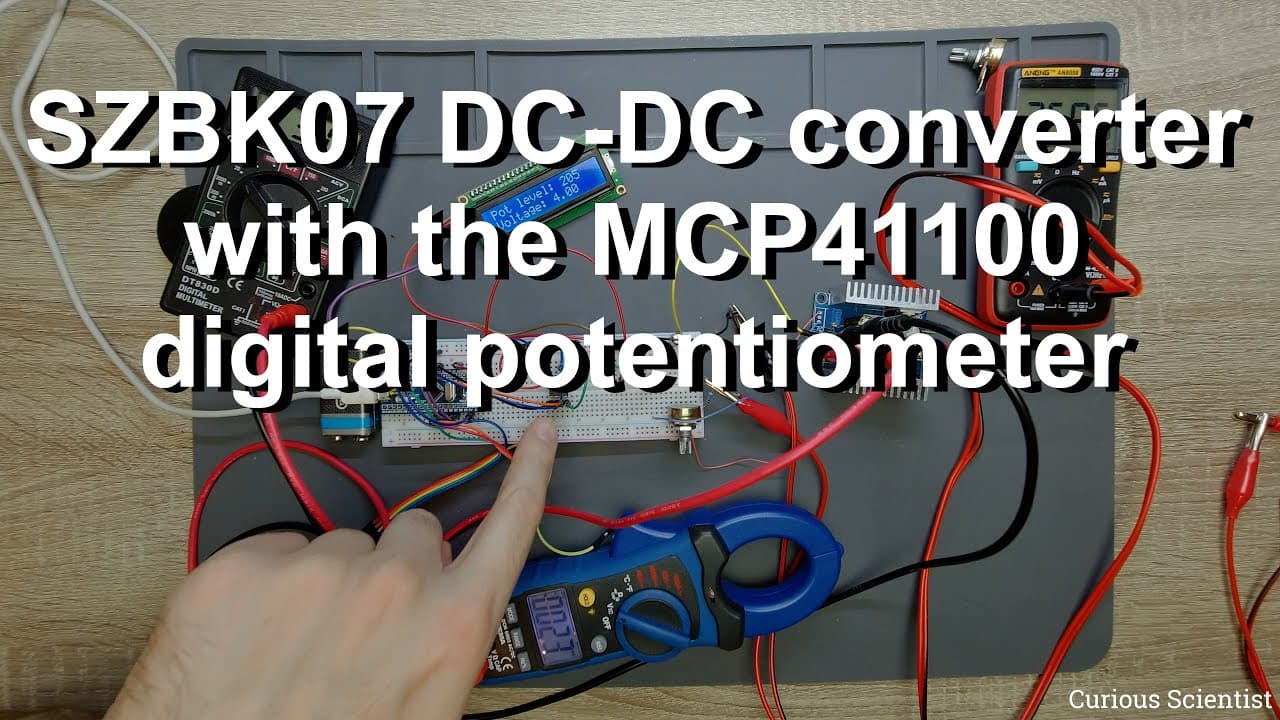
The video details using a rotary encoder and digital potentiometer to control a DC-DC converter's output voltage.
Transcript
welcome everyone in this video i'm going to continue the previous videos experiment uh to see what is my previous video was about please check it in that corner there should be a link or something but i will briefly summarize everything so we are using this uh dc-dc back converter you can see that this is this szbk07 dc-dc converter so it can accep... Read More
Key Insights
- 🧡 The DC-DC converter used can handle input voltages from 6V to 40V and output a range of 1.2V to 36V, with a maximum of 20A under active cooling.
- ⚡ Replacing analog potentiometers with digital versions allows for better voltage precision but requires careful consideration of voltage limits to avoid damage.
- ⌛ The STM32 microcontroller's integration with SPI enables effective communication with the digital potentiometer, facilitating real-time voltage control.
- 😥 Mechanical slack in potentiometers can be utilized to identify threshold points for voltage adjustments, allowing for efficient system calibration.
- 😥 Isolation of measurement reference points is essential to ensure accurate voltage calculations in digital systems.
- 📡 Noise interference is a significant challenge in analog signal processing, thus necessitating careful assembly and shielding.
- ⌛ The experiment illustrates the importance of precise voltage supply values to achieve accurate digital output, emphasizing the need for real-time monitoring and adjustment.
Install to Summarize YouTube Videos and Get Transcripts
Explore YouTube Video Summarizer or Get YouTube Transcript Extractor
Questions & Answers
Q: What was the main objective of the experiment with the DC-DC converter?
The primary goal was to control the output voltage of a DC-DC converter through digital means. The presenter aimed to replace traditional analog potentiometer control with a digital potentiometer connected to a rotary encoder, allowing for finer control and easier voltage adjustments.
Q: Why can't the digital potentiometer be directly connected to the output of the DC-DC converter?
Directly connecting the digital potentiometer to the DC-DC converter's output would exceed its maximum voltage rating of 5.5 volts, risking damage to the potentiometer. Instead, a controlled method using lower voltages and additional resistors is necessary to interface properly without overloading the digital component.
Q: How is the STM32 microcontroller involved in the experiment?
The STM32 microcontroller serves as the control unit that takes inputs from the rotary encoder and translates them into digital signals to manipulate the output voltage of the DC-DC converter. It processes rotary encoder movements and communicates with the digital potentiometer via SPI, ensuring precise adjustments.
Q: What challenges were faced during the experimental setup?
Challenges included ensuring proper voltage levels for the digital potentiometer, dealing with noise and fluctuations on output voltage, and finding suitable connections for the components. The presenter encountered issues with instability in voltage readings due to connection quality and had to keep the output reference within safe limits.
Q: What is the role of the rotary encoder in the project?
The rotary encoder functions as an input device that allows for user-controlled adjustments of the output voltage. By rotating the encoder, users can increase or decrease the potentiometer's digital value, which in turn alters the voltage sent to the feedback pin of the DC-DC converter, effectively controlling its output.
Q: How does the proposed system compare to using traditional methods for voltage control?
The digital control system using a rotary encoder and digital potentiometer offers higher precision and repeatability compared to traditional analog methods. It allows for smoother transitions in output voltage without mechanical wear and is amenable to programming and automation, making it more versatile for complex applications.
Summary & Key Takeaways
-
The video explores how to control the output voltage of a DC-DC converter using a digital potentiometer and a rotary encoder. The presenter explains the challenges of voltage limits and the need for additional components.
-
An STM32 microcontroller is utilized to implement the control system, which translates rotary encoder input into a digital signal corresponding to desired output voltage levels through SPI communication.
-
The experiment demonstrates the setup, showing testing of output voltages and how digital manipulation stabilizes voltage control despite fluctuations caused by connections.
Read in Other Languages (beta)
Share This Summary 📚
Summarize YouTube Videos and Get Video Transcripts with 1-Click
Try YouTube Summary with ChatGPT & Claude or YouTube Transcript Generator
Explore More Summaries from Curious Scientist 📚



![Building a coil winder [Part 6] - A few improvements thumbnail](/_next/image?url=https%3A%2F%2Fi.ytimg.com%2Fvi%2F3eyxG_g2iUA%2Fhqdefault.jpg&w=750&q=75)
Summarize YouTube Videos and Get Video Transcripts with 1-Click
Try YouTube Summary with ChatGPT & Claude or YouTube Transcript Generator