How to Analyze Grouped Data Using Graphpad Prism
TL;DR
To analyze grouped data in Graphpad Prism, start by creating a new grouped data table for your experiments, ensuring to correctly categorize your data with respect to controls and treatments. Utilize features like data transposition for easier organization and customize your graph's appearance for clearer visualization, adjusting elements like bar spacing and axis labels to enhance clarity and interpretation.
Transcript
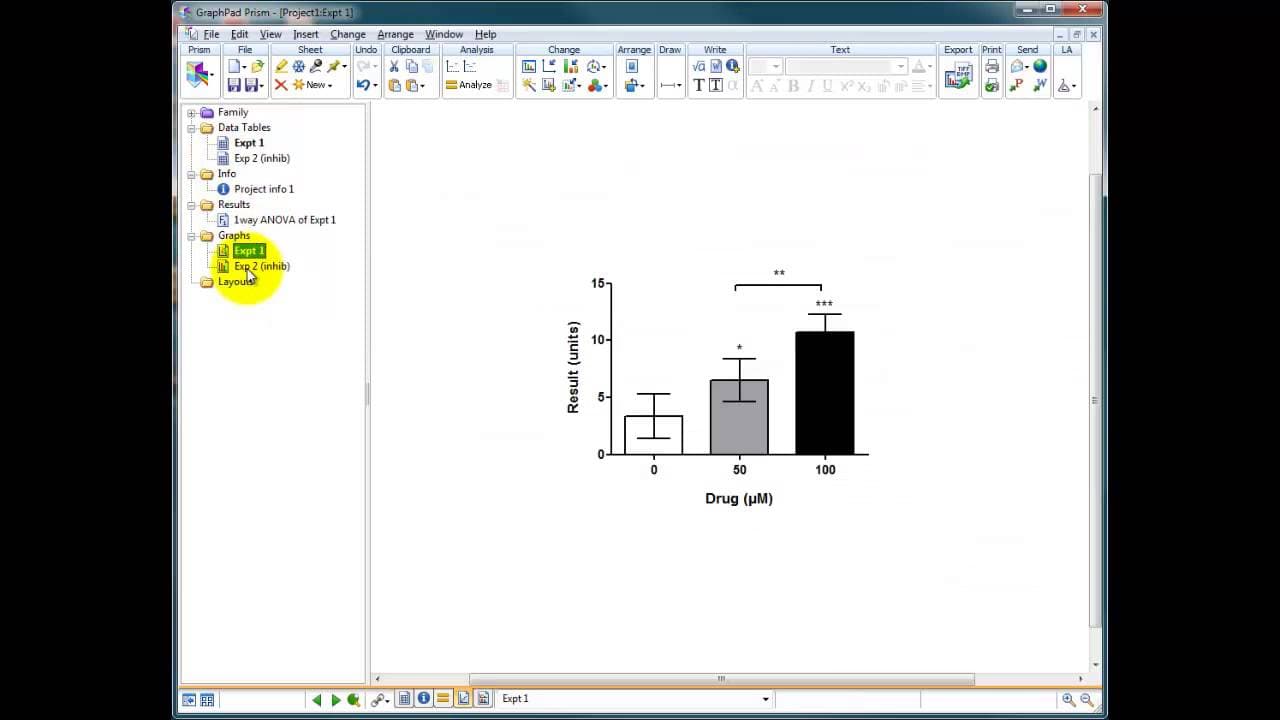
okay so we've got our graph here we've just done our ANOVA analyses let's just real able this graph now to reflect an experiment that might have taken place these could be concentrations for instance of a treatment this could be zero or control this could be 50 micromolar and 100 micromolar so I'm going to real able this and call it a drug and we'r... Read More
Key Insights
- 📈 Realignment of graphs is essential to accurately reflect changes in experimental conditions.
- ❓ Transposing data in Prism software streamlines data organization and analysis.
- 📈 Customizing graph appearance improves data visualization and clarity.
- 📈 Accurate labeling on graphs enhances the representation of experimental variations.
- 🉐 Adjusting bar spacing in graphs enhances the visual comparison of data.
- 📈 Graph realignment is crucial for precise interpretation of experimental results.
- 📈 Utilizing software tools for graph customization improves data analysis efficiency.
Install to Summarize YouTube Videos and Get Transcripts
Explore YouTube Video Summarizer or Get YouTube Transcript Extractor
Questions & Answers
Q: How can you change the labels on a graph to reflect experimental variations?
To change labels on a graph, double-click on the axis and modify the titles to accurately represent the experiment, such as drug concentrations in micromolar.
Q: What is the benefit of transposing data in Prism software?
Transposing data in Prism allows for easy organization and comparison of experimental results, enhancing data interpretation and analysis efficiency.
Q: How can you adjust the appearance of bars on a graph to improve data visualization?
By adjusting the spacing between bars and groups in the graph settings, you can enhance the visual representation of data and make comparisons clearer.
Q: Why is it important to realign and customize graphs for data analysis?
Realigned and customized graphs provide a clear visual representation of experimental data, aiding in the interpretation of results and enabling accurate analysis.
Summary & Key Takeaways
-
Realignment of graphs to reflect experimental changes like varying concentrations or inhibitor presence.
-
Utilizing tools within Prism software to transpose data effectively for analysis.
-
Customizing graph appearance and organization for precise data representation.
Read in Other Languages (beta)
Share This Summary 📚
Summarize YouTube Videos and Get Video Transcripts with 1-Click
Try YouTube Summary with ChatGPT & Claude or YouTube Transcript Generator
Explore More Summaries from Dory Video 📚






Summarize YouTube Videos and Get Video Transcripts with 1-Click
Try YouTube Summary with ChatGPT & Claude or YouTube Transcript Generator