How to Give AI Agents Better Tools in n8n
TL;DR
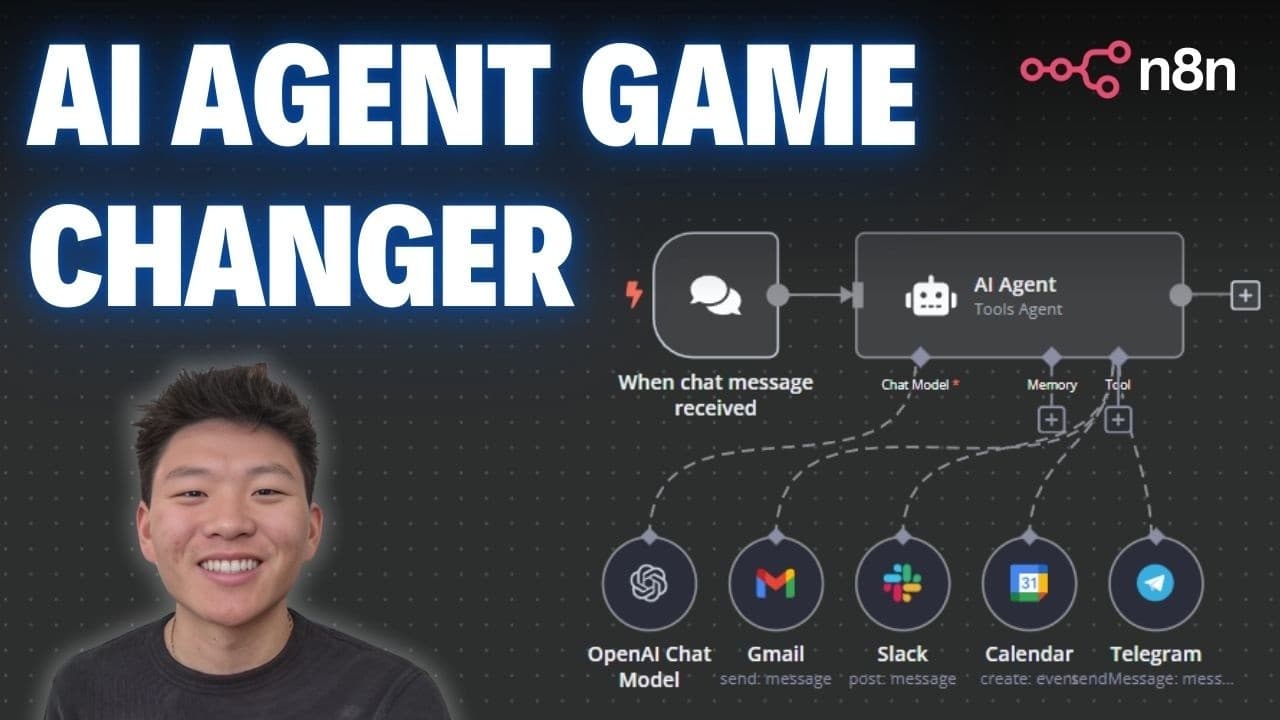
Use the {{ $fromAI }} function inside an n8n tool node to let an AI agent derive field values directly from a natural-language request. It can identify values such as an email recipient, subject, and message without a separate parsing workflow, while optional descriptions, data types, and default values make extraction clearer and more resilient.
Transcript
so today I wanted to come in here and talk about the most powerful AI agent Tools in nadn nadn is getting smarter every day the whole AI space is getting smarter every day everything's moving and shifting so fast so I wanted to come in here and show you guys a new method that I've been working on when I build AI agents that is just a lot easier to ... Read More
Key Insights
- The older tool pattern is a multi-step workflow in which an AI agent passes a request to another workflow, a model or code node structures the request, and a service node performs the action using the resulting parameters.
- Exact parameter mapping is a fragile part of the older method because downstream fields depend on consistent names such as recipient, subject, and message. A changed name or capitalization can prevent the Gmail node from receiving the value it expects.
- The $fromAI function is designed to derive a tool field dynamically from the agent's natural-language query. It effectively moves information extraction into the service node instead of requiring a separate OpenAI or custom code node.
- A Gmail node can use separate $fromAI expressions to identify the recipient, create the subject, and write the message body. The demonstrated request produced a cleaned recipient address, a lunch-related subject, and a complete email message.
- The key is the only required $fromAI parameter, and it tells the agent what information to find. A key such as name signals that the expression should extract or generate a person's name from the available request.
- The description is an optional $fromAI parameter that gives the agent more context about the desired value. For example, describing a name as the name of the person being emailed helps distinguish it from other names in a request.
- The type is an optional parameter that specifies the expected kind of data. The transcript identifies possible types including string, number, Boolean, and JSON, with string being appropriate when the requested output is a word or other text.
- The default value is an optional fallback used when the AI cannot determine the requested information. Setting a value such as unknown allows the node to continue running instead of leaving the expected field without a usable result.
Install to Summarize YouTube Videos and Get Transcripts
Explore YouTube Video Summarizer or Get YouTube Transcript Extractor
Questions & Answers
Q: How do you give an AI agent tools in n8n?
Build the agent with a service node that performs the intended action, then place {{ $fromAI }} expressions in fields the agent must determine from its request. For an email tool, those fields can include the recipient, subject, and message. The agent interprets the natural-language query and supplies each value directly, so a separate workflow for parsing parameters is not required.
Q: What is the $fromAI function in n8n?
The $fromAI function is a JavaScript-style expression used inside an n8n tool field to let an AI agent determine that field's value dynamically. The expression includes a required key and can include a description, data type, and default value. It allows a tool node, such as Gmail, to interpret the agent's query and populate the information needed for an action.
Q: Why use $fromAI instead of a separate parsing workflow?
Using $fromAI reduces the number of steps needed to turn a natural-language request into usable tool parameters. The older approach sends the request to another workflow, parses it with an OpenAI or code node, and maps named outputs into Gmail. With $fromAI, the relevant Gmail fields interpret the request directly, reducing setup, testing, and dependence on exact output names.
Q: How can $fromAI send an email through Gmail in n8n?
Configure a Gmail send-email node as the agent's tool and add a $fromAI expression to each dynamic field. One expression can determine the recipient address, another can create the subject, and another can compose the body. When the agent receives a request describing whom to contact and what to say, those expressions derive the required values before Gmail sends the email.
Q: What parameters does the $fromAI function accept?
The function accepts a key, description, type, and default value. The key is required and identifies what information the AI should find. The description is optional context explaining the field. The optional type indicates whether the expected value is a string, number, Boolean, or JSON. The optional default supplies a fallback when the information cannot be determined.
Q: What does the key parameter do in $fromAI?
The key tells the AI what value the expression is intended to produce, and it is the only required parameter described in the transcript. For example, a key named name tells the agent to look for a person's name. Clear keys help connect the request's meaning to the specific field being populated inside the selected n8n tool node.
Q: When should you add a description, type, or default value?
Add a description when the key alone might be ambiguous, such as clarifying that a name belongs to the person receiving an email. Add a type when the tool expects a particular data format, such as a string rather than a number. Add a default when the workflow should still receive a fallback value if the AI cannot identify the requested information.
Q: How does $fromAI make n8n agent workflows more reliable?
The function reduces reliance on separately generated parameter objects whose field names and capitalization must match downstream mappings exactly. Each tool field instead states what value the AI should determine, with optional context, type guidance, and a fallback. This avoids the demonstrated failure risk where a changed output name prevents the Gmail node from receiving the recipient, subject, or message correctly.
Summary & Key Takeaways
-
The older n8n method sends an agent request to a separate tool workflow, where an OpenAI or code node converts the natural-language query into named parameters. Those parameters must then be mapped precisely into a service node such as Gmail, creating additional setup work and opportunities for inconsistent field names to break execution.
-
The newer method places {{ $fromAI }} expressions directly in fields of the tool node used by the agent. In the Gmail example, the expressions independently determine the recipient address, generate an appropriate subject, and compose the email body from one request, keeping the operation within the same workflow and removing the separate parsing step.
-
The $fromAI function accepts a required key that identifies the information being requested. It can also receive an optional description, expected data type, and default value. Descriptions clarify ambiguous fields, types indicate the expected output format, and defaults provide a fallback when the requested information cannot be identified from the agent's query.
Read in Other Languages (beta)
Share This Summary 📚
Summarize YouTube Videos and Get Video Transcripts with 1-Click
Try YouTube Summary with ChatGPT & Claude or YouTube Transcript Generator
Explore More Summaries from Nate Herk | AI Automation 📚



Summarize YouTube Videos and Get Video Transcripts with 1-Click
Try YouTube Summary with ChatGPT & Claude or YouTube Transcript Generator