How to Generate AI Images Using Your Face for Free
TL;DR
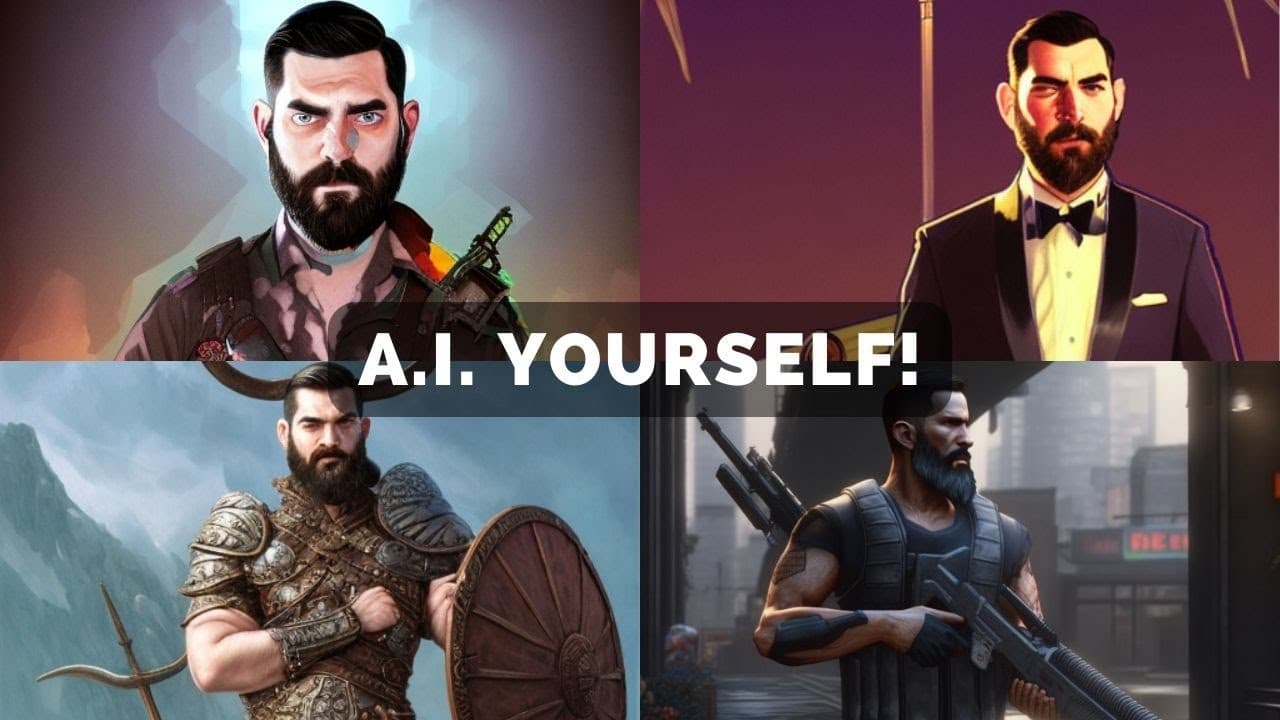
To generate AI images with your face, you'll need around 20 high-quality images of yourself resized to 512x512 pixels. Follow a step-by-step process to train the AI model using these images, set parameters, and customize prompts for varied output styles. Engage actively during processing to prevent timeouts and enhance results.
Transcript
what's up everyone Matt wolf here AKA e flow in this video we're going to talk about AI art and how you can generate images with your face on them you can generate anything you can imagine just look at all these images I've put my face on you can do anything like this once you know how to do what I'm talking about I've literally generated hundreds ... Read More
Key Insights
- 👻 Training an AI model with personalized images allows for the creation of unique AI-generated content.
- 🥰 Following a detailed tutorial with step-by-step instructions is crucial for successfully generating AI art with your face.
- 🌱 Customizing prompts, seed numbers, and other parameters can significantly impact the style and output of AI-generated images.
- ☢️ Active engagement during the processing period is essential to prevent timeouts and ensure efficient completion of the AI training process.
- 🥰 Utilizing online resources and platforms like Lexica.art can provide inspiration and guidance for generating specific styles of AI art.
- 🚂 Saving and utilizing trained model files can enable users to reuse their trained images for future AI art generation projects.
- 🥺 Experimenting with different variables and parameters like seed numbers and guidance scales can lead to diverse styles and variations in AI-generated images.
Install to Summarize YouTube Videos and Get Transcripts
Explore YouTube Video Summarizer or Get YouTube Transcript Extractor
Questions & Answers
Q: How many images are recommended for training the AI model with your face?
It is recommended to have around 20 images of yourself, ideally with different angles, backgrounds, and clothing variations for optimal training.
Q: What are the key steps involved in setting up and configuring the AI model for generating images?
The key steps include installing requirements, logging into Hugging Face, setting up access tokens, uploading images for training, adjusting parameters for training, and generating images based on prompts.
Q: How can users customize the generated images to achieve specific styles or effects?
Users can modify prompts, seed numbers, guidance scale, and other parameters to influence the style, color, and composition of the AI-generated images, allowing for creative customization.
Q: What is the significance of maintaining active engagement while processing the AI model?
It is essential to stay actively engaged during the processing period to prevent timeouts, ensuring the successful completion of the AI training and image generation process without starting over.
Summary & Key Takeaways
-
Generate personalized AI images by training AI with your photos in a specific format.
-
Utilize a step-by-step tutorial to set up the AI model and input necessary data.
-
Explore various options to customize and generate AI-generated images with your face.
Read in Other Languages (beta)
Share This Summary 📚
Summarize YouTube Videos and Get Video Transcripts with 1-Click
Try YouTube Summary with ChatGPT & Claude or YouTube Transcript Generator
Explore More Summaries from Matt Wolfe 📚

Summarize YouTube Videos and Get Video Transcripts with 1-Click
Try YouTube Summary with ChatGPT & Claude or YouTube Transcript Generator