How to Input a List Using Loops in Python
TL;DR
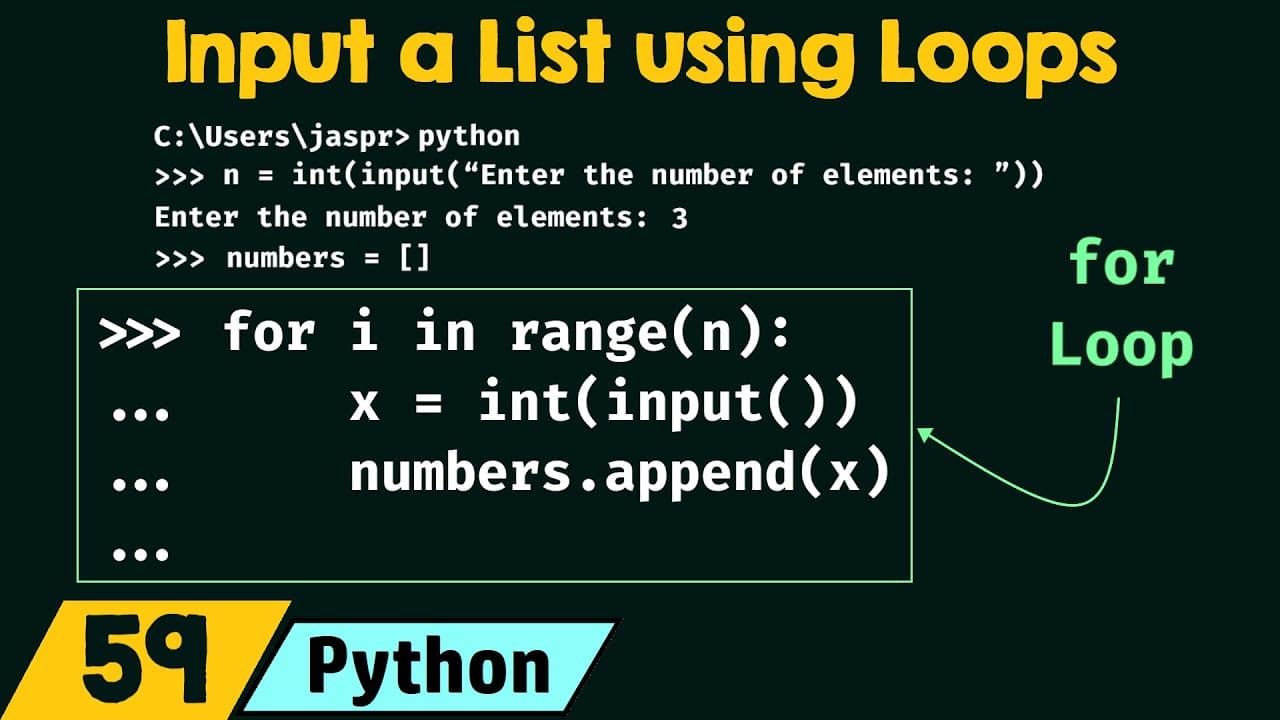
To input a list using loops in Python, ask for the number of elements with n = int(input(...)), create an empty list, and run for i in range(n): to collect each value with int(input()) and append it. For n = 3, the loop stores three separate numbers, such as 67, 48, and 90, instead of one string. Read on to understand each step and why conversion is necessary.
Transcript
foreign in the last presentation we have understood how to use input method to receive input from the user and we have learned how to receive simple data from the user now in this presentation we will learn how to input a list using Loops so without any further delay let's get started the first topic of this presentation is problem with the input m... Read More
Key Insights
- The input() method always returns user input as a string, never an integer or any other data type, which becomes a problem when you want to store multiple values as separate list items.
- Typing a list like '67 48 90' directly into input() produces a single string of eight characters (each digit and space is one item), not a three-item list of numbers 67, 48, and 90.
- To build a list from user input, first ask how many elements the user wants using n = int(input('enter the number of elements')), type-casting the result to an integer.
- Type-casting with int() around input() is required so n points to the integer 3 rather than the character '3', letting it be used correctly by the loop.
- An empty list is created with numbers = [] before the loop, giving a container to append each incoming value to.
- A for loop with the syntax 'for i in range(n):' repeats the enclosed code n times, with i taking values from 0 to n minus 1, and requires a colon and indentation.
- Inside the loop, x = int(input()) receives and type-casts each value, then numbers.append(x) adds that value to the end of the list.
- The append() method adds items at the end of the list, so calling it once per loop iteration builds up the list to the exact three items 67, 48, and 90 the user intended.
Install to Summarize YouTube Videos and Get Transcripts
Explore YouTube Video Summarizer or Get YouTube Transcript Extractor
Questions & Answers
Q: How do you input a list using loops in Python?
First, receive the number of elements with n = int(input('enter the number of elements')) and create an empty list with numbers = []. Then run for i in range(n):, receive each value with x = int(input()), and add it using numbers.append(x). After the loop finishes, the entered numbers are stored as separate list items.
Q: Why does Python input() return entered numbers as a string?
The input() method always returns the user's input as a string, regardless of what the user types. It does not return an integer or another data type automatically, so numerical input must be converted when integer values are required.
Q: What happens when you enter 67 48 90 directly through input()?
Python receives 67 48 90 as one string rather than a three-item list of numbers. The example visualizes it as eight individual characters, including the two spaces, instead of the values 67, 48, and 90 at indices 0, 1, and 2.
Q: Why is int() used around input() when creating the list?
The int() call converts the string returned by input() into an integer. It makes n point to the integer 3 rather than the character 3, and x = int(input()) likewise stores each entered value as a number.
Q: Why must you ask for the number of list elements first?
The number of elements determines how many times the for loop should receive input. If the user enters 3, range(n) makes the loop execute three times so three values can be added to the list.
Q: What does range(n) do in the for loop?
In for i in range(n):, the loop variable i receives values from 0 through n minus 1. When n is 3, i takes the values 0, 1, and 2, causing the loop body to run three times.
Q: What does numbers.append(x) do?
The append() method adds the value referenced by x to the end of the numbers list. Calling it once during each loop iteration builds the initially empty list one entered value at a time.
Q: Why are the colon and indentation required in the for loop?
A colon must follow for i in range(n): to continue into the loop body. The input and append commands inside the loop must be indented so Python treats them as code that should repeat n times.
Summary & Key Takeaways
-
The input() method can receive user input but always returns it as a string. If you ask a user to enter a list of numbers and they type '67 48 90', the numbers variable points to a single string, not a usable list of number values.
-
Visualizing the result shows the difference: instead of a three-item list with values 67, 48, and 90 at indices 0, 1, and 2, you get an eight-item list where each character (including white spaces) is a separate item. This is not what you want.
-
The solution uses loops. Ask the user how many elements with n = int(input(...)), create an empty list numbers = [], then run 'for i in range(n):' to loop n times, using x = int(input()) and numbers.append(x) each iteration to store the three values 67, 48, and 90 correctly.
Read in Other Languages (beta)
Share This Summary 📚
Summarize YouTube Videos and Get Video Transcripts with 1-Click
Try YouTube Summary with ChatGPT & Claude or YouTube Transcript Generator
Explore More Summaries from Neso Academy 📚


Summarize YouTube Videos and Get Video Transcripts with 1-Click
Try YouTube Summary with ChatGPT & Claude or YouTube Transcript Generator