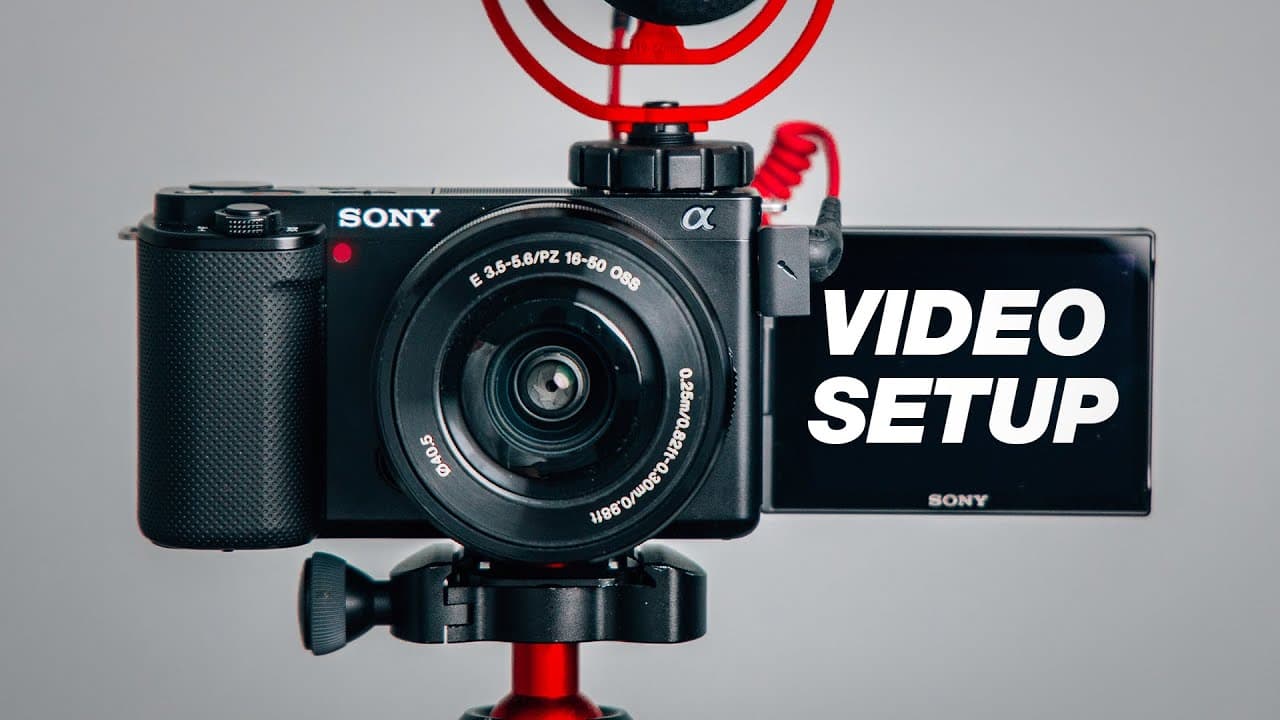
How to Set Up Sony ZV-E10 for Better Video
TL;DR
Set the Sony ZV-E10 to XAVC S 4K at 24p 100M or 30p 100M, then match shutter speed to the chosen frame rate and keep ISO as low as practical. Use manual exposure for stationary talking-head videos, Intelligent Auto for convenient vlogging, and S&Q mode to create slow motion without editing.
Transcript
- One of the best cameras you could be using to create content with is the Sony ZV-E10. Because it's just awesome, it's small. It shoots great video. However, in order to get the most highest quality video out of this camera you wanna dial in your settings. And that's why in this video I'll be sharing three different best settings for this camera. ... Read More
Key Insights
- Manual exposure is the recommended shooting mode for stationary talking-head videos because it lets the creator lock the main image settings. The camera should first be placed in video mode, confirmed by the small video-camera icon displayed at the top left of the screen.
- XAVC S 4K at 24p 100M or 30p 100M is the recommended recording format. The 100M option provides the highest-quality version described for each frame rate, while the choice between 24 and 30 frames per second depends on the creator's preference.
- Shutter speed should be approximately double the selected frame rate. A 24p recording uses 1/50 of a second, while a 30p recording uses 1/60 of a second, producing the intended relationship between frame rate and shutter speed for the demonstrated setup.
- A low aperture number creates more background blur and admits more light. The kit lens may reach f/3.5, while the Sigma 16mm f/1.4 lens can reach f/1.4. The recommended approach is to use the lowest aperture number that the attached lens permits.
- ISO should remain as low as possible while exposure stays around zero or +0.3. Starting at ISO 100 produces a cleaner image, while higher ISO settings introduce more grain. Adjust the light's brightness or distance before raising ISO when practical.
- A locked custom white balance produces more consistent colors than Auto White Balance for stationary recording. A setting near 4500 is recommended with daytime-colored lighting, although the exact value can be adjusted to match the light and filming environment.
- Continuous autofocus with a wide focus area helps keep a presenter sharp. Human face and eye autofocus should be enabled, eye selection should be automatic, and face or eye frame display should remain on so the white tracking box is visible.
- Audio levels should place speech around -12 to -3 decibels, with the camera level commonly set around 9 to 15 after testing. Quieter audio can be increased during editing, but distorted audio generally cannot be repaired, so recording below clipping is safer.
Install to Summarize YouTube Videos and Get Transcripts
Explore YouTube Video Summarizer or Get YouTube Transcript Extractor
Questions & Answers
Q: How should I set up the Sony ZV-E10 for talking-head videos?
Place the camera in video mode, then set the shooting mode to Manual. Choose XAVC S 4K and record at either 24p 100M or 30p 100M. For 24p, use a 1/50-second shutter; for 30p, use 1/60. Open the aperture as far as the lens permits, start at ISO 100, and adjust lighting or ISO until exposure is near zero or +0.3.
Q: What resolution and frame rate should I use on the Sony ZV-E10?
Select XAVC S 4K as the file format. The recommended recording choices are 24p 100M or 30p 100M, and the demonstrated setup uses 24p 100M. Whichever frame rate you choose, select the 100M option. The same resolution and frame-rate preference can remain in place when switching from stationary recording to Intelligent Auto for vlogging.
Q: What shutter speed should I use for 24p or 30p video?
Use a shutter speed that is approximately double the selected frame rate. For 24 frames per second, set the Sony ZV-E10 to 1/50 of a second. If you choose 30 frames per second, set it to 1/60 of a second. The rear control wheel changes the shutter value in the demonstrated manual setup.
Q: How do I choose aperture and ISO for a clean image?
Set the aperture number as low as the attached lens allows. The kit lens may reach f/3.5, while the Sigma 16mm f/1.4 can reach f/1.4 and produce a blurrier background. Start ISO at 100 and keep it as low as possible. Adjust the light first when practical, because raising ISO introduces more grain into the footage.
Q: How should I set white balance for stationary videos?
Avoid Auto White Balance for a stationary talking-head setup. Select the custom temperature option and begin around 4500 when using daytime-colored light on the subject's face. The exact setting can be adjusted for the lighting and environment. Locking the value prevents automatic shifts and helps maintain consistent colors throughout the recording.
Q: What autofocus settings keep a presenter in focus?
Set the focus area to Wide and the focus mode to Continuous. In the face and eye autofocus settings, turn the feature on, select Human, set right or left eye selection to Auto, and enable face or eye frame display. The frame display shows the white tracking box, making it easier to confirm that the camera is following the presenter's face or eye.
Q: What audio level should I use on the Sony ZV-E10?
Set the camera's audio level around 9 to 15 as a starting range, then make a test recording and listen to it on a computer. Aim for recorded speech around -12 to -3 decibels, within the middle safe area. It is preferable to raise quiet audio during editing because distorted audio generally cannot be fixed after recording.
Q: What are the best Sony ZV-E10 settings for vlogging and slow motion?
For vlogging, switch the shooting mode from Manual to Intelligent Auto, retain 4K at 24p 100M or 30p 100M, and keep the audio settings properly adjusted. Use Standard stabilization or turn it off if the Active crop is undesirable. For slow motion, select S&Q mode, choose manual exposure and 24p recording, then select 60 or 120 frames for the desired effect.
Summary & Key Takeaways
-
For stationary YouTube videos, use video mode and manual exposure with XAVC S 4K recording. Select 24p 100M with a 1/50-second shutter, or 30p 100M with a 1/60-second shutter. Open the aperture as far as the lens permits, then adjust lighting and ISO for suitable exposure.
-
For consistent color and focus, set a custom white balance near 4500 when using daytime-colored lighting. Choose the wide focus area, continuous focus, human face and eye autofocus, automatic eye selection, and face or eye frame display. These settings help the camera track the presenter while keeping colors stable during stationary recording.
-
For vlogging, switch from manual exposure to Intelligent Auto while retaining the preferred 4K frame rate and audio settings. Use the defocus button to change background blur. Standard or disabled stabilization avoids the strong crop associated with Active mode. For slow motion, select S&Q mode, manual exposure, 24p recording, and 60 or 120 frames.
-
Key Insights = null
-
Key Insights index 0 = null
-
Key Insights index 1 = null
-
Key Insights index 2 = null
-
Key Insights index 3 = null
-
Key Insights index 4 = null
-
Key Insights index 5 = null
-
Key Insights index 6 = null
-
Key Insights index 7 = null
Read in Other Languages (beta)
Share This Summary 📚
Summarize YouTube Videos and Get Video Transcripts with 1-Click
Try YouTube Summary with ChatGPT & Claude or YouTube Transcript Generator
Explore More Summaries from Think Media 📚


Summarize YouTube Videos and Get Video Transcripts with 1-Click
Try YouTube Summary with ChatGPT & Claude or YouTube Transcript Generator