How to Set Up a Dashboard for Your Home Lab
TL;DR
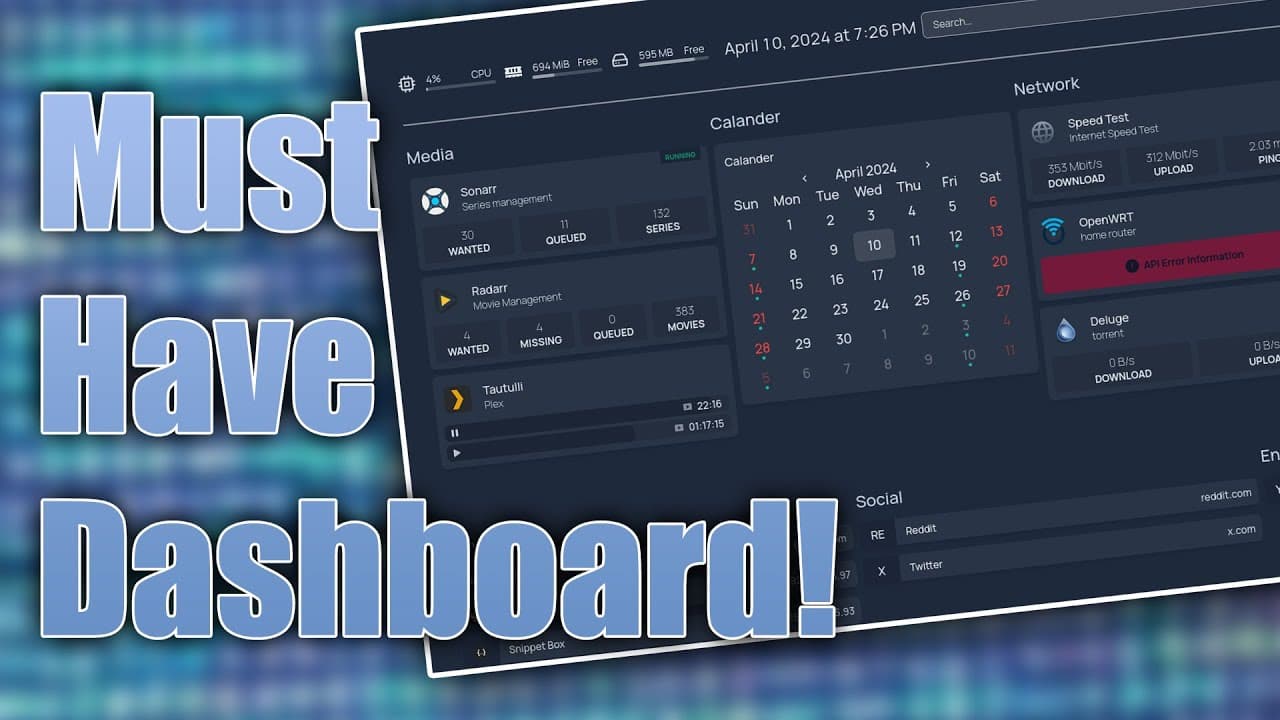
To set up an efficient dashboard for your home lab, use the 'homepage' tool, which offers comprehensive statistics and easy customization via YAML files. It integrates with services like Plex and Sonar, allowing you to track media releases and monitor system performance effectively. Follow the provided instructions to set it up on Proxmox or Docker.
Transcript
so if you guys run a home lab I highly recommend checking out this dashboard called homepage so let's check it out now one of the first things that I remember when I set up my home lab was some sort of homepage now originally I was using homer which I have a video on before but I quickly switch it over to something called Flame this is what I'm cur... Read More
Key Insights
- 👪 "Homepage" offers a robust alternative for home lab management, providing detailed statistics that improve operational efficiency.
- 💁 The dashboard features a clean layout, facilitating easy access to vital information about various running services and their performance.
- 👻 Integration with Sonar and Plex allows users more seamless tracking of media content, enhancing the viewing experience.
- 👤 Customization through YAML is straightforward, enabling users to personalize their dashboard according to their needs and preferences.
- 👤 Users can easily monitor internet speed and network performance using built-in tools, ensuring optimal connectivity.
- 🆘 Statistics for containers managed by Docker or Proxmox give a comprehensive overview of resources, helping in effective capacity planning.
- 🫠 Security concerns arise from entering passwords in plaintext; users should consider read-only access configurations for safety.
Install to Summarize YouTube Videos and Get Transcripts
Explore YouTube Video Summarizer or Get YouTube Transcript Extractor
Questions & Answers
Q: What motivated the switch from earlier dashboards like Flame or Homer to the homepage dashboard?
The switch was motivated by the homepage dashboard's ability to provide detailed statistics and a cleaner, more organized layout. Unlike Homer, which lacked statistical features, the homepage integrates data from multiple services and displays it neatly, making it essential for daily management of the home lab.
Q: How does the calendar feature enhance the user experience when managing media content?
The calendar feature linked to Sonar allows the user to track upcoming releases of their favorite series and shows visually. By highlighting specific events, such as episode releases, it keeps the user informed about what to watch next and ensures they don't miss new content, creating a more streamlined viewing experience.
Q: Can you explain how users can customize the homepage's appearance and functionality?
Users can customize the homepage's appearance and functionality through a YAML configuration file, where they can arrange bookmarks, services, and widgets. They can add or modify groups, adjust settings for aesthetics like background images, and specify which statistics are displayed, enabling a tailored user interface to meet individual preferences.
Q: What specific statistics can users access through the homepage dashboard?
Users can access a variety of statistics, such as CPU usage, RAM availability, storage space, active streams from Plex, and container statuses for Docker and Proxmox. This data provides crucial insights into the system's performance and resource usage, helping users manage their home lab efficiently.
Summary & Key Takeaways
-
The content presents a home lab dashboard called "homepage," which offers better statistics and organization than previous solutions like "Flame" or "Homer."
-
The user describes their current setup, detailing various service statistics, including Linux container usage, streaming details from Plex, and a calendar feature linked with Sonar for tracking media releases.
-
Instructions on setting up the homepage dashboard in Proxmox using Docker containers and YAML configuration files are provided, emphasizing customization and integration of various service statistics.
Read in Other Languages (beta)
Share This Summary 📚
Summarize YouTube Videos and Get Video Transcripts with 1-Click
Try YouTube Summary with ChatGPT & Claude or YouTube Transcript Generator
Explore More Summaries from Novaspirit Tech 📚






Summarize YouTube Videos and Get Video Transcripts with 1-Click
Try YouTube Summary with ChatGPT & Claude or YouTube Transcript Generator