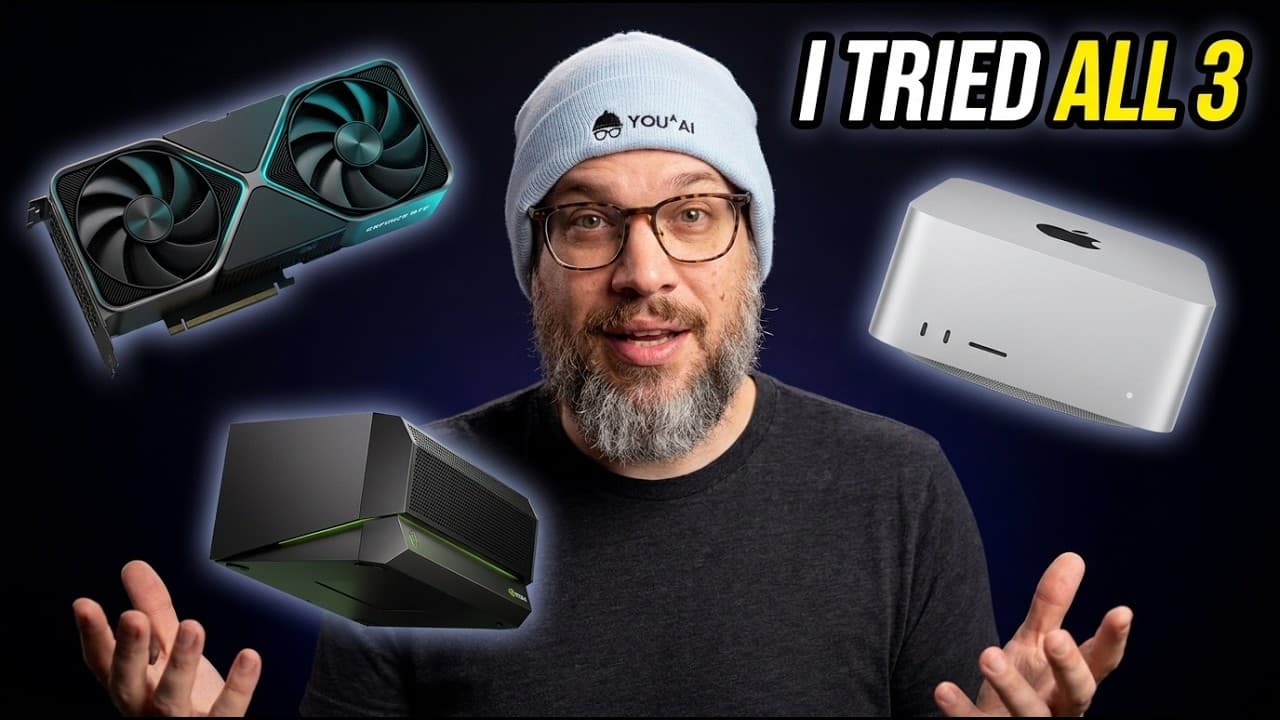
DGX Spark vs Mac Studio vs RTX 5090: Which Is Best for Running Local AI?
TL;DR
The best computer for local AI depends on your daily workload: Mac Studio favors large unified memory and simplicity, RTX 5090 systems prioritize CUDA throughput, and DGX Spark combines Nvidia’s software stack with 128 GB of coherent unified memory. Memory capacity, software support, privacy, noise, power, and maintenance matter more than benchmark prestige, so read on to match each system to the work you want to keep local.
Transcript
The strangest thing about AI right now is that it's making the computer on your desk important again. For the last 15 years, the story of personal computing was basically the story of the computer disappearing. Your files moved into someone else's cloud, your apps became browser tabs, your storage became a sink of some sort, your OS became a launch... Read More
Key Insights
- Personal AI computing is valuable because useful agents need direct access to files, folders, processes, permissions, tools, memory, local state, and execution. The closer agents move toward personal workflows, the more important ownership, privacy, and control over that computing environment become.
- Local and cloud AI are complementary choices rather than opposing camps. Frontier cloud models remain better for the hardest tasks, while local models can handle private, repeated, moderately sized, and context-heavy work involving notes, meetings, drafts, repositories, documents, and personal workflows.
- The durable investment is the complete personal AI stack, not a particular model. Hardware, runtimes, models, memory, applications, and workflows should remain modular so that new components can replace old ones without taking the user’s knowledge base or accumulated context with them.
- Hardware selection is a workload decision constrained by memory capacity, bandwidth, accelerator support, software maturity, storage, cooling, power, noise, and maintenance. The practical question is which workload should be owned locally, rather than which machine is universally best for AI.
- Apple silicon is suited to users who prioritize unified memory, low noise, power efficiency, and a computer-like experience. An M4 Pro Mac mini with 64 GB is presented as an entry point, while Mac Studio configurations support substantially larger unified-memory requirements.
- An RTX 5090 is suited to throughput-focused work and CUDA-supported applications, providing 32 GB of GDDR7 memory. Two cards provide 64 GB distributed across the cards, not one clean 64 GB pool, and introduce considerations involving drivers, heat, power, sharding, and maintenance.
- DGX Spark is an appliance-style Nvidia option built around a Grace Blackwell chip, 128 GB of coherent unified memory, and Nvidia’s software stack. Its value is packaging CUDA-native local inference and fine-tuning into a desktop product instead of requiring users to assemble a custom tower.
- Runtime software is essential because it loads model weights, serves inference, handles quantization, exposes APIs, manages batching, and determines hardware utilization. Llama.cpp supports CPUs, Apple Metal, CUDA, Vulkan, and GGUF, while Ollama adds a simpler command line, server, registry, and compatible API surface.
Install to Summarize YouTube Videos and Get Transcripts
Explore YouTube Video Summarizer or Get YouTube Transcript Extractor
Questions & Answers
Q: Which computer is best for running local AI: DGX Spark, Mac Studio, or RTX 5090?
There is no universally best option; the right computer depends on the workload you plan to run every day. Mac Studio emphasizes unified memory, efficiency, and simplicity, RTX 5090 systems emphasize CUDA-supported throughput, and DGX Spark offers 128 GB of coherent unified memory in an Nvidia desktop appliance.
Q: Is a Mac Studio good for running local AI models?
Mac Studio is well suited to workflows that need large unified memory, low noise, power efficiency, and a conventional computer experience. The described configurations include 128 GB, 256 GB, and 512 GB of unified memory, while an M4 Pro Mac mini with 64 GB is presented as an entry point.
Q: What is an RTX 5090 system best at for local AI?
An RTX 5090 system suits throughput-focused work and applications that benefit from CUDA support, including coding workloads. Each card has 32 GB of GDDR7 memory, but the system also requires attention to drivers, heat, power, cooling, sharding, and maintenance.
Q: Do two RTX 5090 cards provide one unified 64 GB memory pool?
No. Two RTX 5090 cards provide 64 GB distributed across the cards rather than one clean 64 GB pool, so some models and workloads may require sharding or other multi-card handling.
Q: What does DGX Spark offer for local AI workloads?
DGX Spark combines a Grace Blackwell chip, 128 GB of coherent unified memory, and Nvidia’s software stack. It packages CUDA-native local inference and fine-tuning into a desktop appliance without requiring the user to assemble a custom tower.
Q: Why is memory capacity important when choosing local AI hardware?
Local models, long context, personal knowledge, and repeated workflows need sufficient memory capacity to remain close to the work. Unified memory can simplify larger-model workloads, while users focused on notes, documents, meetings, and private writing may value capacity and simplicity more than maximum raw throughput.
Q: Which runtime software can be used for local AI?
Llama.cpp supports CPUs, Apple Metal, CUDA, Vulkan, and the GGUF model format. Ollama adds a simpler command line, local server, model registry, and compatible API surface for other tools.
Q: Why run AI locally when cloud models are better at the hardest tasks?
Local AI gives users control over the files, tools, permissions, memory, and workflows surrounding the model. Cloud models remain valuable for difficult tasks, while local models can handle private, repeated, moderately sized, and context-heavy work involving notes, meetings, drafts, repositories, and documents.
Summary & Key Takeaways
-
A personal AI computer becomes valuable when agents can work directly with private files, processes, tools, permissions, memory, and local state. The case for local computing is not that cloud AI is bad, but that users may want to own the infrastructure handling confidential, repeated, and context-heavy work.
-
Hardware should be selected for a defined daily workload. Apple silicon emphasizes unified memory, efficiency, low noise, and simplicity. RTX 5090 systems emphasize throughput and CUDA support while requiring more maintenance. DGX Spark offers 128 GB of coherent unified memory and packages Nvidia hardware and software as a desktop appliance.
-
A durable local AI system includes hardware, runtime, models, memory, applications, and workflows. Models will change quickly, so the lasting investment is an adaptable substrate where runtimes, memory stores, agents, tools, and interfaces can evolve without taking the user’s accumulated knowledge and context with them.
Read in Other Languages (beta)
Share This Summary 📚
Summarize YouTube Videos and Get Video Transcripts with 1-Click
Try YouTube Summary with ChatGPT & Claude or YouTube Transcript Generator
Explore More Summaries from AI News & Strategy Daily | Nate B Jones 📚




Summarize YouTube Videos and Get Video Transcripts with 1-Click
Try YouTube Summary with ChatGPT & Claude or YouTube Transcript Generator