Home Theater TOUR in My Smart Home!
TL;DR
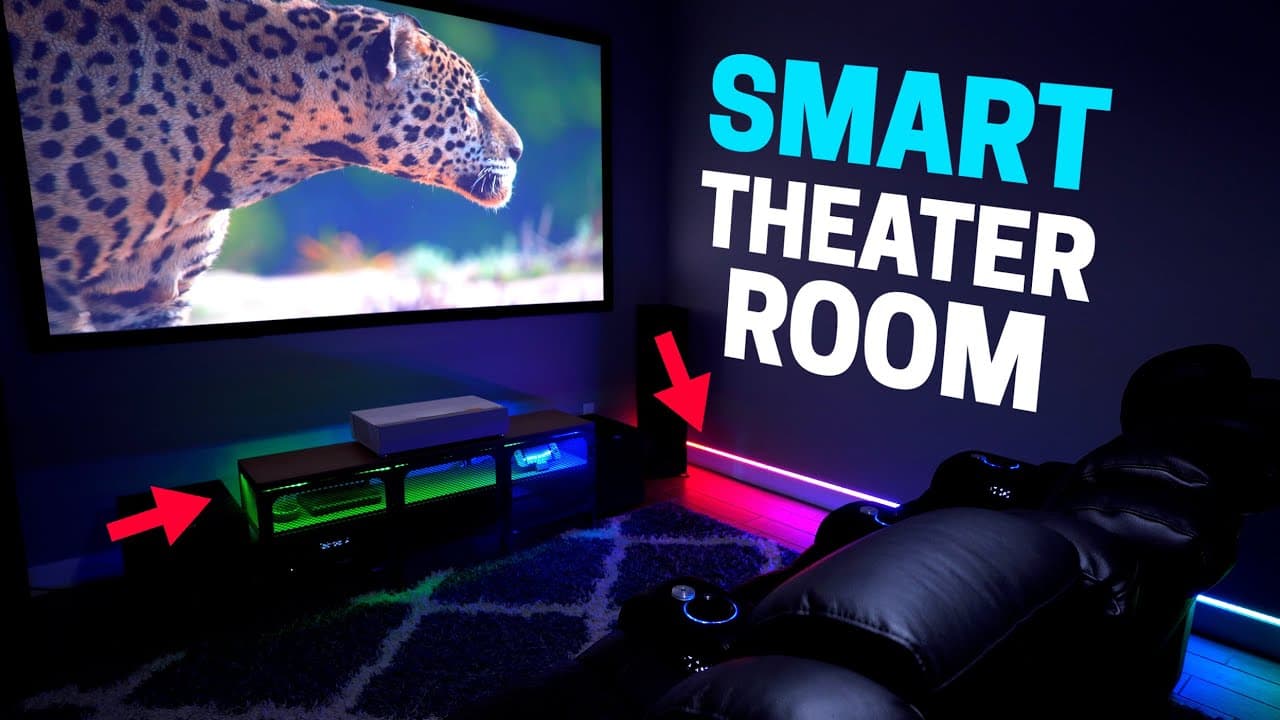
A small media room can feel like a home theater by coordinating smart lighting, blackout shades, the projector, comfortable seating, and automation around each movie. A voice command or dashboard button starts the pre-movie scene, while selected lights dim to 1 percent during playback and brighten gradually after the amplifier turns off. Read on for the specific products, controls, and lighting choices used in this smart home setup.
Transcript
I recently added a lot more smart lighting and automations to my media room. And wow, it’s taken it up to a whole new level. It’s surprisingly easy to set up and automate. I’ll walk you through my setup and show you what I’m using. Links to everything will be down in the description. When you go to a movie theater it’s a fun experience. The smell o... Read More
Key Insights
- 🤵 Integration of smart lighting and automation can significantly enhance the ambiance and functionality of a media room.
- ✋ High-quality seating options like Valencia Tuscany chairs with advanced features can offer unparalleled comfort and convenience during movie sessions.
- 🔇 Klipsch speakers, including ceiling-mounted ones, and a Denon X4700 amplifier can provide immersive sound quality for a theater-like experience.
- 👾 Utilizing a short-throw projector like the Optoma Cinema P2 can deliver impressive visual quality in a confined space.
- 👶 Implementing smart home security measures like a retractable baby gate can help protect the media room from unauthorized access.
- 👀 Strategic placement of lighting and automation controls can enhance the overall movie-watching experience while minimizing distractions.
- 🤵 Careful consideration of furniture and equipment placement is essential for creating an efficient and visually appealing media room setup.
Install to Summarize YouTube Videos and Get Transcripts
Explore YouTube Video Summarizer or Get YouTube Transcript Extractor
Questions & Answers
Q: How was this smart media room turned into a home theater?
The setup combines automated lighting, blackout Lutron Serena shades, a projector, a popcorn machine, and Valencia Tuscany chairs. A voice command or smart home dashboard button runs several actions at once, creating a theater-like sequence before, during, and after the movie.
Q: What does the pre-movie smart home scene control?
The scene turns on the Govee floor lamp and the light strips inside the snack cabinet. It also closes the blackout Lutron Serena shades if they are open and turns on the projector so it can warm up.
Q: How are the lights adjusted while a movie is playing?
The adjacent-room lights and most media-room lights fade off to reduce distractions. The snack cabinet and right-side baseboard LEDs dim to 1 percent, while the left-side baseboard LEDs turn completely off so the light strip is not visible in the viewer’s peripheral vision.
Q: What features do the Valencia Tuscany theater chairs have?
The chairs recline and provide motorized adjustments for the lower-back lumbar area and headrest. They also include armrest storage, attachable snack tables, side USB chargers, illuminated cup holders, under-chair LEDs, and breathable leather.
Q: How does the room provide light when someone gets up during a movie?
Low baseboard lighting can guide someone out of the room, and a motion sensor turns on the kitchen lights. When a movie is playing, those kitchen lights switch off faster after motion stops to limit distractions.
Q: How are the front cabinet lights automated?
A contact sensor on the bottom detects when the cabinet door opens and turns on the light strips so the contents are visible in the dark. The lights turn off again when the door closes.
Q: What happens to the smart lighting after the movie ends?
Turning off the amplifier triggers the room’s post-movie lighting changes. The light strips come on first, the overhead lights follow after a slight delay so viewers’ eyes can adjust, and the Govee lamp switches to a fireworks scene.
Q: How were the media-room light strips installed and automated?
Some strips were mounted with about six small clips, allowing adjustment without removing their sticky backing, while the baseboard strips use channel covers to diffuse the LEDs. Two 6-foot, or 2-meter, channel covers sit beside each other, and Kasa extensions span the wall; saved Kasa scenes can then be imported into the Alexa app for routines.
Summary & Key Takeaways
-
Enhanced media room with smart lighting and automation for an immersive movie theater experience.
-
Utilized voice commands, smart devices, and automation to set the mood and enhance convenience.
-
Integrated high-quality seating, advanced sound system, and projector setup for a cinematic viewing experience.
Read in Other Languages (beta)
Share This Summary 📚
Summarize YouTube Videos and Get Video Transcripts with 1-Click
Try YouTube Summary with ChatGPT & Claude or YouTube Transcript Generator
Explore More Summaries from Smart Home Solver 📚
Summarize YouTube Videos and Get Video Transcripts with 1-Click
Try YouTube Summary with ChatGPT & Claude or YouTube Transcript Generator