How to Set Up a Smart Apartment from Scratch
TL;DR
To set up a smart apartment, use easy-to-install devices like smart light strips, motion sensors, and smart outlets. Automate lighting and security with routines using platforms like Amazon or SmartThings. For temporary living, prioritize convenience and functionality with multi-purpose devices and intuitive controls.
Transcript
[Applause] hey what's up this is reed as you might have seen recently we moved out of our house and we're in an apartment now as we build and a lot of you asked for a smart apartment tour video and i thought this would be a great time to do one because we just moved in i set up all of my must have devices and automations while also keeping it lean ... Read More
Key Insights
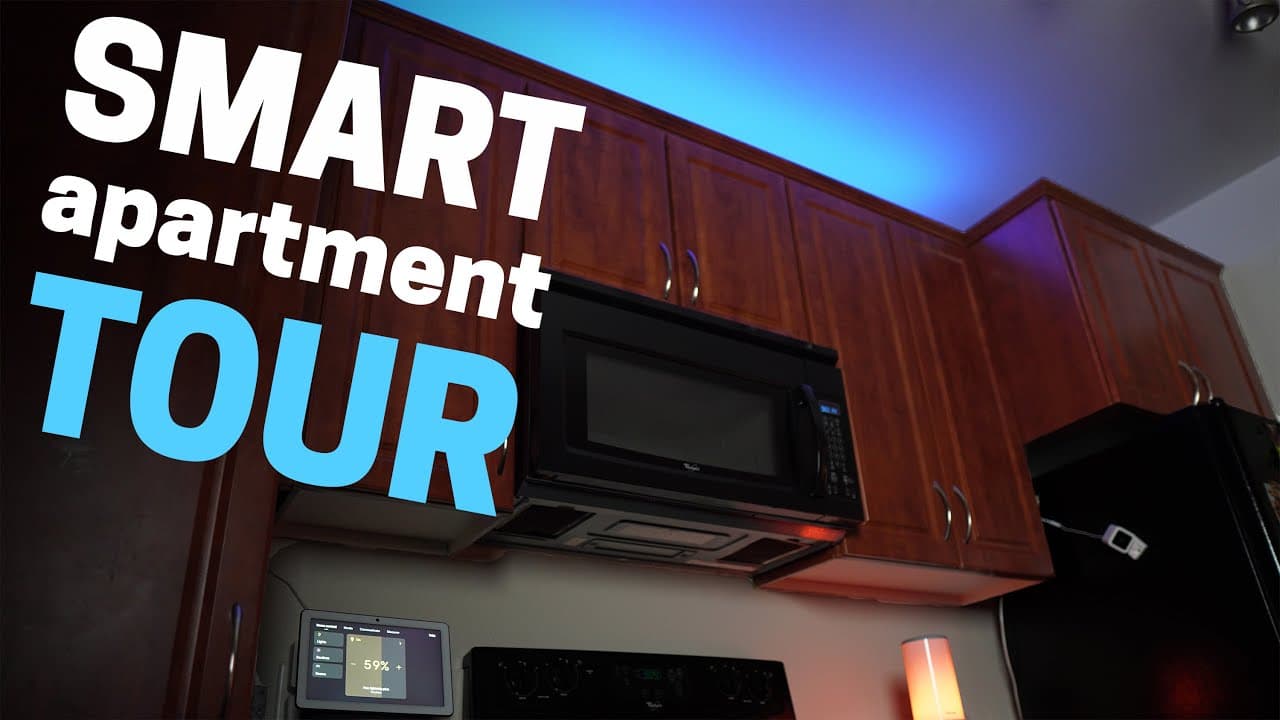
- 🙂 Light strips are a popular and easy way to add ambiance and functionality to kitchen cabinets and other areas in a smart apartment.
- 👾 Motion sensors can be used to automate lighting and make the most of limited space in a temporary living situation.
- 🙂 Smart outlets provide control and energy-saving options for devices like cameras and Christmas lights in an apartment.
- ⚡ NFC tags are an inexpensive and convenient alternative to smart light switches for easy control of smart lights in different rooms.
- 📱 LIFX lights offer versatility and compatibility with various smart home systems, making them a popular choice for smart apartments.
- 🤱 Dashboards, such as the Amazon tablet, serve as convenient control centers for managing smart devices and accessing security camera feeds.
- 🤯 Smart doorbells, like the Ring Peephole Cam, provide security and peace of mind for apartment dwellers without permanent doorbell installations.
Install to Summarize YouTube Videos and Get Transcripts
Explore YouTube Video Summarizer or Get YouTube Transcript Extractor
Questions & Answers
Q: What are the best smart devices and automations for a temporary apartment?
Reed’s must-have setup includes cabinet light strips, an Echo Flex motion sensor, a removable smart light switch, smart outlets, a WyzeCam V3, and a Ring Peephole Cam. He keeps the system lean and easy to install because he expects to live in the apartment for only a few months.
Q: How did Reed install and control the kitchen cabinet light strips?
He laid the strips on top of the cabinets without removing the covers from the 3M tape, routing the power wire through a gap between the cabinets. The lights can be dimmed, shifted between warm and cool white, or set to display color.
Q: How did Reed automate the kitchen light strips with motion?
He connected an Echo Flex with a motion sensor and created several Amazon routines to control the strips. Mounting the device beside the island saves counter space, and the sensor does not require battery changes; Reed says the setup was running within minutes.
Q: How does the apartment’s smart pendant-light switch work?
The switch mounts over the existing switch after removing only the two outer screws from its wall plate. It requires a Zigbee hub, such as SmartThings or the new Amazon Echo; Reed uses SmartThings to turn off the pendant lights and dim the light strips when the TV turns on.
Q: How does Reed protect his privacy with the WyzeCam V3?
The WyzeCam V3 is connected to a smart outlet that cuts power while Reed is home and restores it while he is away. Two routines coordinate this with Amazon Guard: away mode powers the outlet on, while home mode turns it off.
Q: What does Reed use for apartment door security?
He uses a Ring Peephole Cam because most video doorbells and outdoor cameras are not practical for his apartment. It can alert him when someone is at the door, presses the button, or knocks, and it provides motion notifications when packages arrive; installation requires a door with a peephole.
Q: How are the TV lights and living-room devices automated?
Hue Gradient light strips behind the TV connect to a Hue Sync Box so their lighting follows the television. Smart outlets also turn on the Christmas tree and outdoor lights, while an Amazon routine uses a custom command to set the Govee table lamp to its fire scene.
Q: Which robot vacuum does Reed use in the apartment?
He uses the Roborock S6 MaxV, whose front cameras help it avoid objects on the floor. Reed considers it potentially excessive and expensive for an apartment; he mentions the lower-cost Wyze robot vacuum but says he has not personally tested it and cannot judge whether it is good.
Summary & Key Takeaways
-
Reed gives a tour of his smart apartment, highlighting the devices and automations he has set up in each room.
-
He showcases smart light strips in the kitchen cabinets, automated with motion sensors and voice control.
-
Reed demonstrates automation with a smart light switch, a WyzeCam V3, and a robot vacuum in different areas of the apartment.
Read in Other Languages (beta)
Share This Summary 📚
Summarize YouTube Videos and Get Video Transcripts with 1-Click
Try YouTube Summary with ChatGPT & Claude or YouTube Transcript Generator
Explore More Summaries from Smart Home Solver 📚

Summarize YouTube Videos and Get Video Transcripts with 1-Click
Try YouTube Summary with ChatGPT & Claude or YouTube Transcript Generator