How to Create AI Videos From One Photo in VEED
TL;DR
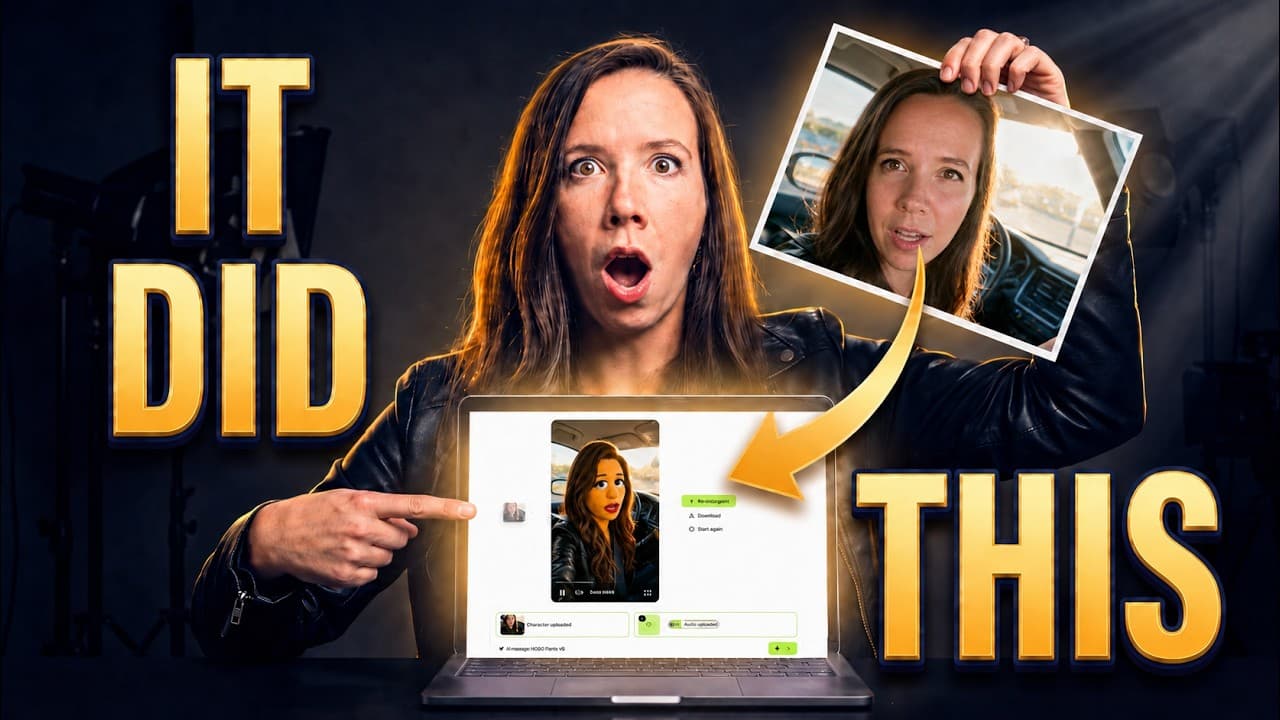
Use VEED’s Fabric model to animate one still image with audio-driven lip movement, head motion, shoulder movement, and hand gestures, then finish the result in the same editor. Short clips of 10 to 30 seconds produced the strongest results, while five-minute generations exposed more flaws, and a trained avatar built from real footage still looked more realistic.
Transcript
So, today I'm running an experiment. Can one photo and one written [music] prompt replace an entire filming day? I tested this AI video tool to find out. The clip you just watched was generated from one picture. The picture is AI, too. No camera touched any frame of this. The lip sync, the head tilts, the hands move when the voice pushes. And a mod... Read More
Key Insights
- VEED’s Fabric model animates a single still image by using audio to drive the lips, head, shoulders, and hand gestures. The result is more than a photograph with a moving mouth because multiple parts of the character respond to the voice’s rhythm and emphasis.
- Fabric accepts more than real photographs as source images. The same animation process can work with an AI-generated likeness, illustration, 3D render, mascot, or anime character, allowing a synthetic or branded character to serve as the visible host of a video.
- Short generations are Fabric’s strongest use case. Although a single generation can run for up to five minutes, the reviewer observed more visible flaws at that length and found that clips lasting 10, 20, or 30 seconds were better suited to the model.
- Gen AI Studio converts one written prompt into a complete first draft. It can write the script, assemble scenes, add a library voiceover or avatar, and generate captions, while leaving each scene’s script and visual choices available for manual revision.
- The generated script is a starting point rather than a finished creative decision. The reviewer judged the automatically written script as acceptable but not excellent, and emphasized that users can rewrite individual scenes before rendering the final version.
- VEED’s B-roll generator reads each scene, recommends suitable visuals, and writes the generation prompt. Users choose which available AI model will render the footage, then combine that B-roll with talking-character scenes or their own uploaded material on one timeline.
- VEED’s editor combines creation and post-production tools in one system. Its finishing options include customizable dynamic subtitles, AI transitions, royalty-free music, audio cleanup, eye contact correction, silence removal, filler-word removal, and background expansion.
- A trained avatar still provides greater realism than a one-photo animation. The tradeoff is production effort: the trained avatar required real footage and a filming day, while Fabric produced a convincing talking character from a single picture and audio.
Install to Summarize YouTube Videos and Get Transcripts
Explore YouTube Video Summarizer or Get YouTube Transcript Extractor
Questions & Answers
Q: How do you create a talking video from one photo in VEED?
Open VEED, hover over Create, select AI Playground, and choose the talking video feature under the Character tab. Upload one image, then select a voice from the library, clone your own voice, or upload recorded audio. After generation, Fabric uses that audio to animate the character’s lips, head, shoulders, and hand gestures rather than moving only the mouth.
Q: What does VEED Fabric animate in a still image?
VEED’s Fabric model uses the supplied audio to control several visible elements of the performance. It synchronizes the lips with speech while also creating blinks, head tilts, shoulder movement, and hand gestures that respond to the voice’s rhythm. According to the review, this broader motion makes the output look more like an active speaker than a static image with basic lip sync.
Q: Can VEED Fabric animate AI-generated characters and mascots?
Yes. The reviewer used an AI-generated picture based on her own likeness rather than a real photograph. The transcript also states that the same model can animate illustrations, 3D renders, mascots, and anime characters. This means a creator can use a synthetic likeness or brand mascot as a video host without first recording that character on camera.
Q: What video length works best with VEED Fabric?
Fabric can produce a single generation lasting up to five minutes, but the reviewer found that longer output began to reveal visible flaws. She identified short generations of 10, 20, or 30 seconds as the model’s strongest range. Those lengths also fit social content, making the tool especially practical for brief clips rather than uninterrupted long-form avatar performances.
Q: What does VEED Gen AI Studio create from one prompt?
Gen AI Studio can turn a written topic into a first video draft by writing a script, constructing scenes, adding a voiceover or avatar, and placing captions. The result remains editable rather than locked. Users can revise each scene’s text, run their character, insert B-roll, or upload their own footage before rendering a final cut.
Q: How does VEED generate B-roll for an AI video?
VEED’s B-roll generator examines the content of an individual scene, suggests visuals that match it, and writes a generation prompt automatically. The user then chooses which available AI model should render the B-roll. Generated footage can be mixed with avatar scenes or uploaded clips inside the same editor and timeline, reducing the need to assemble the project across separate systems.
Q: Which editing tools are available for finishing a VEED video?
The finishing workflow includes adjustable subtitles with control over style, size, and placement, plus dynamic word-by-word highlighting. VEED also provides AI transitions, a royalty-free music library, audio cleanup, eye contact correction, silence removal, removal of ums and ahs, and background expansion. These tools allow a generated draft to be polished into a social-ready cut within the same platform.
Q: Can one-photo AI video replace a trained avatar?
A one-photo animation can replace a filming session for some short-form content, but the reviewer found that her trained avatar still won on realism. That trained avatar was built from real footage and required a filming day, while Fabric needed only one picture. The choice therefore depends on whether the creator prioritizes maximum realism or faster production with a much simpler source asset.
Summary & Key Takeaways
-
VEED’s Fabric model creates talking videos from one still image and supplied audio. The workflow begins in AI Playground, where users select the talking video feature, upload an image, choose a library voice, clone their own voice, or upload audio, and generate an animated performance driven by the recording.
-
Gen AI Studio turns a written prompt into a first draft containing a script, scenes, voiceover or an avatar, captions, and optional B-roll. Each scene remains editable, allowing users to rewrite the script, select a character, add generated B-roll, or upload footage before rendering the final cut.
-
VEED’s main editor provides the finishing pass through adjustable subtitles, AI transitions, royalty-free music, audio cleanup, eye contact correction, silence removal, filler-word removal, and background expansion. The review concludes that one-photo avatars favor speed and accessibility, while trained avatars created from real footage still deliver stronger realism.
Read in Other Languages (beta)
Share This Summary 📚
Summarize YouTube Videos and Get Video Transcripts with 1-Click
Try YouTube Summary with ChatGPT & Claude or YouTube Transcript Generator
Explore More Summaries from Julia McCoy 📚



Summarize YouTube Videos and Get Video Transcripts with 1-Click
Try YouTube Summary with ChatGPT & Claude or YouTube Transcript Generator