Products
Features
YouTube Video Summarizer
Summarize YouTube videos
Web & PDF Highlighter
Highlight web pages & PDFs
Chat with PDF
Ask any PDF questions with AI
Ask AI Clone
Chat with your highlights & memories
Audio Transcriber
Transcribe audio files to text
Glasp Reader
Read and highlight articles
Kindle Highlight Export
Export your Kindle highlights
Idea Hatch
Hatch ideas from your highlights
Integrations
Obsidian Plugin
Notion Integration
Pocket Integration
Instapaper Integration
Medium Integration
Readwise Integration
Snipd Integration
Hypothesis Integration
Apps & Extensions
Chrome Extension
Safari Extension
Edge Add-ons
Firefox Add-ons
iOS App
Android App
Discover
Discover
Ideas
Discover new ideas and insights
Articles
Curated articles and insights
Books
Book recommendations by great minds
Posts
Essays and notes from readers
Quotes
Inspiring quotes collection
Videos
Curated videos and summaries
Explore Glasp
Glasp Story
How we grew from 0 to 3 million users
Glasp Newsletter
Weekly insights and updates
Glasp Talk
Interview series with great minds
Glasp Blog
Latest news and articles
Glasp Use Cases
Learn how others use Glasp
Build & Support
Glasp API
Access Glasp's API for developers
MCP Connector
Connect Glasp to Claude & ChatGPT
Community
Glasp Reddit Community
Students
Student discount and benefits
FAQs
Frequently Asked Questions
AboutPricing
DashboardLog inSign up

3D Light Cube - Computerphile
October 11, 2018
by
Computerphile
YouTube video player
3D Light Cube - Computerphile

TL;DR

Maker creates an interactive RGB cube with 512 lights controlled by a microcontroller, allowing for personalized games and designs.

Transcript

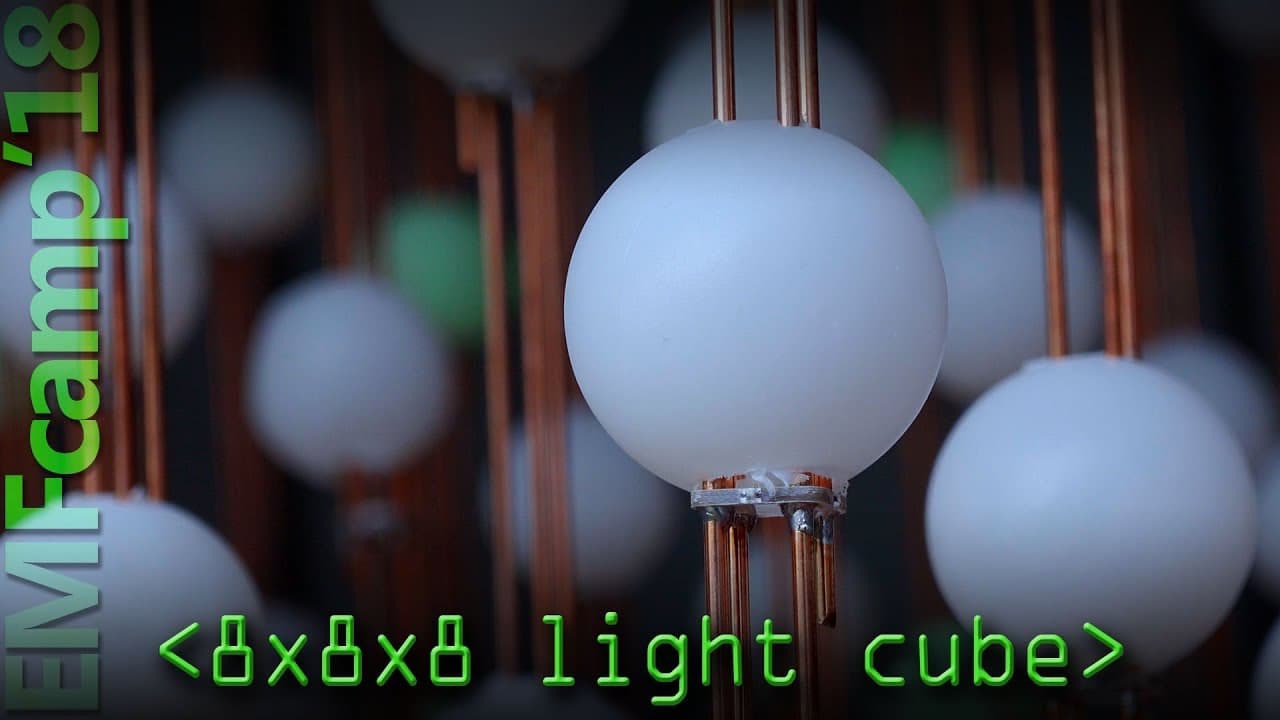
so i'm i'm a maker i like to make things and this is my biggest project that i've ever made and it's an eight by eight by eight red green blue cube of lights each light is sitting underneath a ping pong ball which have all been drilled so it's 512 ping pong balls that have been drilled to diffuse the light it's actually really simple because in the... Read More

Key Insights

  • 🏓 The RGB cube is a complex DIY project that involves drilling 512 ping pong balls and wiring 512 lights together.
  • 👻 The cube's interactivity allows for personalized games and designs, promoting user creativity and customization.
  • 🫦 Microcontrollers like Arduino, Raspberry Pi, and micro:bit provide versatility in controlling the cube.
  • 😒 The cube's portability has been improved through the use of sturdy copper-coated iron rods for wiring.

Install to Summarize YouTube Videos and Get Transcripts

Explore YouTube Video Summarizer or Get YouTube Transcript Extractor

Questions & Answers

Q: How does the RGB cube work?

The cube consists of 512 lights connected together, and each light is controlled individually. Microcontrollers like Arduino or micro:bit can be used to program the cube's behavior.

Q: Can kids program the RGB cube?

Yes, the micro:bit is especially suitable for kids as it is small, cheap, and easy to code. Kids can use block-based languages like make code to program the cube with their own designs.

Q: What interactive games can be played on the RGB cube?

The maker has developed 3D snake and Pac-Man games for the cube. However, the cube is highly customizable, and users are encouraged to create their own games like two-player pong or 3D Tetris.

Q: How sturdy is the RGB cube?

The second version of the cube is more reliable and sturdy, thanks to the use of copper-coated iron rods for wiring. It has been traveled extensively without any issues, and it can be disassembled for transport in the car's boot.

Summary & Key Takeaways

  • The maker has created an 8x8x8 RGB cube of lights, with each light sitting underneath a drilled ping pong ball for light diffusion.

  • The cube consists of 512 lights connected like Christmas tree lights and can be controlled by microcontrollers such as Arduino, Raspberry Pi, or micro:bit.

  • The maker emphasizes the importance of user customization, encouraging people to create their own games and designs for the cube.


Read in Other Languages (beta)

English

Share This Summary 📚

Summarize YouTube Videos and Get Video Transcripts with 1-Click

Download browser extensions on:

Try YouTube Summary with ChatGPT & Claude or YouTube Transcript Generator

Explore More Summaries from Computerphile 📚

Mainframes and the Unix Revolution - Computerphile thumbnail
Mainframes and the Unix Revolution - Computerphile
Computerphile
What Was the Tiltman Break in Codebreaking? thumbnail
What Was the Tiltman Break in Codebreaking?
Computerphile
What Is Superfish and How It Enables Attacks? thumbnail
What Is Superfish and How It Enables Attacks?
Computerphile
Network Address Translation - Computerphile thumbnail
Network Address Translation - Computerphile
Computerphile
What Makes Time Zones So Complicated? thumbnail
What Makes Time Zones So Complicated?
Computerphile
Error Detection and Flipping the Bits - Computerphile thumbnail
Error Detection and Flipping the Bits - Computerphile
Computerphile

Summarize YouTube Videos and Get Video Transcripts with 1-Click

Download browser extensions on:

Try YouTube Summary with ChatGPT & Claude or YouTube Transcript Generator

Apps & Extensions

  • Chrome Extension
  • Safari Extension
  • Edge Add-ons
  • Firefox Add-ons
  • iOS App
  • Android App

Key Features

  • YouTube Video Summarizer
  • Web & PDF Summarizer
  • Web & PDF Highlighter
  • Chat with PDF
  • Ask AI Clone
  • Audio Transcriber
  • Glasp Reader
  • Kindle Highlight Export
  • Idea Hatch

Integrations

  • Obsidian Plugin
  • Notion Integration
  • Pocket Integration
  • Instapaper Integration
  • Medium Integration
  • Readwise Integration
  • Snipd Integration
  • Hypothesis Integration

More Features

  • APIs
  • MCP Connector
  • Blog & Post
  • Embed Links
  • Image Highlight
  • Personality Test
  • Quote Shots
  • Open Graph Checker

Company

  • About us
  • Our Story
  • Blog
  • Community
  • FAQs
  • Job Board
  • Newsletter
  • Pricing
Terms

•

Privacy

•

Guidelines

© 2026 Glasp Inc. All rights reserved.