How to Use the Smart Connections Plugin in Obsidian
TL;DR
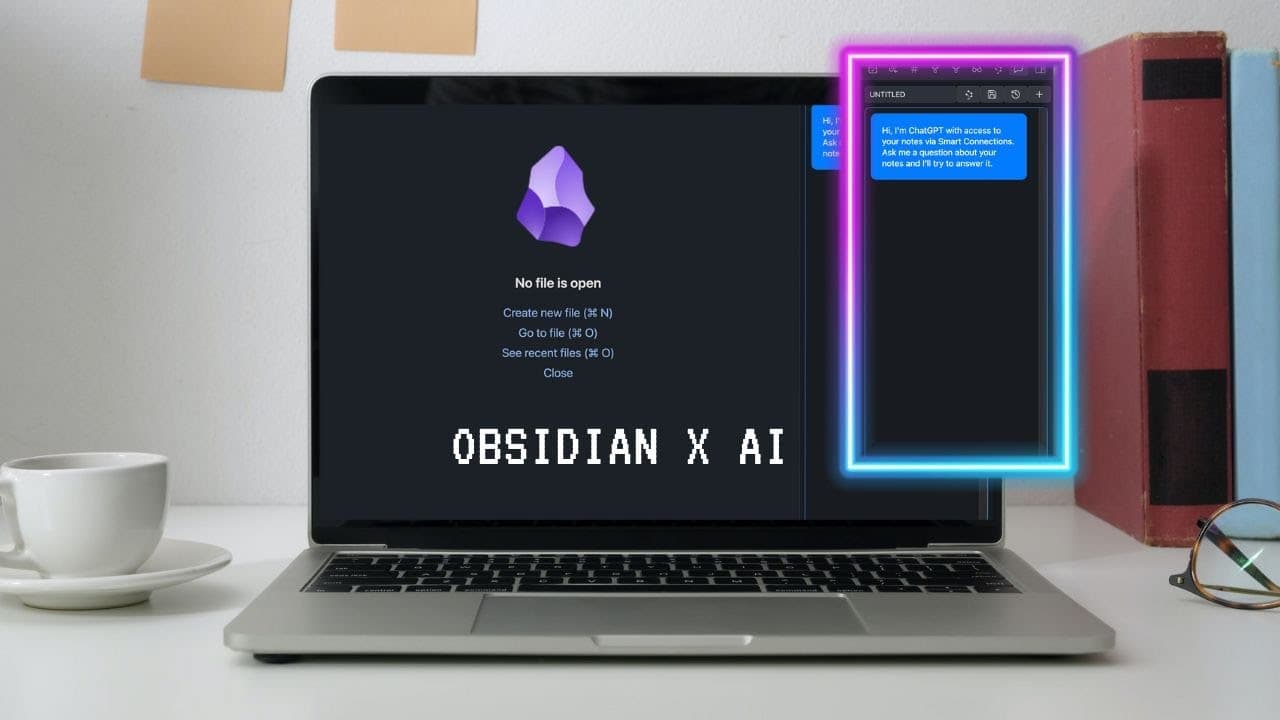
The Smart Connections plugin enhances Obsidian by surfacing relevant notes based on their connections to your current note. It allows users to highlight specific passages for easy reference and includes a chat feature that uses AI to answer questions based on your notes, making it a powerful tool for organizing and accessing personal knowledge.
Transcript
I think I finally found the best AI plugin to use in obsidian in a way that doesn't take away from the thinking process but really just augments how we can think with a second brain so this is the plug-in smart connections and it really solves the number one pain point of how can I better connect the notes in my Vault so let me show you how it work... Read More
Key Insights
- 🧠 The power of the brain lies in connections between ideas rather than the individual substances that make up the brain.
- 👶 Linking different ideas together and creating something new is vital for creativity and innovation.
- 💱 Chemical reactions can cause fundamental changes and transformations when two elements are combined, highlighting their importance in various processes.
- 🤔 Cross-disciplinary thinking is a valuable source of creativity and innovation.
- 🤔 The Smart Connections plugin in Obsidian helps users surface forgotten notes, making better connections and enhancing their thinking.
- 🎵 Highlighting specific passages in notes improves reference and connection to related content.
- 💦 The chat feature in the plugin provides AI-generated answers based on the user's notes, assisting in working with private knowledge.
Install to Summarize YouTube Videos and Get Transcripts
Explore YouTube Video Summarizer or Get YouTube Transcript Extractor
Questions & Answers
Q: How does the Smart Connections plugin improve note connections in Obsidian?
The plugin suggests highly relevant notes based on connections and relevancy to the current note, helping users make better connections between their ideas and enhancing their thinking process.
Q: Can the Smart Connections plugin help highlight specific passages in notes?
Yes, users can highlight specific passages in their notes and use the plugin to find connections to that specific part, making it easier to reference and connect related content.
Q: How does the chat feature in the Smart Connections plugin work?
The chat feature in the plugin functions similar to Chat GPT, where users can ask questions based on their notes, and the plugin provides AI-generated answers, offering assistance in working with private knowledge.
Q: How can I set up the Smart Connections plugin in Obsidian?
To set up the plugin, go to the settings and browse for the Smart Connections plugin. Install it and provide an OpenAI API key. Test the API key, choose language and model preferences, set usage limits, and exclude files or folders as needed.
Summary & Key Takeaways
-
The Smart Connections plugin enhances note connections in Obsidian, allowing users to surface highly relevant notes based on relevancy and connections to the current note.
-
It enables users to highlight specific passages in their notes for easier reference and connection to related content.
-
The plugin also features a chat function that uses AI to answer questions based on the user's notes, providing a valuable tool for working with private knowledge.
Read in Other Languages (beta)
Share This Summary 📚
Summarize YouTube Videos and Get Video Transcripts with 1-Click
Try YouTube Summary with ChatGPT & Claude or YouTube Transcript Generator
Explore More Summaries from Vicky Zhao [BEEAMP] 📚




Summarize YouTube Videos and Get Video Transcripts with 1-Click
Try YouTube Summary with ChatGPT & Claude or YouTube Transcript Generator