How to Choose YouTube Gear for Beginners
TL;DR
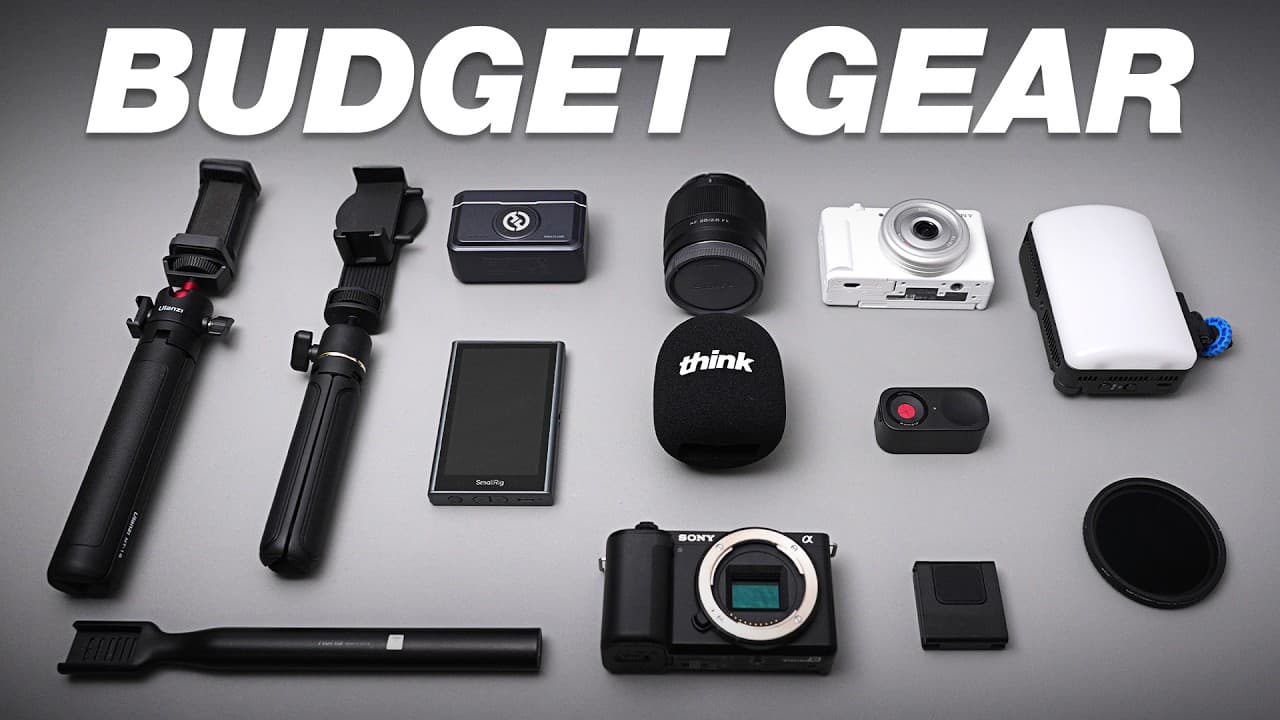
Choose YouTube gear by evaluating audio, video, lighting, and stabilization, then match each purchase to your recording style and budget. For audio, shotgun microphones suit directional recording, wireless systems support movement, and podcast microphones provide a richer sound for desk setups. Start with the simplest compatible equipment and upgrade when your production needs justify it.
Transcript
If you're ready to start your YouTube journey, it can feel a little bit overwhelming to figure out what gear do you actually need. There's so much tech out there and nobody wants to overspend on the wrong stuff. Well, after 10 years of working in video production, I'm breaking down everything you actually need to make highquality videos. And whethe... Read More
Key Insights
- The AVLS framework is a practical way to organize YouTube equipment decisions because it separates production into audio, video, lighting, and stabilization. Dialing in these four areas can produce strong results with either a smartphone or a more complete studio setup.
- Shotgun microphones are directional tools that capture sound primarily from directly ahead while reducing audio from the sides and rear. Positioning one about 1–2 feet from the speaker can produce good audio, making this microphone style useful across several recording situations.
- The Deity D4 Mini is a budget shotgun microphone priced around $40–$50. It includes a 3.5 mm output for connecting to a camera and a 3.5 mm input that can accept another audio source, including a potential wireless signal.
- The Rode VideoMic Go II is a versatile mid-tier shotgun microphone costing around $130, or as little as $99 during sales. Its 3.5 mm and USB-C outputs support connections to cameras, laptops, smartphones, and iPads.
- Wireless microphones are useful when creators need to move freely because their transmitters can be clipped to clothing or held in a hand. Their internal microphones often provide lower sound quality than shotgun or podcast microphones, although current budget options can still sound good.
- The Hollyland Lark A1 is a roughly $40 wireless system designed for smartphones. It includes two microphones, offers noise cancellation and app connectivity, and comes with either a USB-C or Lightning receiver for use with compatible phones.
- The Hollyland Lark MAX 2 is a higher-level wireless system with internal transmitter recording for backup audio. It can pair as many as four microphones with one receiver and accepts external 3.5 mm microphones, including lapel microphones for a more professional appearance.
- The Vocaster Two is a $99 budget audio interface designed for podcasting and live-streaming workflows with multiple XLR microphones. It provides clearly labeled controls, two headphone connections for real-time monitoring, and subtle audio processing without requiring extensive menu navigation.
Install to Summarize YouTube Videos and Get Transcripts
Explore YouTube Video Summarizer or Get YouTube Transcript Extractor
Questions & Answers
Q: How should beginners choose gear for YouTube videos?
Beginners should organize purchasing decisions around four production areas: audio, video, lighting, and stabilization. This AVLS framework makes a complicated equipment market easier to evaluate. The creator should then match each item to the intended workflow, such as mobile filming, desk-based podcasting, interviews, or studio recording, while selecting a price tier that fits the available budget and current needs.
Q: What type of microphone is best for recording YouTube videos?
The best microphone type depends on the recording format. A shotgun microphone is a versatile choice for directional recording when the speaker can remain about 1–2 feet away. A wireless microphone is better when the creator must move freely. A podcast microphone is suited to a fixed desk or table setup where richer, fuller, and warmer audio is preferred.
Q: How does a shotgun microphone improve YouTube audio?
A shotgun microphone captures audio primarily from the direction it faces and reduces sound arriving from its left, right, and rear. This directional behavior helps isolate a person speaking in front of it. Placing the microphone about 1–2 feet from the speaker can produce good audio, while mounting options include a camera or a separate microphone stand.
Q: What is a good budget shotgun microphone for YouTube?
The Deity D4 Mini is presented as a budget shotgun microphone that generally costs about $40–$50. It is a small, directional model with a 3.5 mm output that connects directly to a camera. It also includes a 3.5 mm input, which can receive another source, such as a wireless audio signal, when a setup requires two audio sources.
Q: When should a creator use a wireless microphone?
A wireless microphone is appropriate when the speaker needs freedom to move instead of remaining close to a camera-mounted or stand-mounted microphone. The transmitter can be clipped directly to a shirt or held in the hand, then connected wirelessly to a camera or smartphone. The tradeoff is that built-in wireless microphones often sound less refined than shotgun or podcast microphones.
Q: What wireless microphone options fit different budgets?
The Hollyland Lark A1 is a roughly $40 smartphone-focused system with two microphones, noise cancellation, app support, and either USB-C or Lightning connectivity. Around $100, the small Hollyland Lark M2 adds camera support through a 3.5 mm receiver. The higher-level Lark MAX 2 adds internal recording, support for as many as four microphones, and external 3.5 mm microphone inputs.
Q: What podcast microphone should a beginner buy?
The Fifine AM8 is the recommended budget podcast microphone at about $50. It includes a tabletop stand, while a boom-arm package costs only a few dollars more. Because it provides both USB-C and XLR outputs, a beginner can connect it directly to a computer with one cable and later use it with an audio interface if the recording setup expands.
Q: Why would a YouTube creator need an audio interface?
An audio interface helps capture and process sound for podcasts, live streams, and other YouTube recordings, particularly when multiple XLR microphones or headphones are involved. The $99 Vocaster Two supports two headphone connections, allowing a host and guest to monitor audio in real time. Its clearly labeled controls and subtle processing features make it a user-friendly budget choice, while the RodeCaster Duo adds more mixing and processing controls.
Summary & Key Takeaways
-
The AVLS framework divides YouTube production into audio, video, lighting, and stabilization. Improving these four areas can support high-quality results whether recording with a smartphone or a full studio setup. Audio deserves early attention because it is often overlooked, and the appropriate microphone depends on recording distance, movement, location, and connection requirements.
-
Shotgun microphones capture sound directionally and reduce audio arriving from the sides or rear. Wireless microphones give creators freedom to move, although their internal microphones may not sound as strong as shotgun or podcast models. Podcast microphones are designed mainly for desks or tables and deliver a richer, fuller, warmer sound.
-
Budget choices include the Deity D4 Mini shotgun microphone, Hollyland Lark A1 wireless system, and Fifine AM8 podcast microphone. Higher tiers add broader compatibility, internal backup recording, XLR connections, or additional processing. Audio interfaces such as the Vocaster Two and RodeCaster Duo support XLR microphones, monitoring, mixing, and live production workflows.
Read in Other Languages (beta)
Share This Summary 📚
Summarize YouTube Videos and Get Video Transcripts with 1-Click
Try YouTube Summary with ChatGPT & Claude or YouTube Transcript Generator
Explore More Summaries from Think Media 📚
Summarize YouTube Videos and Get Video Transcripts with 1-Click
Try YouTube Summary with ChatGPT & Claude or YouTube Transcript Generator