How to Use Crosshatching for Detailed Drawings
TL;DR
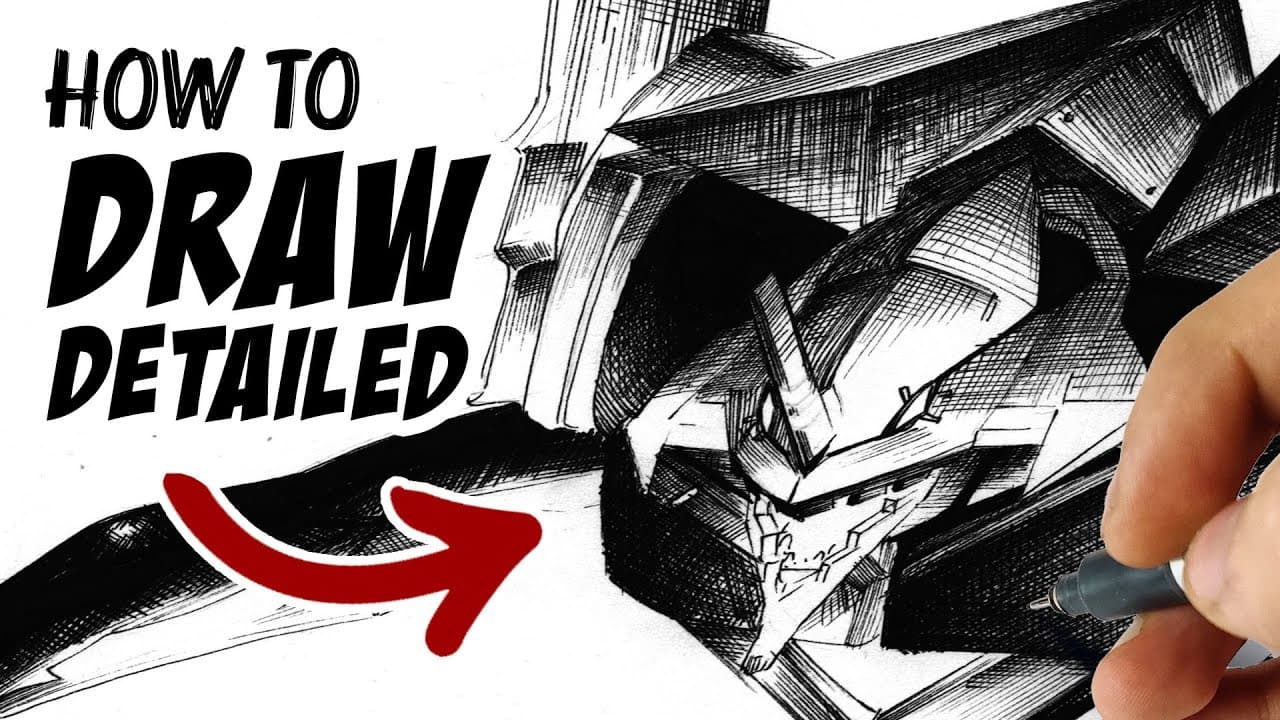
To effectively use crosshatching for detailed drawings, start by mastering shading and understanding anatomy. Use spaced lines to control darkness and create realistic textures, remembering that tighter lines produce darker areas. Basic supplies can suffice for practice, but invest in professional tools for serious artwork to achieve better results.
Transcript
[music] Hi guys. My name is Marcel and today-- "Umm, sir, can you make a video on how to do crosshatching and the other type?" You know what I mean? Mm, no, I don't know what you mean. But, sure. Let's make a video about crosshatching or let's just make it a video about rendering your drawings in general. Rendering, in case your unaware, doesn't ne... Read More
Key Insights
- 🕰️ Rendering is likened to grinding a diamond, suggesting a process of refining a rough artwork into a polished final piece.
- ❓ Shading techniques are essential for creating depth; understanding anatomy enhances the realism of represented subjects.
- 😑 Different hatching styles can convey various artistic expressions; precision can evoke a clean look while chaotic energy can create dynamic visuals.
- 💦 Planning out shading and hatching is advised to achieve natural-looking artwork; loose initial sketches can guide detailed work.
- 🫥 The spacing of lines in hatching controls tone; tighter lines create darker areas while wider spacing results in lighter areas.
- 🥰 Basic tools can suffice for practice; professional art supplies are recommended for serious projects to achieve better results.
- 🖐️ Acknowledging the importance of both tools and techniques is crucial; the artist’s ability plays a significant role in the finished product.
Install to Summarize YouTube Videos and Get Transcripts
Explore YouTube Video Summarizer or Get YouTube Transcript Extractor
Questions & Answers
Q: What is the primary focus of the video?
The video primarily focuses on teaching crosshatching techniques to enhance rendering in artwork. The creator, Marcel, explains how rendering can elevate the quality of drawings by adding details that simulate texture and depth, making the artwork more engaging and visually appealing.
Q: Why is shading important in the rendering process?
Shading is critical in rendering as it helps to create the illusion of depth and volume in drawings. Understanding how light interacts with surfaces allows artists to depict realistic shapes and forms. Marcel emphasizes that mastering shading techniques forms the foundation for advanced rendering, making it essential for any aspiring artist.
Q: How does the creator explain the process of hatching?
The creator explains that hatching involves drawing closely spaced lines to create darker areas, while spaced-out lines result in lighter areas. By manipulating line density and direction, artists can achieve various shades and textures, contributing to a more nuanced and realistic depiction of objects in their artwork.
Q: What supplies does the creator recommend for effective rendering?
Marcel recommends starting with basic supplies like ballpoint pens or pencils for practice, but for serious works, he suggests using thin liners. He mentions that pen nibs and ink can produce superior results, emphasizing that while tools matter, the skills and techniques of the artist take precedence.
Q: How should artists approach understanding anatomy in rendering?
Artists should study the anatomy of their subjects to effectively apply shading and hatching techniques. By knowing how body parts curve and how light falls on them, artists can render more accurate and lifelike illustrations. Marcel advises practicing with simple shapes to enhance one’s understanding of form and structure.
Q: What are some common mistakes artists make when shading?
A common mistake is shading without considering the shape of the object, which can lead to flat and unrealistic artwork. Marcel warns against merely copying other drawings; instead, artists should learn to construct their subjects, which will enhance their understanding of form and improve shading accuracy.
Q: Can digital artists effectively use traditional hatching techniques?
Yes, digital artists can adapt traditional hatching techniques digitally. While it may be easier to create smooth gradients digitally, Marcel highlights that using traditional methods like hatching can yield a rich and textured appearance that makes the artwork appear more organic and detailed.
Q: What additional resources does the creator offer for learning?
Marcel offers a variety of tutorials covering different aspects of drawing on his channel, including specific techniques like drawing clothes and anatomy. He also encourages viewers to follow him on social media for personal artwork updates and provides a Patreon option for those who want to support his content creation.
Summary & Key Takeaways
-
The video teaches viewers about rendering techniques, focusing on crosshatching as a method to add detail and depth to artwork. Understanding shading and anatomy is crucial for successful rendering.
-
Viewers are guided through the process of using hatching to create gradients and textures, emphasizing the importance of line placement for achieving darker or lighter areas.
-
The creator suggests using simple supplies for practice while recommending more professional tools for significant projects, stressing that skill is more important than the tools utilized.
Read in Other Languages (beta)
Share This Summary 📚
Summarize YouTube Videos and Get Video Transcripts with 1-Click
Try YouTube Summary with ChatGPT & Claude or YouTube Transcript Generator
Explore More Summaries from Draw like a Sir 📚

Summarize YouTube Videos and Get Video Transcripts with 1-Click
Try YouTube Summary with ChatGPT & Claude or YouTube Transcript Generator