How Do You Plan Intentional Spending With Simplify by Quicken?
TL;DR
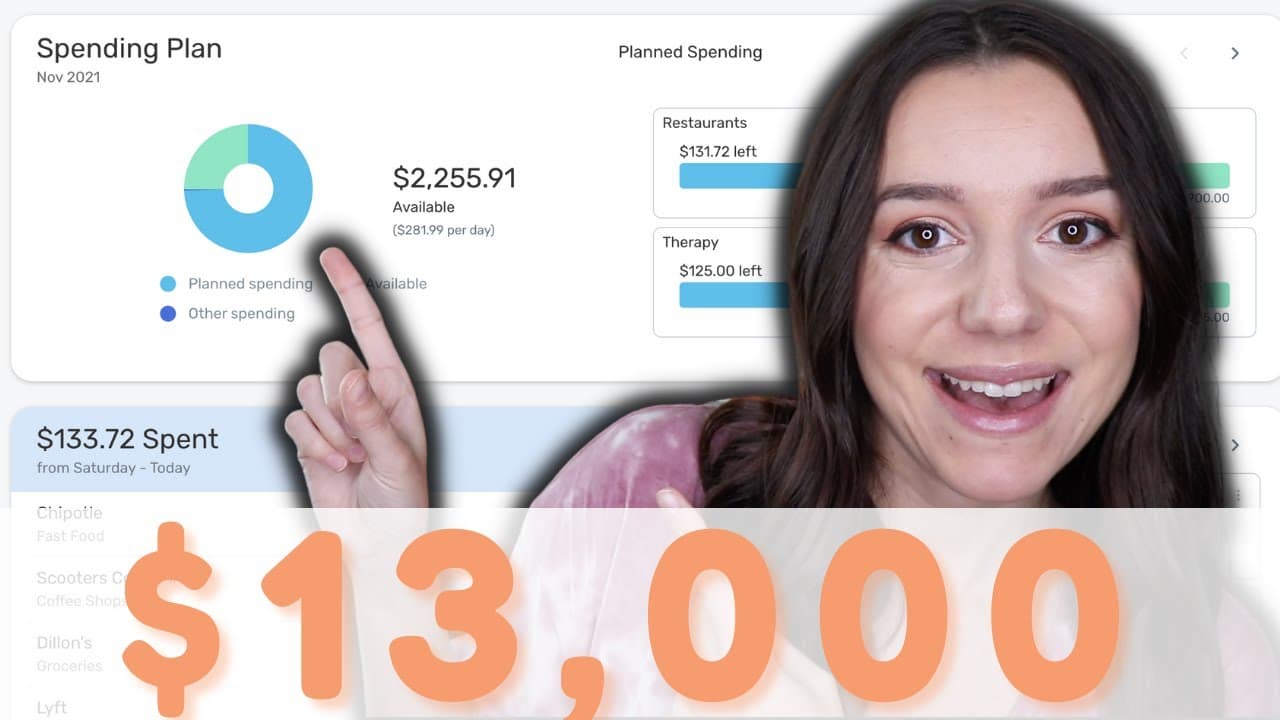
Instead of relying only on a budget spreadsheet, use Simplify by Quicken to forecast income, organize planned expenses, identify uncategorized spending, and prioritize savings goals. Justine applies its spending plan to her November budget, grouping categories such as shopping while separately planning for restaurants, gas, therapy, and groceries. Read on to see how the dashboard can reveal spending patterns that separate line items may hide.
Transcript
you guys know that i am a budget spreadsheet girl through and through but i also like to find other methods of budgeting to help me either supplement a method i'm already using or find methods that might work best for your brain maybe spreadsheet isn't it maybe an app is it so in this video we are going to be covering my november spending by foreca... Read More
Key Insights
- 😀 Simplify by Quicken streamlines budgeting by categorizing expenses and setting savings goals within the app.
- 👣 Justine demonstrates how to customize spending categories and track income effectively using Simplify.
- 😀 The app provides a clear overview of income, expenses, and available funds, aiding in budget planning and management.
- 😫 Setting savings goals within Simplify helps to prioritize expenses and work towards achieving financial objectives.
- 👤 Justine showcases how Simplify can track various expenses like shopping, dining out, and essential monthly costs in a user-friendly manner.
- 😀 The app's interface is clean and intuitive, making it easy for users to understand their financial status and plan for future spending.
- 🤑 Simplify helps users to account for all their money and allocate funds to different categories, ensuring a well-rounded budgeting approach.
Install to Summarize YouTube Videos and Get Transcripts
Explore YouTube Video Summarizer or Get YouTube Transcript Extractor
Questions & Answers
Q: How does Simplify by Quicken help with budgeting?
Simplify lets users plan spending and view bank accounts, credit cards, debt, and investments in one dashboard. Its spending plan displays income, planned and completed spending, uncategorized spending, and the amount still available.
Q: How does Justine use Simplify by Quicken for her November spending plan?
Justine connects her primary bank account, credit cards, and transferred savings, then focuses on the app’s spending plan. She compares the plan with her budget spreadsheet and customizes categories for her expected November expenses.
Q: How can Simplify support intentional spending?
The app lets Justine assign money to planned categories before spending it. This approach gives her permission to spend within the plan while showing what remains available for the month.
Q: How does Simplify categorize shopping expenses?
Simplify groups expenses such as clothing under the broader shopping category rather than keeping every spreadsheet line item separate. Seeing clothing, general shopping, fun money, and gifts together made Justine reconsider how much she was allocating to material purchases.
Q: How are unplanned transactions handled in the spending plan?
Transactions that have not yet been planned appear under other spending. Justine reviews those items, checks their categories, and converts recurring needs such as groceries into planned monthly expenses.
Q: Can Simplify track bills and upcoming paychecks?
Yes, the dashboard shows which bills have been paid and which paychecks are expected to reach an account. Justine says this helped her see her husband’s remaining paychecks before they reached the checking account.
Q: Can savings goals be included in a Simplify spending plan?
Yes, Simplify allows users to create savings goals within the app and include them in the monthly spending plan. This makes the goals visible alongside other priorities when deciding how to allocate available money.
Q: Can Simplify be used without a spreadsheet?
Yes, Justine presents Simplify as an alternative for people whose brains work better with an app than a spreadsheet. It can be used on a desktop or phone, although she demonstrates it while referring back to her own budget spreadsheet.
Summary & Key Takeaways
-
Justine reviews the Simplify by Quicken budgeting app for November spending planning.
-
The app simplifies categorizing expenses and setting savings goals.
-
Justine demonstrates using the app for budgeting and tracking various expenses.
Read in Other Languages (beta)
Share This Summary 📚
Summarize YouTube Videos and Get Video Transcripts with 1-Click
Try YouTube Summary with ChatGPT & Claude or YouTube Transcript Generator
Explore More Summaries from Debt Free Millennials 📚



Summarize YouTube Videos and Get Video Transcripts with 1-Click
Try YouTube Summary with ChatGPT & Claude or YouTube Transcript Generator