How to Use Track Presets in Cubase for VST Instruments
TL;DR
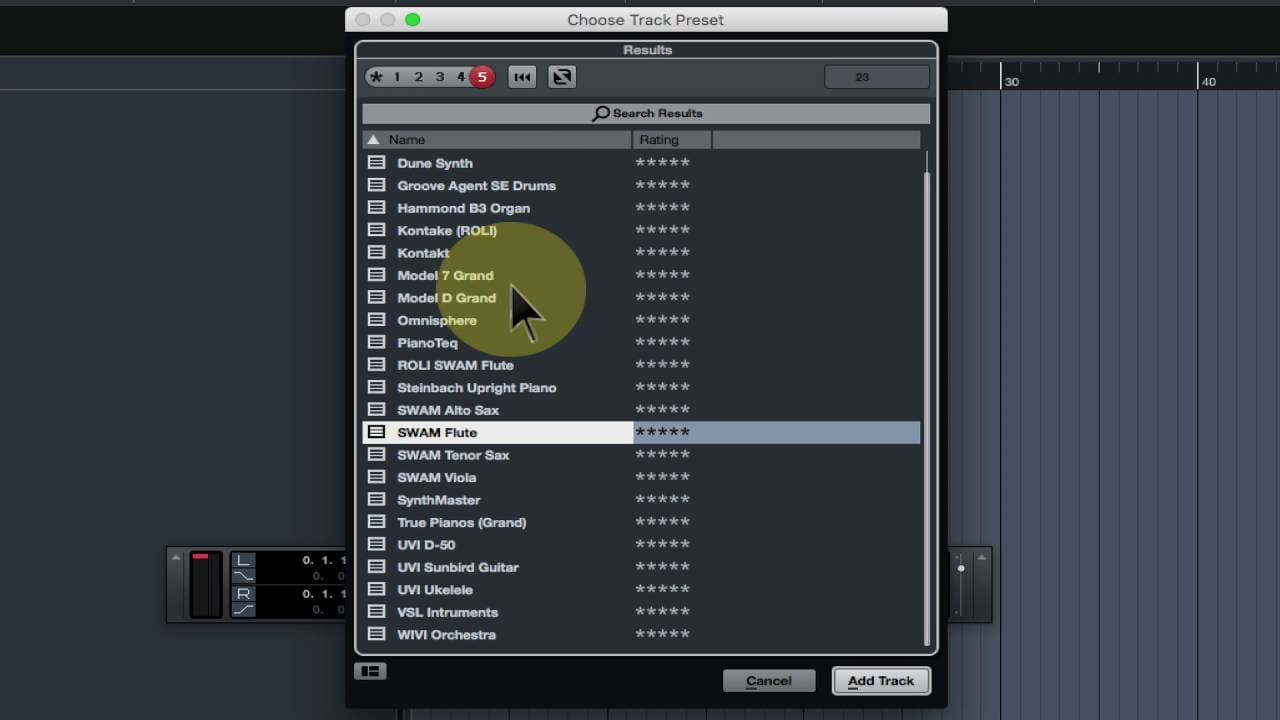
To use track presets in Cubase, create a customized VST instrument track, right-click it, and select 'Save Track Preset.' This allows you to quickly insert the instrument with your saved settings in future projects, streamlining your workflow while also saving audio inserts, EQ, and channel strip configurations. Though effect sends aren’t included, track presets significantly reduce setup time.
Transcript
okay so you're using cubase and here we're using cubase elements but you could be using cubase pro and you spent a lot of time creating a vst instrument track so for instance here we've got the swam flute that's the sample modeling flute and we've configured it for use by rolly what we've also done is we've changed the color and we can let's just c... Read More
Key Insights
- 👻 Cubase allows users to save time configuring VST instruments by using track presets.
- 👣 Track presets can be customized with various settings, including color, icon, and instrument preferences.
- ⏮️ Pre-made track presets provided by Cubase offer a wide range of options for different instruments and effects setups.
- 👣 Track presets also save audio inserts, EQ, and channel strip settings, enhancing workflow efficiency.
- 👣 Although track presets don't save effect sends, they are still a valuable tool for streamlining music production processes.
- 😫 Creating and using track presets can significantly reduce the time and effort required to set up VST instruments in Cubase.
- 👶 By saving instrument configurations as track presets, users can easily recreate their desired setups in new projects.
Install to Summarize YouTube Videos and Get Transcripts
Explore YouTube Video Summarizer or Get YouTube Transcript Extractor
Questions & Answers
Q: How can I save time configuring VST instruments in Cubase?
You can save time by creating track presets, which store your instrument settings, including color, icon, pitch bend, expression, and more. Simply right-click on the track, choose "Save Track Preset," and customize the preset options.
Q: Does Cubase come with pre-made track presets?
Yes, Cubase provides a variety of pre-made track presets for different instruments, effects setups, and more. However, you can also create your own custom track presets based on your specific needs.
Q: Can track presets save audio effects and inserts?
Yes, track presets can save audio inserts, EQ settings, and channel strip settings. This means you can quickly apply your desired effects and processing to a VST instrument track without having to set them up manually each time.
Q: What are the limitations of using track presets in Cubase?
While track presets are incredibly useful, they do not save effect sends, so if you have specific effect sends or default reverb settings, you will need to set them up separately.
Summary & Key Takeaways
-
The video demonstrates how to create a track preset in Cubase to save time configuring VST instruments.
-
Saving track presets allows users to quickly insert instruments with customized settings and preferences.
-
Track presets also save audio inserts, EQ, and channel strip settings for added convenience.
Read in Other Languages (beta)
Share This Summary 📚
Summarize YouTube Videos and Get Video Transcripts with 1-Click
Try YouTube Summary with ChatGPT & Claude or YouTube Transcript Generator
Explore More Summaries from Dory Video 📚






Summarize YouTube Videos and Get Video Transcripts with 1-Click
Try YouTube Summary with ChatGPT & Claude or YouTube Transcript Generator