How to Build AI Agents in ChatGPT Agent Builder
TL;DR
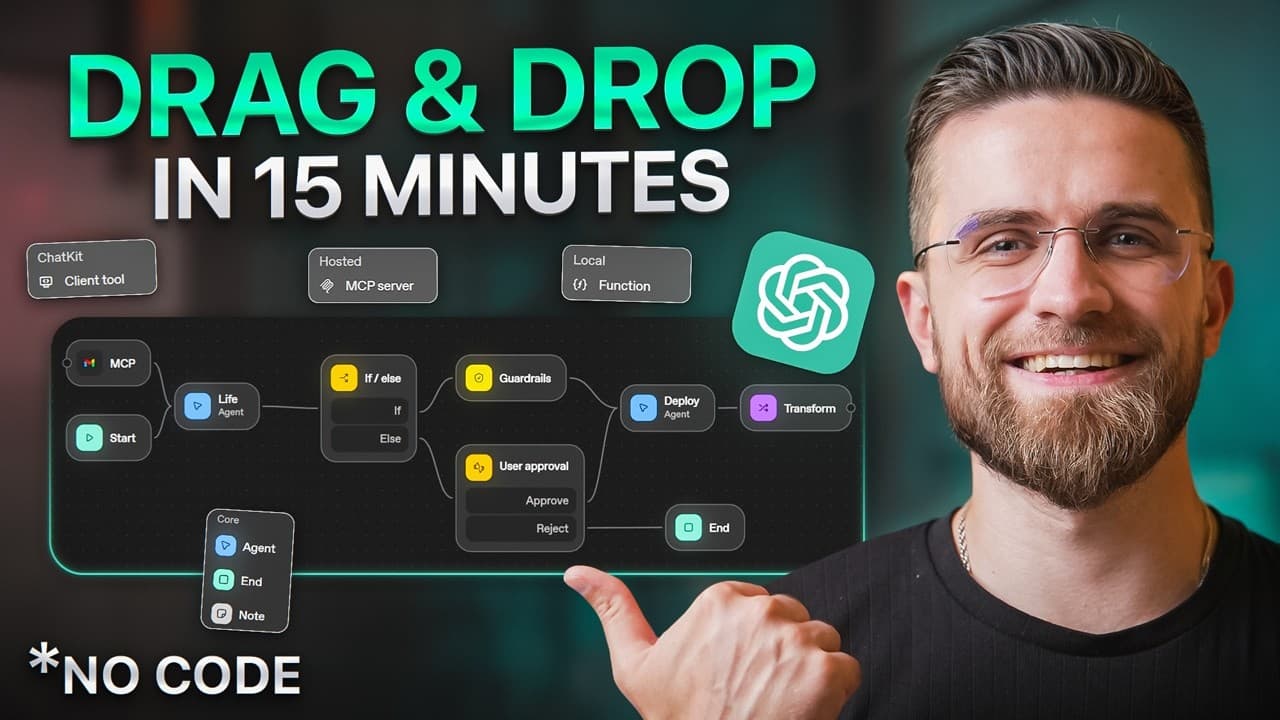
OpenAI's new Agent Builder is a visual, no-code workflow tool inside ChatGPT where you drag blocks onto a canvas and connect them with arrows to build AI agents. Blocks fall into four categories (core, tools, logic, data), and you can connect external apps like Gmail, Google Calendar, and Google Drive through MCP. A meeting-prep agent was built in about 9 minutes.
Transcript
2025 is the year of AI agents. But here's the problem. Most people think building them is hard, technical, and expensive. What if I told you Chad GPT just released a tool that lets you build agents in 10 minutes? Drag, drop, done. No coding. Watch this. By the end of this video, you'll go from zero to strong AI agent builder. I'm building three rea... Read More
Key Insights
- ChatGPT's Agent Builder is a visual workflow tool where you build AI agents like flowcharts, dragging blocks onto a dark canvas and connecting them with arrows so the workflow runs in order, with no coding or developer experience required.
- Every workflow begins with a start block, and the left-side tools panel is organized into four categories: core (agent, end, and note blocks), tools (file search, guard rails, MCP), logic (if/else branches, while loops, user approval), and data (transform blocks, set state).
- MCP blocks connect external apps to an agent, offering connections including Gmail, Google Calendar, Google Drive, Outlook, and Microsoft Teams, so agents can pull real data from services you already use.
- Clicking any block opens a settings panel on the right where you configure instructions, model choice, and output format, letting you name blocks and define exactly what each step does.
- The meeting-prep agent pulled upcoming events from Google Calendar, searched Google Drive for relevant files, used an agent block to summarize each meeting, then a second agent block drafted a prep email under 200 words, and it took about 9 minutes to build.
- The email assistant used an if/else logic block routing only 'normal' emails to an auto-reply drafter while sending urgent emails to a user approval block for manual review, adding a safety layer so urgent messages are never auto-replied.
- Guard rails add built-in safety checks; enabling the personally identifiable information guard rail stops the agent from leaking sensitive data like credit card numbers or SSNs in its outputs, with these safety checks built directly into the system by OpenAI.
- Agents in the demo were configured with the model set to GPT o3 mini, reasoning effort medium, and output format text, showing model and reasoning settings are chosen per agent block inside its settings panel.
Install to Summarize YouTube Videos and Get Transcripts
Explore YouTube Video Summarizer or Get YouTube Transcript Extractor
Questions & Answers
Q: What is ChatGPT Agent Builder?
ChatGPT Agent Builder is a visual workflow tool OpenAI launched inside ChatGPT that lets you build AI agents like flowcharts. You open a dark canvas with a start block, drag blocks from a left-side tools panel, connect them with arrows, and the workflow runs in order. It requires no coding or developer experience. Clicking any block opens a settings panel on the right where you configure instructions, model choice, and output format.
Q: How do you connect Gmail or Google Calendar to an agent?
You connect external apps using MCP blocks found in the tools category of the left sidebar. Clicking MCP opens a panel showing available connections including Gmail, Google Calendar, Google Drive, Outlook, and Microsoft Teams. Selecting one drops a colored block onto the canvas, and clicking it opens a settings panel where you configure the tool action, such as choosing 'batch read event' for Google Calendar or 'search' for Google Drive.
Q: What are the four block categories in Agent Builder?
The tools panel on the left is organized into four categories. Core has the basics: agent blocks, end blocks, and note blocks for comments. Tools has file search, guard rails for safety checks, and MCP for connecting external apps. Logic has if/else branches, while loops, and user approval steps. Data has transform blocks for processing information and set state blocks for storing variables. You snap these together like Lego.
Q: How do you build a meeting prep agent in Agent Builder?
Starting from a blank canvas with a start block, add an MCP Google Calendar block configured to batch read events, then an MCP Google Drive block set to search. Connect both to an agent block named meeting analyzer that summarizes each meeting with key topics, action items, and attendees. Connect that to a second agent block that drafts a professional prep email under 200 words, then add an end block. In the demo this took about 9 minutes.
Q: How does the email assistant handle urgent versus normal emails?
The email assistant pulls recent emails from Gmail, then an agent block categorizes each as urgent, normal, or spam. An if/else logic block routes emails: if the category equals normal, it proceeds to a reply-drafter agent that writes a polite reply under 100 words; otherwise urgent emails are flagged and sent to a user approval block that pauses the workflow for manual review. This ensures urgent emails never get auto-replied, acting as a safety layer.
Q: What are guard rails in ChatGPT Agent Builder?
Guard rails are built-in safety checks you can add to a block from the tools section of its settings. In the demo, clicking the plus icon and selecting personally identifiable information, then toggling it on, stops the agent from accidentally leaking sensitive data like credit card numbers or Social Security numbers in its outputs. OpenAI built these safety checks directly into the system so you are not building agents without protection.
Q: Do you need coding skills to build AI agents now?
No. According to the video, building agents previously took developers hours or sometimes days and required API knowledge, coding skills, and debugging sessions, and even tools like N8N or Zapier still needed logic building, webhook setups, and trial and error. With ChatGPT's Agent Builder, anyone can build agents in minutes by dragging blocks onto a canvas, connecting them with arrows, and configuring settings, with no code or developer experience needed.
Q: What model settings were used for the agents in the demo?
For the agent blocks in both the meeting-prep and email assistant workflows, the creator set the model to GPT o3 mini, reasoning effort to medium, and output format to text. These settings are chosen individually inside each agent block's settings panel, which opens on the right when you click the block. The panel is also where you name the block and write its instructions, such as telling the meeting analyzer to create a bullet-point summary.
Q: Why does building AI agents matter for businesses and creators?
The video argues that every business, creator, and entrepreneur has repetitive tasks eating their time, such as scheduling meetings, drafting emails, researching competitors, and summarizing documents. Agents can handle all of that. Because Agent Builder requires no coding, you can now build these agents yourself instead of hiring developers or paying for expensive tools. In the demo, a meeting-prep agent built in 9 minutes saved an hour of manual work.
Summary & Key Takeaways
-
OpenAI launched a visual workflow builder inside ChatGPT that lets anyone build AI agents like flowcharts. You drag blocks onto a dark canvas, connect them with arrows, and the workflow runs in order. Blocks are organized into four categories: core, tools, logic, and data. No coding or developer experience is needed.
-
The first agent, a meeting-prep assistant, used MCP blocks to pull events from Google Calendar and search Google Drive, then an agent block summarized each meeting with key topics, action items, and attendees. A second agent drafted a professional prep email under 200 words. It took about 9 minutes.
-
The second agent read Gmail, categorized emails as urgent, normal, or spam, and used an if/else block to auto-draft replies to normal emails while routing urgent ones to a user approval block. A guard rail for personally identifiable information was added to prevent leaking sensitive data like credit card numbers or SSNs.
Read in Other Languages (beta)
Share This Summary 📚
Summarize YouTube Videos and Get Video Transcripts with 1-Click
Try YouTube Summary with ChatGPT & Claude or YouTube Transcript Generator
Explore More Summaries from AI Master 📚




Summarize YouTube Videos and Get Video Transcripts with 1-Click
Try YouTube Summary with ChatGPT & Claude or YouTube Transcript Generator